Brand: Rollei
Category: Car Electronics
Document Type: Manual
Language: EN
Brand: Rollei
Category: Car Electronics
Document Type: Manual
Language: EN
Uploaded: Aug. 10, 2025, 12:33 a.m.
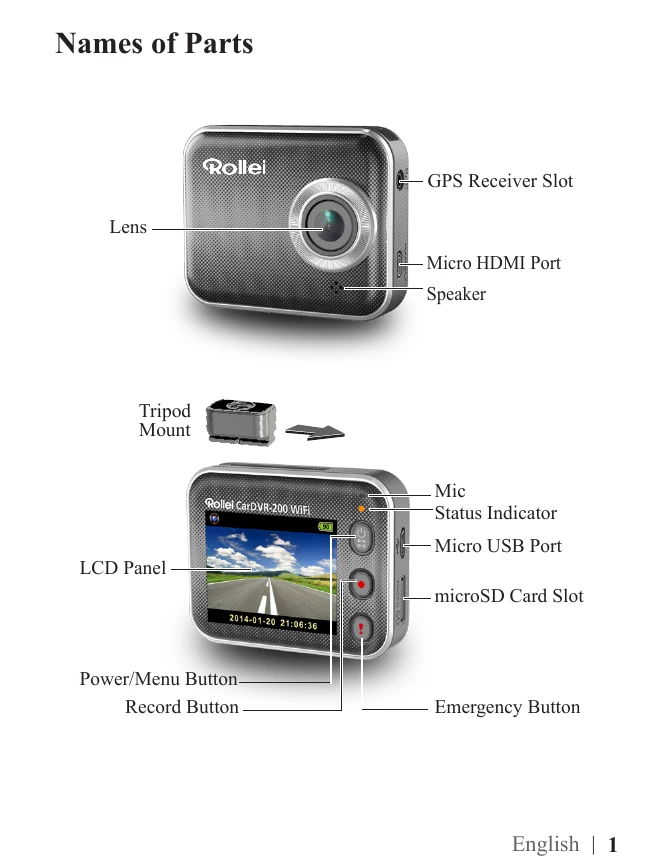
1. Insert a microSD card (4GB-64GB).
2. Charge the unit using a car charger, PC USB port, or USB adapter.
3. Power on by pressing the button.
4. To record, press the record button.
5. Access menu settings by pressing the menu button.
The device has two modes: Action Cam (normal videos) and Dash Cam (loop and emergency videos).
Download the "Rollei Car-DVR" app for local control (WiFi) or internet live view.
Local Function: Connect your mobile device to the Car-DVR's WiFi for remote control, live view, and management.
Internet Function: Enable cloud connection for video streaming to the cloud server and remote viewing.
| Situation | Cause/Solution |
|---|---|
| Rollei Car-DVR cannot turn on | Power is low. Recharge battery |
| Rollei Car-DVR is frozen | Press and hold button for 5 seconds to force shutdown; press again to turn on |
| Rollei Car-DVR cannot record | • No microSD card or microSD card is full • microSD card cannot be recognized • Format microSD card or replace microSD card |
| Rollei Car-DVR cannot connect to AP or could server | • Invalid AP name or password • Weak WiFi signal or not in WiFi coverage • No internet or cloud server is not accessible • Blocked by some firewall |
| Mobile cannot find Rollei Car-DVR [Local] | • Rollei Car-DVR WiFi is disabled or not in WiFi coverage • Mobile WiFi is disabled • iOS user does not choose Rollei Car-DVR name in Wi-Fi Settings • Tap [Refresh] button on [Rollei Car-DVR] |
| Mobile cannot watch live view [Local] | • Weak WiFi signal • Rollei Car-DVR is recording • Rollei Car-DVR is occupied by other mobile |
| Mobile cannot connect to cloud server [Internet] | Check mobile 3G/4G or WiFi internet connection |
| Mobile cannot watch live view [Internet] | The internet bandwidth is insufficient for Rollei Car-DVR upload or mobile download |
| Forget Rollei Car-DVR password | Enter Rollei Car-DVR menu settings and select [Settings]→[Factory Reset] to reset |