Manual for MD-090P

Manual for MD-090P

Brand: RunningSnail

Category: Emergency Radio

Document Type: Manual

Language: EN
Uploaded: April 20, 2026, 7:46 p.m.

Warranty Information

The device has an 18-month warranty against manufacturing defects from the date of purchase.

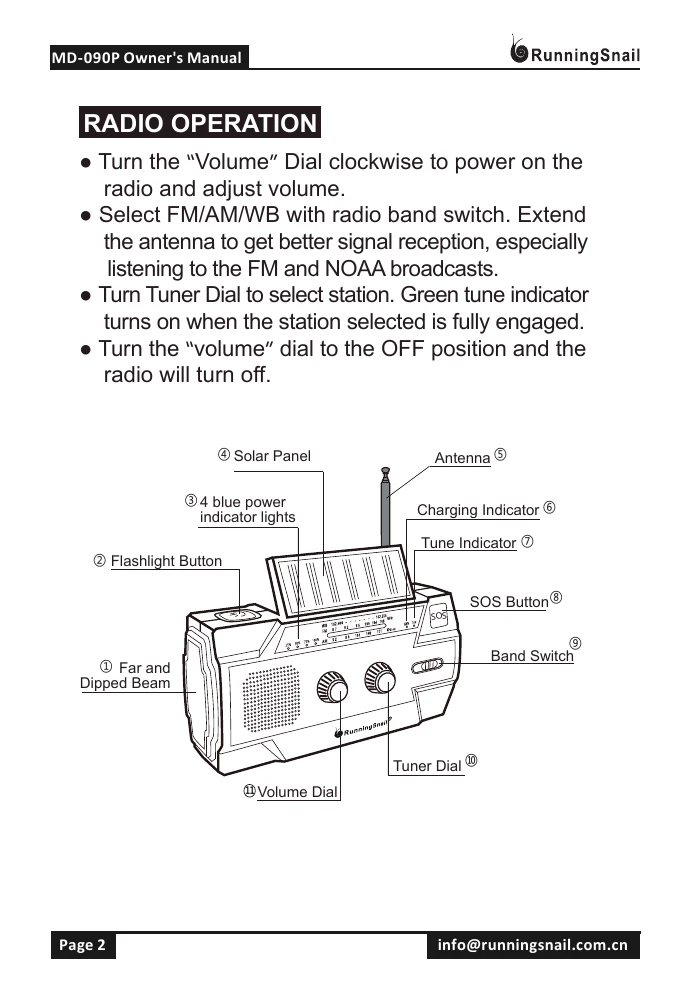
  • Radio Operation: Turn volume dial clockwise to power on and adjust volume. Use band switch for FM/AM/WB. Extend antenna for better reception. Turn tuner dial to select station; green indicator confirms selection. Turn volume dial to OFF to power down.
  • SOS Alarm: Press and hold SOS button for siren and flashing beam; press again to turn off.
  • Flashlight: Cycle through far beam, dipped beam, both beams, and off with button presses.
  • Reading Lamp: Turn sensor switch to LIGHT, open solar panel for light; close panel to turn off.
  • Motion Sensor: Set switch to AUTO; lamp activates with movement within 3m, turns off after 30s of no movement. Close solar panel to extinguish. Turn switch to LIGHT when not in use.
  • Charge & Discharge: Use USB output port to charge USB devices. Power indicator lights diminish during discharge. Use only in emergencies, not as a regular power bank.
  • Power Methods: USB charging (connect cable to Micro USB Input), Hand Crank (turn handle at back), Solar Power (expose panel in sunlight), Replaceable Li-ion Battery (requires screwdriver).
  • Power Indicator: 4 blue lights show power capacity. Lights up for 30s when activating features, stays on during charging/discharging.
  • Kind Reminder: Hand crank for 1 min on first use or after 60 days idle. Keep dry, avoid liquids. Do not over-discharge. Avoid shining flashlight directly into eyes.
Privacy Policy