Brand: SAMSUNG
Category: Air Conditioner
Document Type: Manual
Language: EN
Brand: SAMSUNG
Category: Air Conditioner
Document Type: Manual
Language: EN
Uploaded: Nov. 21, 2025, 7:36 p.m.
For installation and maintenance, refer to the "Installation and Maintenance" section for details on warranty and paid services.
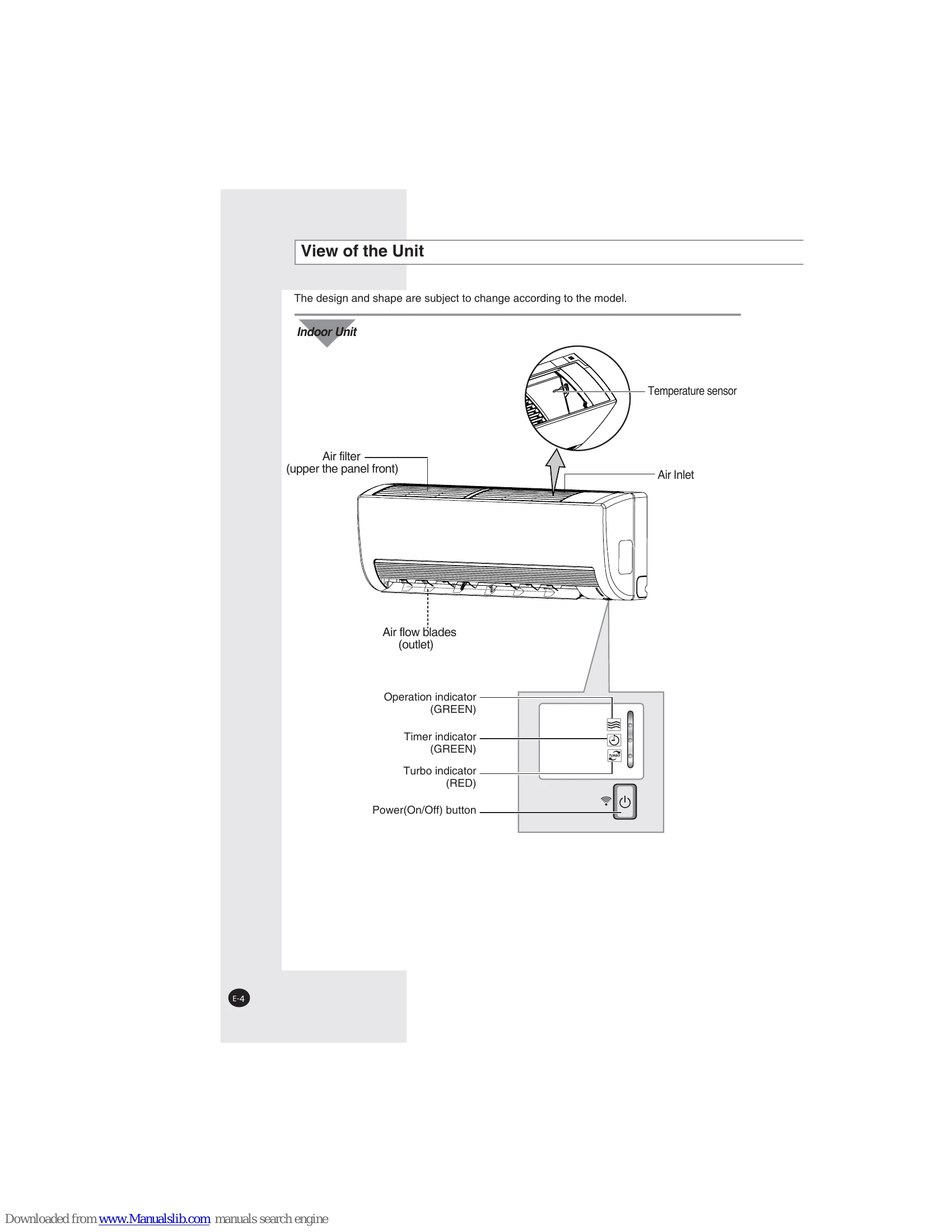
Preparing Your Air Conditioner: Includes safety precautions, a view of the indoor and outdoor units, and instructions for inserting remote control batteries and getting started.
Operating Your Air Conditioner: Details how to select automatic, cooling, heating, dehumidifying, and fan modes. It also covers adjusting room temperature, fan speed, and air flow direction.
Programming Your Air Conditioner: Explains how to set the on and off timers, and select the good'sleep mode for optimized comfort during sleep.
Recommendations for Use: Provides advice on optimal operating conditions, temperature and humidity ranges, troubleshooting common problems, and cleaning the unit.
Installation and Maintenance: Outlines recommended installation, servicing, and preventative maintenance procedures for the air conditioner.
| Problem | Explanation/Solution |
|---|---|
| The air conditioner does not operate at all |
• Check that the breaker used for the air conditioner is switched on. • Check that the operation indicator on the indoor unit is on; if necessary press the $\sqrt{}$ button on the remote control. • Check whether the Timer indicator on the indoor unit is switched on. If so: Wait until the switch-on time is reached and the air conditioner starts up automatically. Cancel the timer (see pages 16 and 17 for further details) |
| The air conditioner does not operate with the remote control |
• Check that there are no obstacles between you and the indoor unit. • Check the remote control batteries. • Check that you are close enough to the indoor unit (seven meters/yards or less). |
| No beep is heard when you press the $\sqrt{}$ on the remote control |
• Check that you are pointing the remote control at the remote control sensor in the right of the indoor unit. • Replace the remote control batteries if necessary. |
| The air conditioner does not cool |
• Check that the correct operating mode has been selected (Auto, Cool). • The room temperature may be too low. • Dust may be blocking the air filter guard; refer to pages 23 for cleaning instructions. • Check that there is no obstacle in front of the outdoor unit. |
| The fan speed does not change when you press the $\mathbb{T}$ button | • Check that the operating mode is set to the Auto, Cool or Fan mode; in the Dry mode, the fan speed changes automatically. |
| The air flow direction does not change when you press the $\mathbb{T}$ button | • Check that the air conditioner has been switched on; if necessary, press the $\sqrt{}$ button on the remote control. |
| The timer is not correctly triggered | • Check that the timer has been programmed correctly; see pages 16 and 17. |
| Odour is permeated in the room during air conditioning | • Air the room. |