Brand: SAMSUNG
Category: Camera Lens
Document Type:
Language: EN
Brand: SAMSUNG
Category: Camera Lens
Document Type:
Language: EN
Uploaded: Aug. 9, 2025, 11:38 p.m.
Thank you for purchasing the SAMSUNG lens. Using the SAMSUNG lens, you can finely adjust the focus (manually and automatically). SAMSUNG lens can be used only with the SAMSUNG DSLR (Digital single-lens reflex) cameras. It is not compatible with the film SLR cameras.
Warning: Never look at the sun through the lens or camera. Serious damage to the retina or total loss of eyesight may occur.
Caution: Do not leave the lens in direct sunlight without lens caps. Direct sunlight passing through the lens will be intensified, and should it focus on flammable materials, fire may occur.
Store the lens in a dry, well-ventilated place. Avoid storing in poorly ventilated locations or areas of high temperature and humidity. Use a desiccant if needed. The lens is not waterproof. Never use organic solvents to clean the lens. Handle with care to avoid shocks and pressure. Avoid rapid temperature changes to prevent condensation. Attach lens caps when not in use. Do not leave the camera with the lens cap off on a tripod in direct sunlight. Inspect the lens every one or two years.
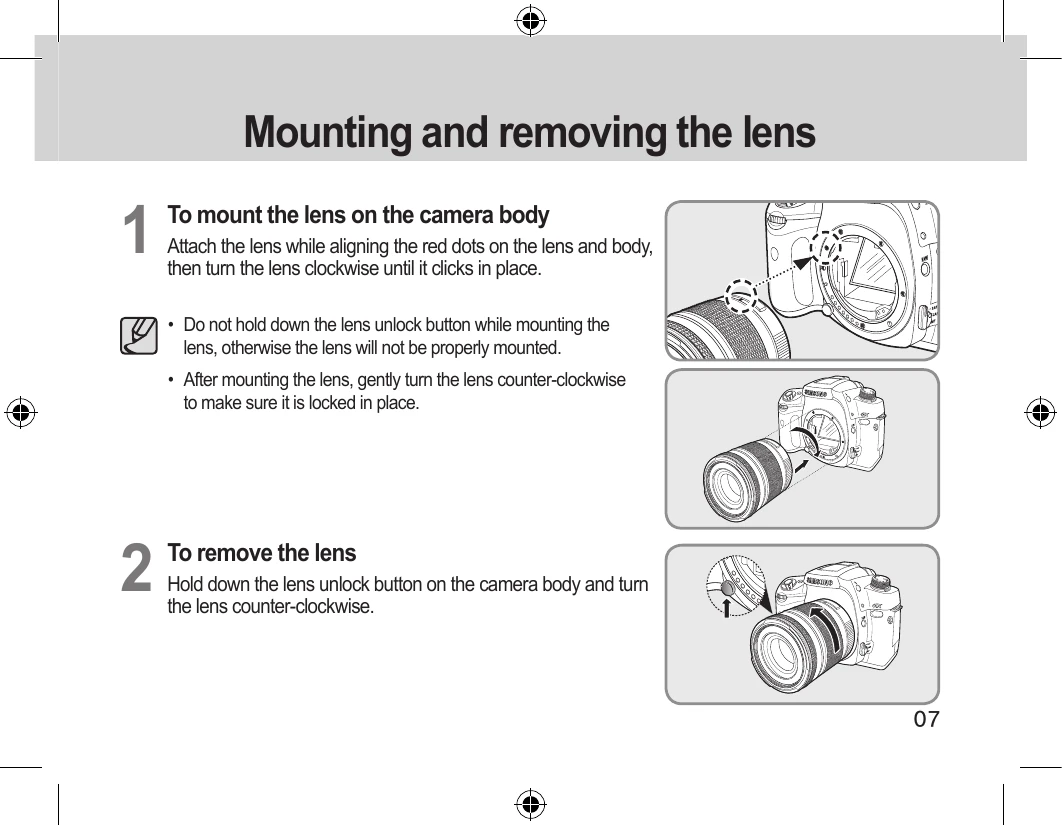
To mount: Align red dots, turn clockwise until it clicks. To remove: Hold unlock button, turn counter-clockwise.
Press tabs inward to remove. Attach when not in use.
Use camera's focus mode switch for auto focus (SAF, CAF) or manual focus (MF). For AF, set mode and press shutter halfway. For MF, set mode to MF and turn focusing ring.
Turn clockwise for telephoto, counter-clockwise for wide-angle. Use the LOCK button to fix focal length.
Align indices and turn clockwise to lock. Hold focus and zoom rings securely during attachment. Can be reversed when not in use.
Ensure filter size matches lens. Handle filters with care. Avoid using multiple filters simultaneously unless it's a circular polarizing filter with another. Vignetting may occur with wide-angle lenses and thick filter frames.
Avoid using the built-in flash for close distances to prevent exposure issues and vignetting. Remove lens hood before using the built-in flash as it may block the flash.