Brand: SAMSUNG
Category: Camera
Document Type: Manual
Language: EN
Brand: SAMSUNG
Category: Camera
Document Type: Manual
Language: EN
Uploaded: Nov. 21, 2025, 6:03 p.m.
Manual Publish Date: 2008-03-10
SEA warrants the product free from defective material and workmanship for 1 year for parts and 90 days for labor.
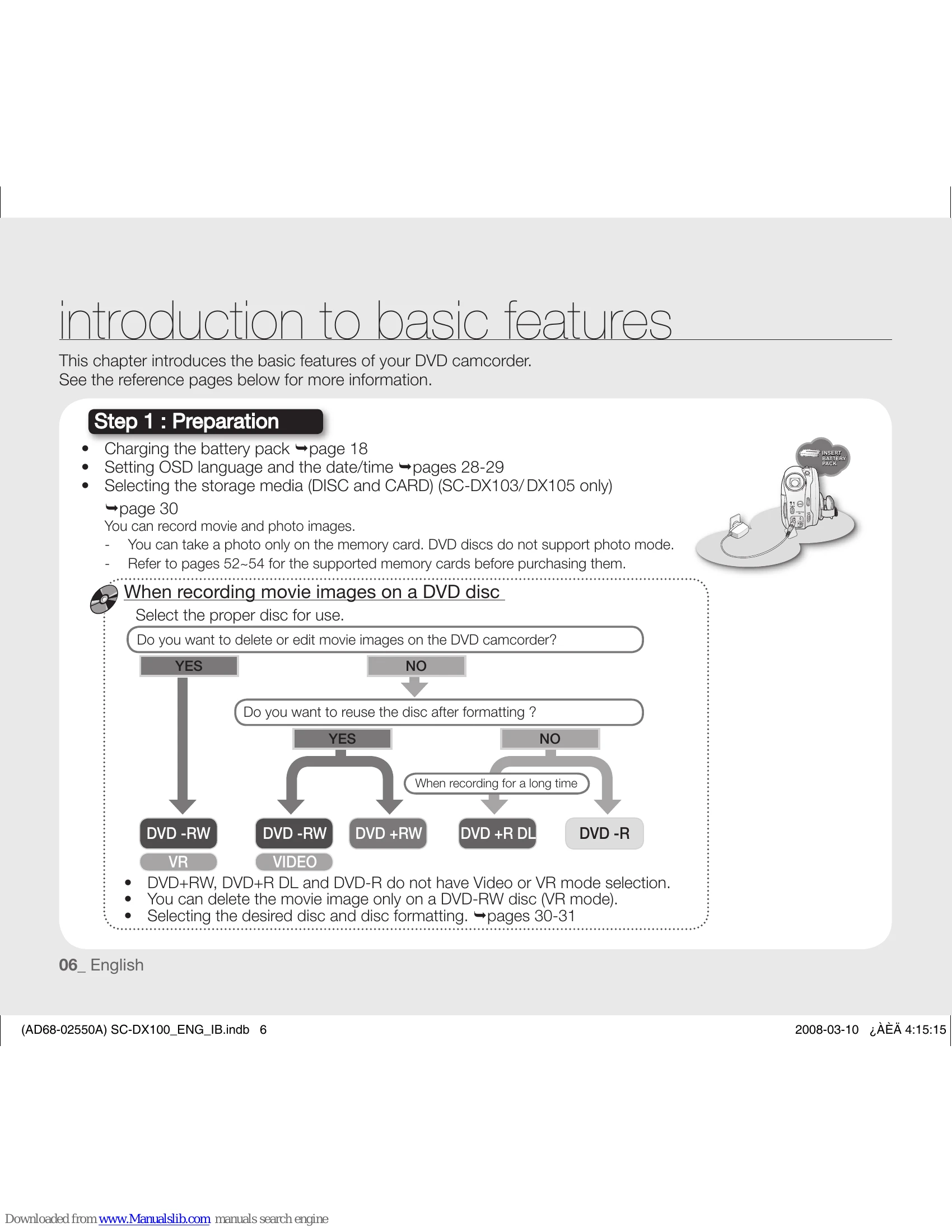
Preparation: Charge battery, set language and date/time, select storage media (DISC/CARD for SC-DX103/DX105 only).
Recording Movie Images: Select disc type (DVD-RW, DVD+RW, DVD+R DL, DVD-R) and format if necessary. Record movie images on disc or memory card (SC-DX103/DX105 only).
Recording Photo Images: (SC-DX103/DX105 only) Take photos only on memory card.
Playback and Editing: Select images from thumbnail views, play back on PC or TV, edit movie images (DVD-RW VR mode only).
Viewing on DVD Devices: Finalize the disc to ensure playback on other DVD devices.
Connecting to Devices: Connect to TV, VCR, DVD/HDD recorder, or PC. Use PC cam function.
Maintenance and Troubleshooting: General care, troubleshooting tips for common issues.
| Symptom | Explanation/Solution | ||||||||||||||||||||||||||||
| Overall | |||||||||||||||||||||||||||||
| The date and time are incorrect. | Has the camcorder been left unused for a long period of time? The backup memory battery(button type battery) may be discharged. Replace with a new battery. →page 14 | ||||||||||||||||||||||||||||
| Menu | |||||||||||||||||||||||||||||
| Menu items are greyed out. |
|
||||||||||||||||||||||||||||
| Discs | |||||||||||||||||||||||||||||
| The disc cannot be removed. |
|
||||||||||||||||||||||||||||
| Disc is not recognized and the disc cover opens. | The disc is damaged. Replace with a new disc. | ||||||||||||||||||||||||||||
| Memory cards (SC-DX103/DX105 only) | |||||||||||||||||||||||||||||
| Digital camera modes are not operable. |
|
||||||||||||||||||||||||||||
| Image cannot be deleted. |
|
||||||||||||||||||||||||||||
| You cannot format the memory card. |
|
||||||||||||||||||||||||||||
| The data file name is not indicated correctly. |
|
||||||||||||||||||||||||||||
| Recording | |||||||||||||||||||||||||||||
| Pressing the Recording start/ stop button does not start recording. |
|
||||||||||||||||||||||||||||