Brand: SAMSUNG
Category: Home Cinema
Document Type: Manual
Language: EN
Brand: SAMSUNG
Category: Home Cinema
Document Type: Manual
Language: EN
Uploaded: Nov. 21, 2025, 8:40 p.m.
Refer to the product label for warranty information.
This product can play DVD-Video, DVD±R/±RW, Data CD, CD-R/-RW, DivX, MP3, JPEG discs.
Supported devices include USB storage media, MP3 players, and digital cameras. Ensure proper file name length and file system compatibility (FAT16/FAT32). External HDDs are not supported.
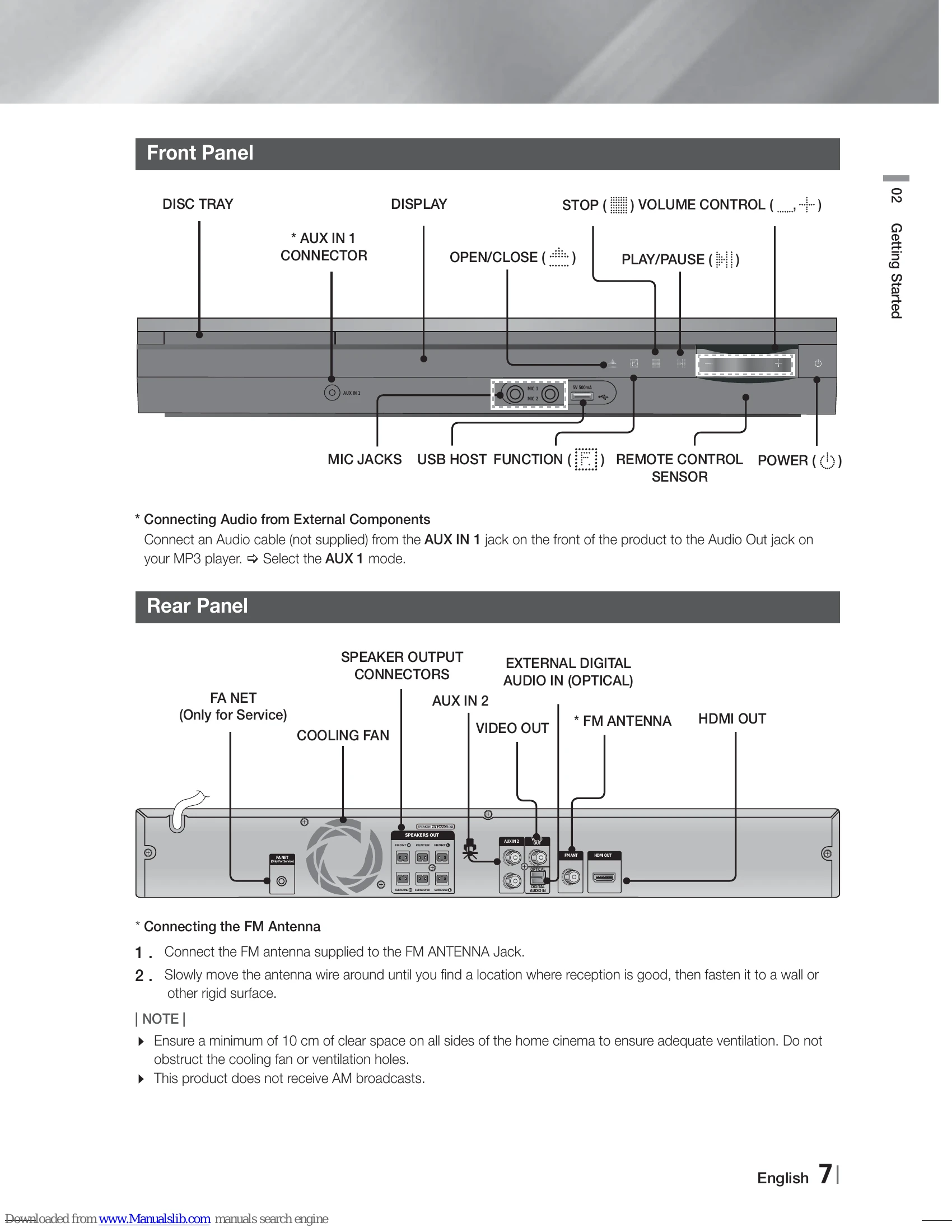
Key components include Disc Tray, Display, Volume Control, Open/Close, Play/Pause, Stop, Aux In 1, Mic Jacks, USB Host Function, Remote Control Sensor, and Power.
Connections include Speaker Output Connectors, External Digital Audio In (Optical), Aux In 2, Video Out, FM Antenna, and HDMI Out.
The remote control allows operation of the product and some TV functions. Buttons include Power, Numeric buttons, Playback controls, Volume control, Setup menu access, and special function buttons.
Diagrams illustrate normal and simple speaker positions. Instructions are provided for connecting speaker wires and positioning speakers for optimal sound.
Two methods are provided: Method 1 (HDMI Cable - Recommended) and Method 2 (Video Cable).
Use the FUNCTION button to select the correct mode (DVD/CD, D.IN, AUX 1, AUX 2, USB, FM) for external components like analog and digital audio devices.
Microphones can be connected to the front panel MIC jacks. Functions like MIC VOL, ECHO, KEYCON, and MY KARAOKE are explained.
First-time setup involves selecting language, TV aspect, and simple speaker setup.
Navigate to the Settings menu using the POWER and direction buttons.
Options include TV Aspect (4:3 Pan-Scan, 4:3 Letter Box, 16:9 Wide) and BD Wise settings.
Set the HDMI video signal output resolution (e.g., 576p, 720p, 1080i, 1080p).
Includes Simple Setup for speaker layout, Speaker Setting (size, Test Tone), Sound Edit, Delay Time, Test Tone, DRC, AUDIO SYNC, and Speaker Selection (Home Theater or TV Speaker).
Instructions for playing DVD, CD, MP3, WMA, and DivX discs, including playback controls and features like Resume function and Skip functions.
How to play JPEG files and use the slide show function.
Details on Forward/Reverse Search, Skipping Scenes/Songs, Slow Motion Play, and Step Motion Play.
How to set a designated section for repeat playback.
Using the TOOLS button to view disc details like title, chapter, playing time, audio, and subtitle information.
Explanation of special buttons like P.BASS, GIGA, FOOTBALL, S.VOL, S/W LEVEL, and DSP/EQ.
Instructions for tuning FM stations, setting stereo/mono, and presetting stations.
How to play media files from a USB device and perform safe USB removal.
How to record audio from CD-DA, FM radio, or external devices to a USB memory.
| Symptom | Check/Remedy |
|---|---|
| I cannot eject the disc. | • Is the power cord plugged securely into the outlet? • Turn off the power and then turn it back on. |
| Playback does not start. | • Check the region number of the DVD. DVD discs purchased from abroad may not be playable. • Make sure that the rating level is correct. • CD-ROMs and DVD-ROMs cannot be played on this product. |
| Playback does not start immediately when the Play/Pause button is pressed. | • Are you using a deformed disc or a disc with scratches on the surface? • Wipe the disc clean. |
| Sound is not produced. | • No sound is heard during fast playback, slow playback, and step motion playback. • Are the speakers connected properly? Is the speaker setup correctly customized? • Is the disc severely damaged? |
| Sound can be heard only from a few speakers and not all 6. | • On certain DVD discs, sound is output from the front speakers only. • Check if the speakers are connected properly. • Adjust the volume. • When listening to a CD, radio or TV, sound is output to the front speakers only. Select V-SURROUND (Virtual Surround) on the remote control to use all six speakers. |
| Dolby Digital 5.1 CH Surround Sound is not produced. | • Is there "Dolby Digital 5.1 CH" mark on the disc? Dolby Digital 5.1 CH Surround Sound is produced only if the disc is recorded with 5.1 channel sound. • Is the audio language correctly set to Dolby Digital 5.1-CH in the information display? |
| The remote control does not work. | • Is the remote control being operated within its operation range of angle and distance? • Are the batteries drained? • Have you selected the correct mode (RECEIVER DVD/TV)? |
| • Disc is rotating but no picture is produced. • Picture quality is poor and picture is shaking. |
• Is the TV power on? • Are the video cables connected properly? • Is the disc dirty or damaged? • A poorly manufactured disc may not be playable. |
| Audio language and subtitles do not work. | • Audio language and subtitles will not work if the disc does not contain them. |
| The Disc/Title menu screen does not appear even when the Disc/Title function is selected. | • Are you using a disc that does not contain menus? |