Brand: SAMSUNG
Category: Microwave Oven
Document Type: Manual
Language: EN
Brand: SAMSUNG
Category: Microwave Oven
Document Type: Manual
Language: EN
Uploaded: Nov. 21, 2025, 6:22 p.m.
This limited warranty covers manufacturing defects for one year parts and labor, and ten years for the magnetron part.
Checking the parts: Carefully unpack your microwave oven and verify all parts are present. Contact Samsung Call Center if any parts are missing or damaged.
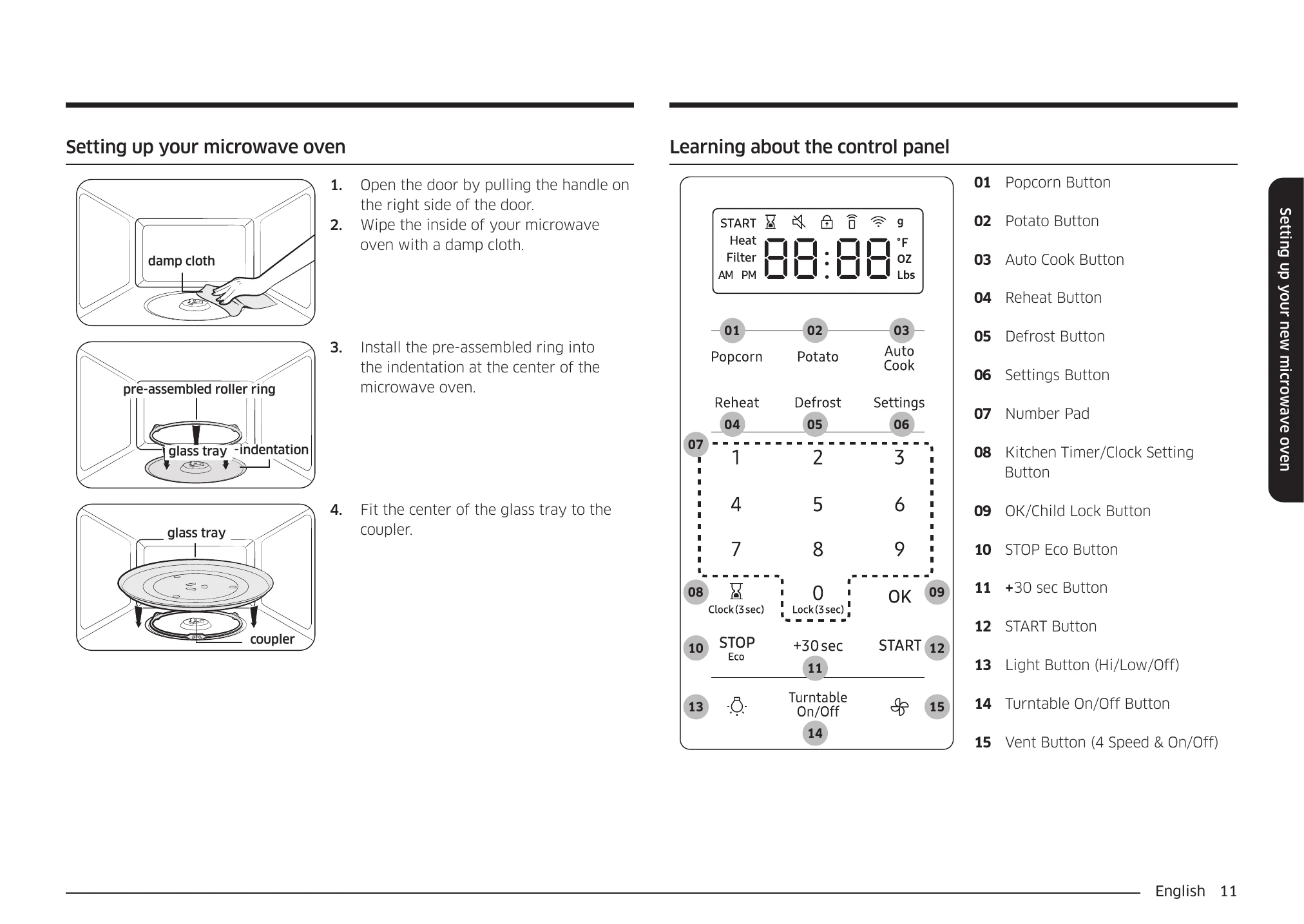
Setting up your microwave oven: Open the door, wipe the interior with a damp cloth, install the roller ring, and place the glass tray on the coupler.
Learning about the control panel: Familiarize yourself with the buttons such as Popcorn, Potato, Auto Cook, Reheat, Defrost, Settings, Number Pad, OK/Child Lock, STOP/Eco, +30 sec, START, and Light/Turntable/Vent buttons.
Set Time: Set the built-in clock by touching and holding the Clock button, using numeric buttons for time, and confirming with OK. Adjust AM/PM as needed.
System Settings: Customize preferences like Weight Unit, Time Format, Sound, Remind End Signal, Daylight Saving Time, Demo mode, Filter Remind, and Wi-Fi.
Smart Control: Download the SmartThings app to connect and control the microwave remotely. Functions may be affected by Wi-Fi signal strength.
Voice Control: Use Bixby, Amazon Alexa, or Google Assistant via the SmartThings app to control the microwave with voice commands.
Auto Connectivity: Automatically connects the hood via Wi-Fi to a compatible Samsung cooktop. The hood fan operates automatically when the cooktop is on.
Turntable (On/Off): Toggle the turntable on or off. Use pot holders as the turntable can become hot.
Kitchen Timer: Set the timer for up to 99 minutes, 99 seconds. Touch STOP to cancel.
Child Lock: Lock all buttons by touching the Lock button for 3 seconds to prevent accidental operation by children.
Stop Button: Clears entered instructions, pauses cooking, or stops cooking and returns to time display.
Eco Mode: Reduces standby power usage. Touch STOP Eco to turn on; touch any other button to cancel.
+30 sec: Adds 30 seconds to cooking time in manual or standby mode.
Cooktop Lamp: Turn the cooktop lamp on or off, and adjust brightness (high/low).
Vent Fan: Controls boost, high, medium, low, or off for the vent fan. The fan automatically turns on if excess heat is detected.
Popcorn: Easily cook popcorn by selecting the size and touching START. No manual time or power setting is required.
Potato: Cook potatoes using preset options. Place potatoes on the tray, select the food item and amount, then touch START.
Auto Cook: Cooks favorite foods using preset power levels and times. Select food category and item, then amount, and touch START.
Reheat: Reheats precooked, refrigerated foods. Place food on the tray, select food item and amount, then touch START.
| Problem | Cause | Action |
|---|---|---|
| General | The buttons cannot be touched properly. | Foreign matter may be caught between the buttons. Remove the foreign matter and try again. |
| For touch models: Moisture is on the exterior. | Wipe the moisture from the exterior. | |
| The time is not displayed. | Power is not supplied. | Make sure power is supplied. Confirm the microwave is plugged in. Check your fuses or circuit breakers. |
| The Child Lock is activated. | Deactivate the Child Lock. | |
| The Eco (power-saving) function is set. | Turn off the Eco function. | |
| The oven does not work. | Power is not supplied. | Make sure power is supplied. Confirm the microwave is plugged in. Check your fuses or circuit breakers. |
| The door is open. | Close the door and try again. | |
| The door open safety mechanisms are covered by foreign matter. | Remove the foreign matter and try again. | |
| There is not enough ventilation space around the oven. | There are intake/exhaust outlets on the front and rear of the oven for ventilation. Check the installation guide and make sure that the microwave is far enough away from walls and cabinets for proper ventilation. | |
| Several appliances or devices are plugged into the same outlet. | Unplug all other appliances or devices from the outlet. | |
| The oven stops while in operation. | The user has opened the door to turn food over. | After turning over the food, touch the START button again to start operation. |
| The power turns off during operation. | The oven has been cooking for an extended period of time. | After the oven has cooked for an extended period of time, let the oven cool. |
| The cooling fan is not working. | Listen for the sound of the cooling fan. | |
| Trying to operate the oven without food inside. | Put food in the oven. | |
| There is no power to the oven. | Power is not supplied. | Make sure power is supplied. Confirm the microwave is plugged in. Check your fuses or circuit breakers. |
| There is a popping sound during operation, and the oven doesn't work. | Cooking food in a sealed container or using a container with a tight lid. | Do not cook food in sealed containers or in containers with tight lids. Expanding steam from the cooking food can cause the containers to burst or the lids to pop off. |
| The oven exterior gets too hot during operation. | There is not enough ventilation space around the oven. | |
| Objects are on top of the oven. | Remove all objects on the top of the oven. | |
| Food residue is stuck between the door and oven interior. | Clean the oven and then open the door. | |
| The oven does not heat. | The oven may not work if too much food is being cooked or improper cookware is being used. | To test the oven, put one cup of water in a microwave-safe container, put the container in the oven, and then run the microwave for 1-2 minutes to check whether the water is heated. If the water is heated, reduce the amount of food and start the function again. Use a cooking container with a flat bottom. |
| Heating is weak or slow. | The oven may not work if too much food is being cooked or improper cookware is being used. | To test the oven, put one cup of water in a microwave-safe container, put the container in the oven, and then run the microwave for 1-2 minutes to check whether the water is heated. If the water is heated, reduce the amount of food and start the function again. Use a cooking container with a flat bottom. |
| The warm function does not work. | The oven may not work if too much food is being warmed or improper cookware is being used. | To test the oven, put one cup of water in a microwave-safe container, put the container in the oven, and then run the microwave for 1-2 minutes to check whether the water is heated. If the water is heated, reduce the amount of food and start the function again. Use a cooking container with a flat bottom. |
| The thaw function does not work. | The oven may not work if too much food is being thawed or improper cookware is being used. | To test the oven, put one cup of water in a microwave-safe container, put the container in the oven, and then run the microwave for 1-2 minutes to check whether the water is heated. If the water is heated, reduce the amount of food and start the function again. Use a cooking container with a flat bottom. |
| The interior light is dim or does not turn on. | The door has been left open for a long time. | The interior light may automatically turn off when the Eco function operates. Close and reopen the door or touch the STOP button. |
| The interior light is covered by foreign matter. | Clean the inside of the oven and check again. | |
| A beeping sound occurs during cooking. | If the Auto Cook function is being used, this beeping sound means it's time to turn over the food. | After turning over the food, touch the START button again to restart operation. |
| The oven is not level. | The oven is installed on an uneven surface. | Make sure the oven is installed on flat, stable surface. |
| There are sparks during cooking. | Metal containers are used during cooking or thawing. | Do not use metal containers. |
| When power is connected, the oven immediately starts to work. | The door is not properly closed. | Close the door and check again. |
| There is electricity coming from the oven. | The power source or power outlet is not properly grounded. | Make sure the power source and power outlet are properly grounded. |
| There is water dripping. | Water or steam may be generated by the cooking or defrosting process, depending on the food. This is not an oven malfunction. | Let the oven cool and then wipe with a dry dish towel. |
| There is steam coming through a crack in the door. | Water or steam may be generated by the cooking or defrosting process, depending on the food. This is not an oven malfunction. | |
| There is water left in the oven. | Water or steam may be generated by the cooking or defrosting process, depending on the food. This is not an oven malfunction. | |
| The brightness inside the oven varies. | Changes in brightness reflect changes in power output. Power output changes depending on the functions in use. | Power output changes during cooking are not malfunctions. |
| Cooking is finished, but the cooling fan is still running. | To ventilate the oven, the cooling fan continues to run for about 3 minutes after cooking is complete. | This is not an oven malfunction. |
| Touching the START button operates the oven. | This happens when the oven is not operating. | The microwave oven is designed to start operating when you touch the START button if it was not operating. |
| Turntable | While turning, the turntable comes out of place or stops turning. | There is no roller ring, or the roller ring is not properly in place. |
| The turn table drags while turning. | The roller ring is not properly in place, there is too much food, or the container is too large and touches the inside of the microwave. | |
| The turn table rattles while turning and is noisy. | Food residue is stuck to the bottom of the oven. |