Brand: SAMSUNG
Category: Microwave Oven
Document Type: Manual
Language: EN
Brand: SAMSUNG
Category: Microwave Oven
Document Type: Manual
Language: EN
Uploaded: Nov. 21, 2025, 7:39 p.m.
Manual Publish Date: 2016-02-12
Samsung warranty does not cover service calls for operation explanation, installation, or cleaning.
Diagram showing oven components: Door handle, Door, Ventilation holes, Light, Door latches, Turntable, Coupler, Roller ring, Safety interlock holes, Control panel.
| Problem | Cause | Action |
|---|---|---|
| General | ||
| The buttons cannot be pressed properly. | Foreign matter may be caught between the buttons. | Remove the foreign matter and try again. |
| For touch models: Moisture is on the exterior. | Wipe the moisture from the exterior. | |
| The time is not displayed. | Child lock is activated. | Deactivate Child lock. |
| The Eco (power-saving) function is set. | Turn off the Eco function. | |
| The oven does not work. | Power is not supplied. | Make sure power is supplied. |
| The door is open. | Close the door and try again. | |
| The door open safety mechanisms are covered in foreign matter. | Remove the foreign matter and try again. | |
| The oven stops while in operation. | The user has opened the door to turn food over. | After turning over the food, press the Start button again to start operation. |
| The power turns off during operation. | The oven has been cooking for an extended period of time. | After cooking for an extended period of time, let the oven cool. |
| The cooling fan is not working. | Listen for the sound of the cooling fan. | |
| There is a popping sound during operation, and the oven doesn't work. | Trying to operate the oven without food inside. | Put food in the oven. |
| There is not sufficient ventilation space for the oven. | There are intake/exhaust outlets on the front and rear of the oven for ventilation. Keep the gaps specified in the product installation guide. | |
| Several power plugs are being used in the same socket. | Designate only one socket to be used for the oven. | |
| Cooking sealed food or using a container with a lid may causes popping sounds. | Do not use sealed containers as they may burst during cooking due to expansion of the contents. | |
| The oven exterior is too hot during operation. | There is not sufficient ventilation space for the oven. | There are intake/exhaust outlets on the front and rear of the oven for ventilation. Keep the gaps specified in the product installation guide. |
| The door cannot be opened properly. | Objects are on top of the oven. | Remove all objects on the top of the oven. |
| Food residue is stuck between the door and oven interior. | Clean the oven and then open the door. | |
| Heating including the Warm function does not work properly. | The oven may not work, too much food is being cooked, or improper cookware is being used. | Put one cup of water in a microwave-safe container and run the microwave for 1-2 minutes to check whether the water is heated. Reduce the amount of food and start the function again. Use a cooking container with a flat bottom. |
| The thaw function does not work. | Too much food is being cooked. | Reduce the amount of food and start the function again. |
| The interior light is dim or does not turn on. | The door has been left open for a long time. | The interior light may automatically turn off when the Eco function operates. Close and reopen the door or press the Cancel button. |
| The interior light is covered by foreign matter. | Clean the inside of the oven and check again. | |
| A beeping sound occurs during cooking. | If the Auto Cook function is being used, this beeping sound means it's time to turn over the food during thawing. | After turning over the food, press the Start button again to restart operation. |
| The oven is not level. | The oven is installed on an uneven surface. | Make sure the oven is installed on flat, stable surface. |
| There are sparks during cooking. | Metal containers are used during the oven/thawing functions. | Do not use metal containers. |
| When power is connected, the oven immediately starts to work. | The door is not properly closed. | Close the door and check again. |
| There is electricity coming from the oven. | The power or power socket is not properly grounded. | Make sure the power and power socket are properly grounded. |
| 1. Water drips. 2. Steam emits through a door crack. 3. Water remains in the oven. | There may be water or steam in some cases depending on the food. This is not an oven malfunction. | Let the oven cool and then wipe with a dry dish towel. |
| The brightness inside the oven varies. | Brightness changes depending on power output changes according to function. This is not an oven malfunction. | Power output changes during cooking are not malfunctions. This is not an oven malfunction. |
| Cooking is finished, but the cooling fan is still running. | To ventilate the oven, the cooling fan continues to run for about 3 minutes after cooking is complete. | This is not an oven malfunction. |
| Turntable | ||
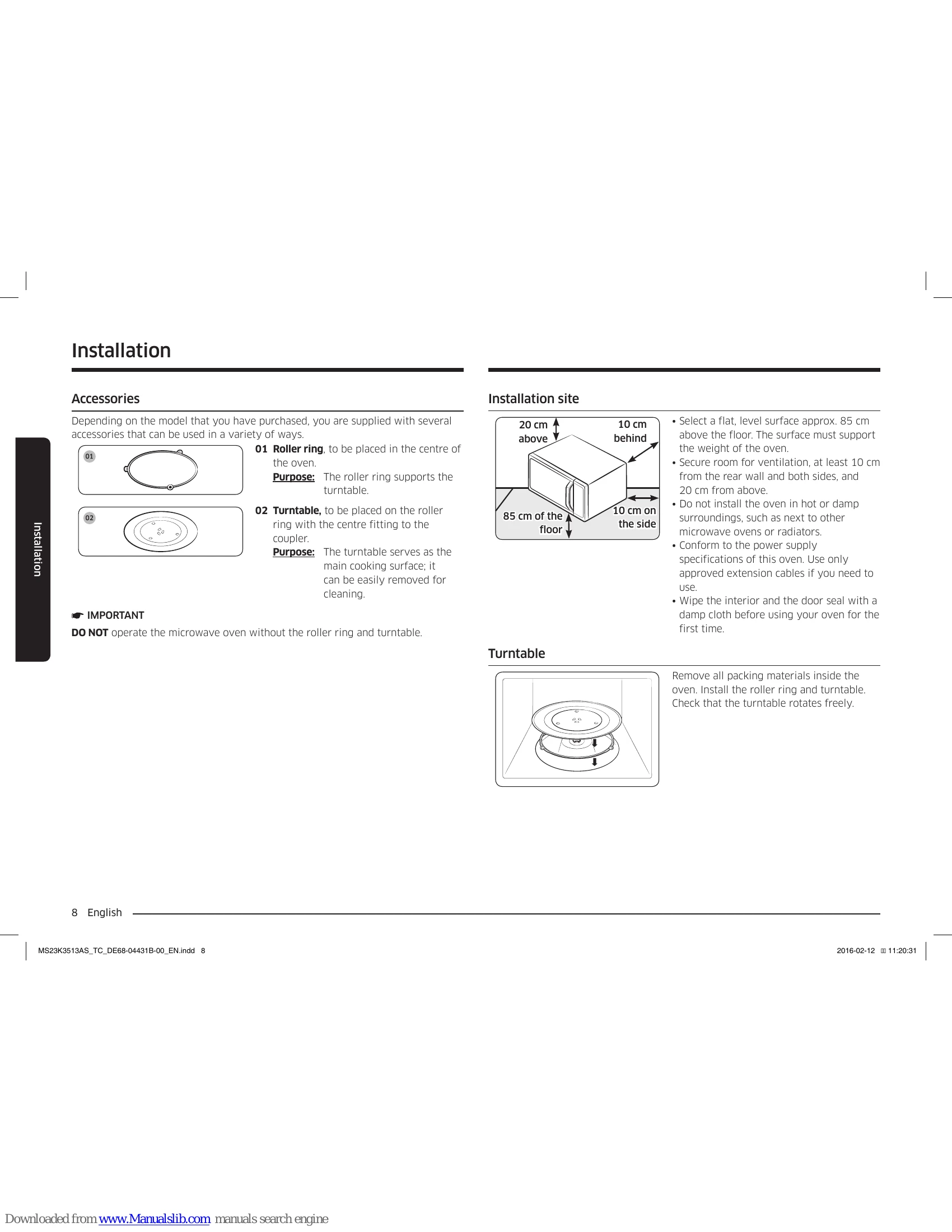
| While turning, the turntable comes out of place or stops turning. | There is no roller ring, or the roller ring is not properly in place. | Install the roller ring and then try again. |
| The turn table drags while turning. | The roller ring is not properly in place, there is too much food, or the container is too large and touches the inside of the microwave. | Adjust the amount of food and do not use containers that are too large. |
| The turn table rattles while turning and is noisy. | Food residue is stuck to the bottom of the oven. | Remove any food residue stuck to the bottom of the oven. |