Brand: SAMSUNG
Category: MOBILE PHONE
Document Type: Manual
Language: EN
Brand: SAMSUNG
Category: MOBILE PHONE
Document Type: Manual
Language: EN
Uploaded: Nov. 21, 2025, 6:44 p.m.
Manual Publish Date: 2025-02-01
Warranty information is not explicitly detailed in the provided pages.
Learn about your device's layout, how to insert SIM and microSD cards, charge the battery, and turn the device on and off.
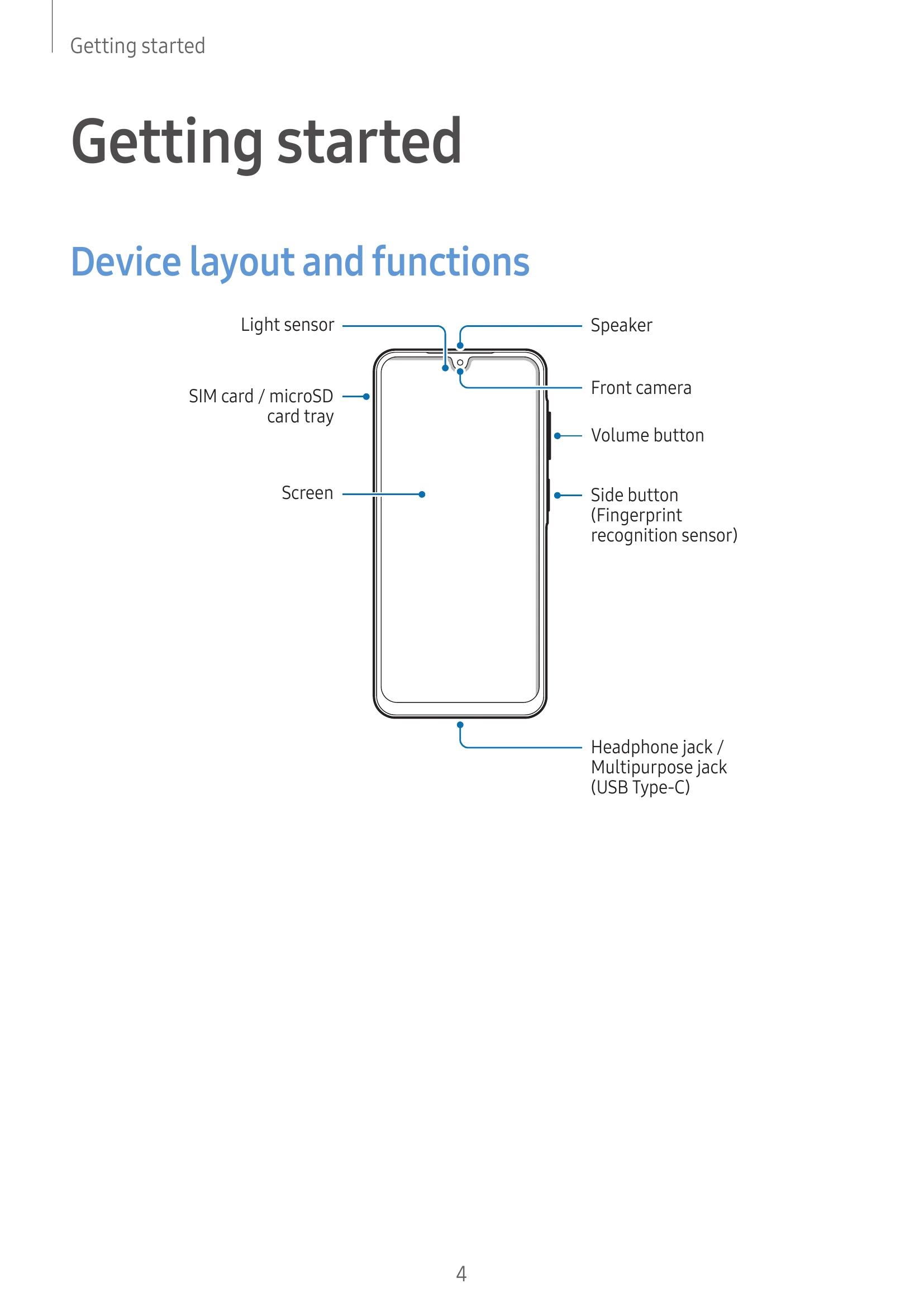
Familiarize yourself with the buttons, sensors, cameras, and ports of your device.
Instructions on wired and quick charging, as well as tips for reducing battery consumption and precautions.
Step-by-step guides for inserting Nano-SIM and microSD cards, and managing SIM settings.
How to power on, power off, and force restart your device, including emergency call information.
Guidance for setting up your device for the first time, including Samsung account setup and data transfer.
Learn various touch gestures like tapping, dragging, swiping, and pinching to control the screen.
Understand the functions of the Recents, Home, and Back buttons, and how to hide the navigation bar.
Navigate between the Home screen and Apps screen, and learn how to edit the Home screen, add widgets, and create folders.
Find solutions for common issues such as device not turning on, touch recognition problems, device freezing, call issues, network errors, and battery problems.
| Problem | Solutions |
|---|---|
| When you turn on your device or while you are using the device, it prompts you to enter one of the following codes: |
|
| Your device displays network or service error messages |
|
| Your device does not turn on |
|
| Touch recognition works slowly or improperly |
|
| Your device freezes or encounters a fatal problem |
|
| Calls are not connected |
|
| Others cannot hear you speaking on a call |
|
| A cellular network or the internet is often disconnected or audio quality is poor |
|
| The battery does not charge properly (For Samsung-approved chargers) |
|
| The battery depletes faster than when first purchased |
|
| Error messages appear when opening the camera |
|
| Picture quality is poorer than the preview |
|
| Error messages appear when opening multimedia files |
|
| Bluetooth is not working well |
|
| A connection is not made when you connect the device to a computer |
|
| Your device cannot find your current location |
|
| Data stored in the device has been lost |
|
| A small gap appears around the outside of the device case |
|
| There is not enough space in the device's storage |
|
| The Home button does not appear |
|