Manual for SM-R400N

Manual for SM-R400N

Brand: SAMSUNG

Category: MOBILE PHONE

Document Type: Manual

Language: EN
Uploaded: Nov. 21, 2025, 9:08 p.m.

Getting started

About the Galaxy Buds FE

Galaxy Buds FE are wireless earbuds that allow you to listen to music or answer incoming calls after connecting them to your mobile device.

Device layout and functions

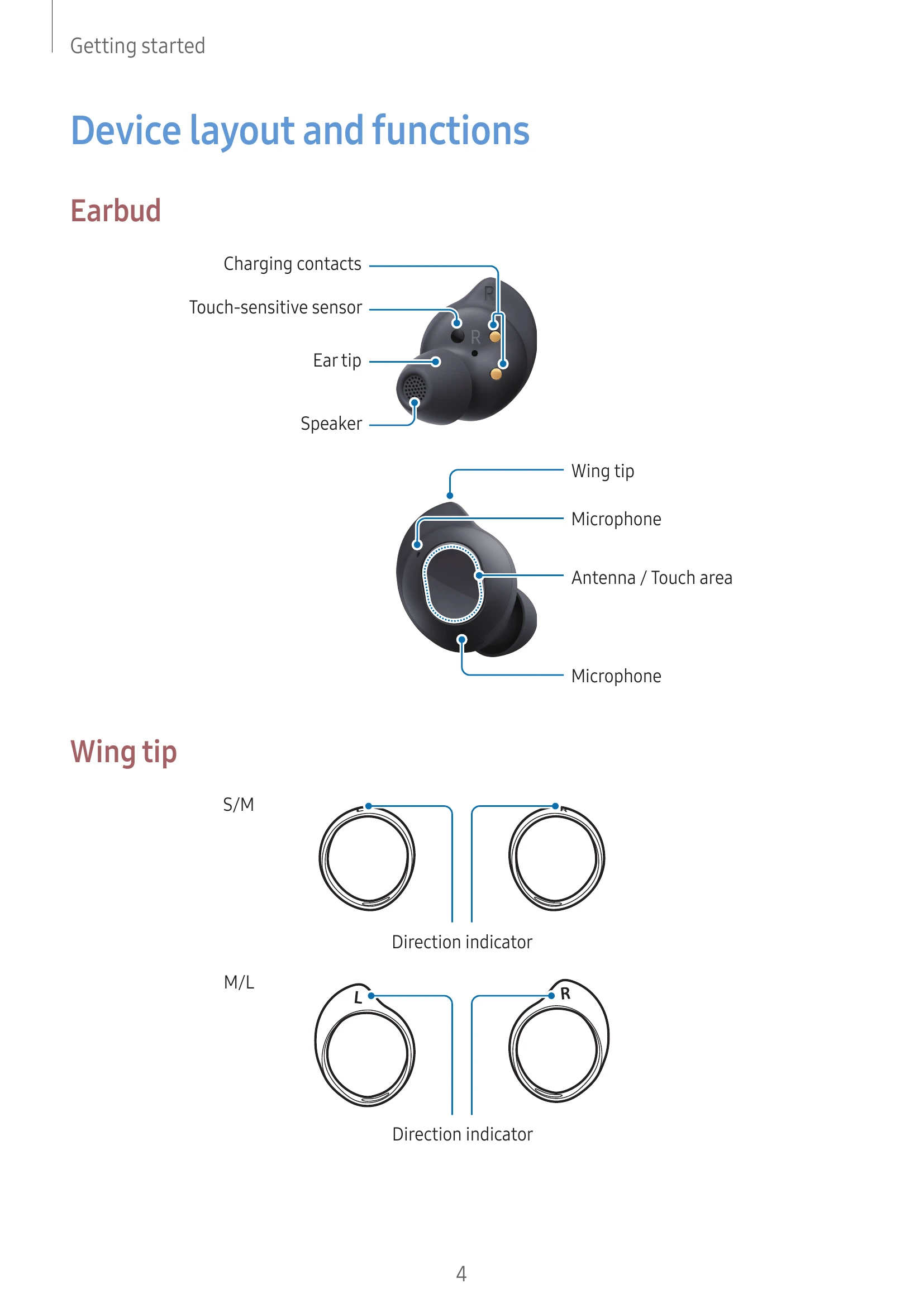
See diagrams for earbud components (charging contacts, touch-sensitive sensor, ear tip, speaker, wing tip, microphone, antenna/touch area) and wing tip sizes (S/M, M/L).

Charging case

Diagram shows charging contacts (left/right), earbud battery indicator light, charging case battery indicator light, and charger port (USB Type-C). Precautions about magnets and damaged devices are listed.

Preparing the earbuds for use

Instructions on attaching ear tips and wing tips are provided with diagrams and safety precautions.

Charging the battery

Fully charge the battery before first use. The charging case also has a built-in battery. Instructions on how to charge the earbuds and case are given with diagrams.

Battery indicator lights identification

Details on earbud and charging case indicator light colours and their meanings (charging, fully charged, blocked, low battery, moderate battery, high battery).

Troubleshooting and error codes

Issue Solution
Your earbuds do not work
  • Charge the battery completely.
  • If the touch-sensitive sensor does not make contact with your ear, remove and re-insert the earbuds.
  • If touch feature malfunctions, insert earbuds in the charging case, close, and remove after 7 seconds or more.
Bluetooth device cannot locate your earbuds
  • Close and open the charging case to enter pairing mode.
  • Ensure devices are within the maximum Bluetooth connection range (10 m).
A Bluetooth connection is not established or your earbuds and the mobile device are disconnected
  • Ensure no obstacles between devices.
  • Ensure the latest version of the Galaxy Wearable app is installed.
  • Ensure devices are within the maximum Bluetooth connection range (10 m).
  • Restart the mobile device and reopen the Galaxy Wearable app.
  • If only a single earbud is connected, restart the earbuds.
The battery does not charge properly (For Samsung-approved chargers)
  • Ensure charging contacts are in contact.
  • Ensure the charger is connected properly.
  • If charging contacts are dirty, wipe with a dry cloth.
The charging time and the battery life is different between the earbuds Charging time and battery life may differ due to inner components.
The battery depletes faster than when first purchased
  • Cold or hot temperatures can reduce useful charge.
  • Battery is consumable and useful charge gets shorter over time.
  • Store earbuds in a charged case when not in use.
You cannot hear others speaking Adjust the volume on the connected mobile device.
Sound echoes during a call Adjust the volume on the connected mobile device or move to another area.
Sound is emitted from the connected mobile device, not the earbuds, during a call
  • Check if earbuds are worn properly.
  • Remove and re-insert earbuds.
Audio quality is poor
  • Wireless network services may be disabled; keep earbuds away from electromagnetic waves.
  • Ensure devices are within the maximum Bluetooth range (10 m).
  • Adjust the connected device's sound appropriately.
Your earbuds sound comes slower than the screen when playing videos and games There may be a time lag between video and sound output.
The noise controls mode does not work well
  • Wear both earbuds and launch the noise cancelling feature.
  • Check and clean microphones if there is buildup.
  • Ensure the latest software version is installed.
Your Galaxy Buds FE are hot to the touch It is normal for earbuds to feel hot after extended use. If they overheat, stop use and contact service if persistent.
A small gap appears around the outside of the Galaxy Buds FE This is a necessary manufacturing feature; parts may rock or vibrate slightly.
When the earbuds are removed from your ears, the ear tips are turned upside down If ear tips turn over, turn them back to the original direction.
Privacy Policy