Manual for SMT-W5100

Manual for SMT-W5100

Brand: SAMSUNG

Category: MOBILE PHONE

Document Type: Manual

Language: EN
Uploaded: Nov. 21, 2025, 7:31 p.m.

Safety Concerns:
  • Warning: Provides information to avoid personal injury or fatality.
  • Caution: Provides information to avoid service failure or damage to the system.
  • Note: Indicates additional information as a reference.
  • Checks: Provides operator checkpoints for stable system operation.
Power Safety:
  • Do not turn the phone on if wet; wipe and take to service center.
  • Do not bend or damage power cord.
  • Keep battery away from metallic objects.
  • Use only the provided battery.
  • Replace old or expanded batteries immediately.
  • Do not allow battery to get wet.
  • Do not use damaged power cords.
  • Do not remove battery in flammable areas.
  • Always use Samsung-provided battery and charger.
Installation/Maintenance Safety:
  • Do not expose battery to excessive heat.
  • Avoid dusty or temperature-fluctuating places.
  • Do not use while charging with wet hands.
  • Keep away from combustible sprays or flammable materials.
  • Keep battery away from infants and animals.
  • Contact service if phone makes strange sounds, smells, or emits smoke.
  • Discard batteries at designated areas.
General Caution:
  • Keep battery indoors when not in use.
  • Overcharging/frequent discharging may decrease battery lifetime.
General Instruction:
  • Obey local regulations; turn off phone in prohibited/dangerous places.
Preparation:
  • Unpacking: Check all items included in the box.
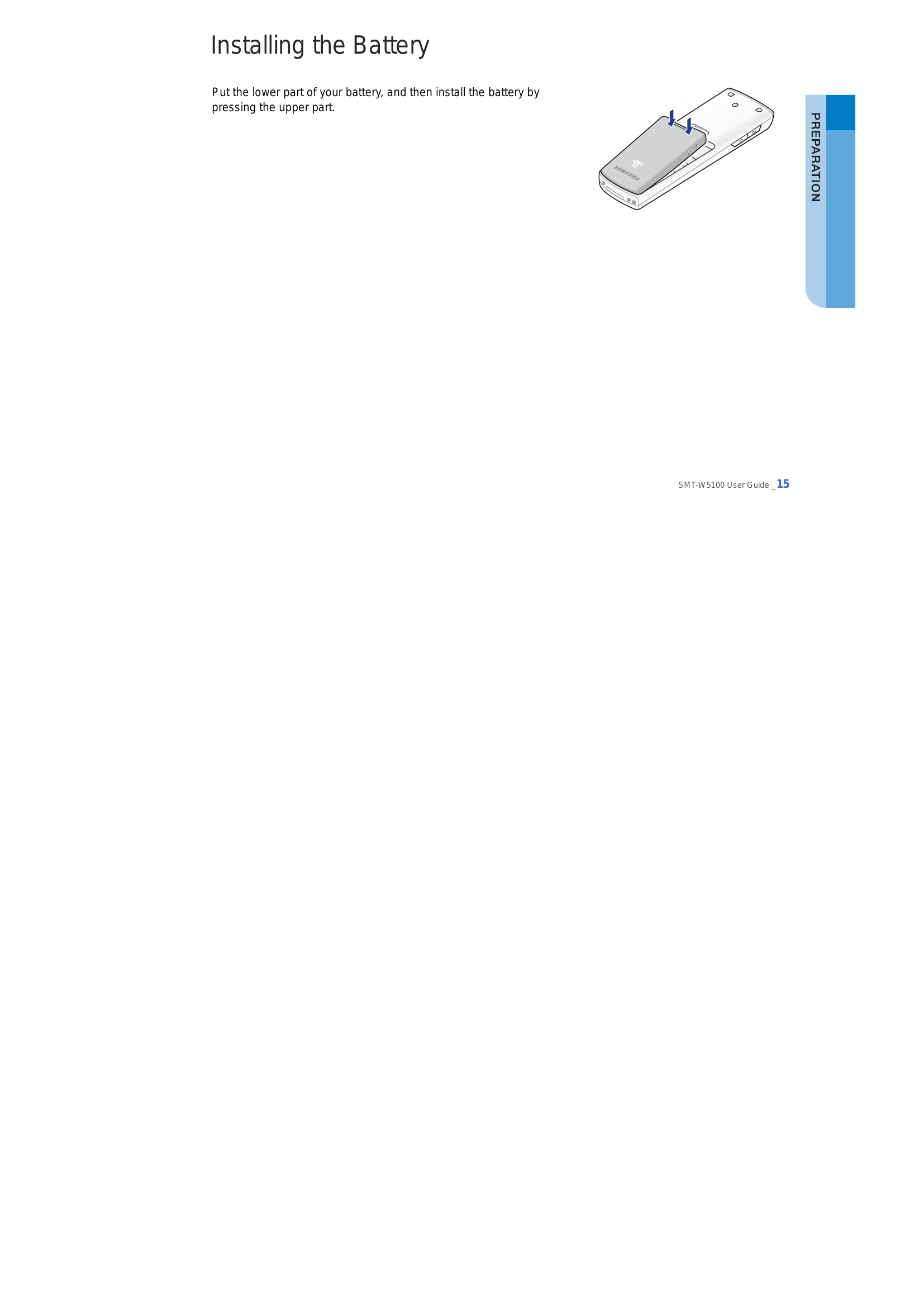
  • Installing Battery: Insert battery correctly.
  • Removing Battery: Follow steps to safely remove battery.
  • Charging Battery: Charge battery using the provided charger.
  • Checking Battery Status: Monitor battery levels via LCD icons.
Phone Layout & Buttons:
  • Familiarize yourself with phone components and button functions.
Icon Descriptions:
  • Understand various icons for signal, service, calls, messages, battery, etc.
Basic Features:
  • Making Calls (Dialpad, Call Lists, Speed Dial).
  • Answering Calls.
  • Volume Adjustment.
  • Etiquette Mode setup.
  • Automatic Key Lock setup.
  • Entering Characters.
Convenient Features:
  • During Call features (Mute, Conference, Transfer, Hold).
  • Calling Failure features (Call Back, Station Message, Camp On).
  • During Receiving Call features (Call Reject).
Menus:
  • Navigate through Menu Structure, Phonebook, Utilities, Message, Volume/Ring, Soft Menu, Call Forward, Phone Settings, System.
Help & Troubleshooting:
  • Access Function Descriptions and Troubleshooting guides for assistance.
Product Specifications:
  • View technical details of the SMT-W5120.

Troubleshooting and error codes

Trouble Solution
The bell does not ring or the ring sound is too small.
  • Check if the phone is set to etiquette mode.
  • Adjust the volume at [MENU] → [4. Volume/Ring] → [1. Incoming calls] → [3. Ring Volume].
The battery is not empty but the phone does not turn on. Take the battery out and put it in again, and turn the phone on.
Voices echo during a call.
  • Press the [Volume] button and adjust the volume
  • Move to another area.
Calls are disconnected frequently. Move to another area since the frequency is unstable.
The phone operates abnormally or does not operate at all. Take the battery out and insert it again, and turn the phone on again.
The lamp on the charger flashes yellow.
  • Take the battery out from the charger and put the battery in again.
  • If the yellow light continues to flash, clean the charging phones of the charger.
Phone registration failure.
  • Check if the power of the system or AP is on and reregister the phone.
  • Move to a serviceable area of the system or AP and reregister the phone.
The LCD does not light up. Battery is discharged. Recharge the battery and turn the phone on again.
The   indicator appears on screen and calls cannot be made.
  • Your phone may not be registered on the system. Use the phone after registration.
  • Move to an area where service can be provided.
  • Check if the power of the system or AP is on.
Privacy Policy