Manual for DCS EURO SERIES 24 BUTTON LCD HANDSETS

Manual for DCS EURO SERIES 24 BUTTON LCD HANDSETS

Brand: SAMSUNG

Category: Other

Document Type: Manual

Language: EN
Uploaded: Nov. 21, 2025, 9:02 p.m.

Warranty Information

Refer to your system administrator for specific warranty information regarding your keyset and system.

Basic Operation of your DCS Keyset

Making Calls:

  • Outside Calls: Lift handset, press an idle outside line key, or dial a line access code. Then dial the number.
  • Internal Calls: Dial the extension number or group number.

Answering Calls:

  • Outside Calls: Lift handset or press the ANS/RLS key.
  • Internal Calls: In Ring mode, lift handset or press ANS/RLS. In Voice Announce, press ANS/RLS to speak. In Auto Answer, the call is answered automatically.

Key Features:

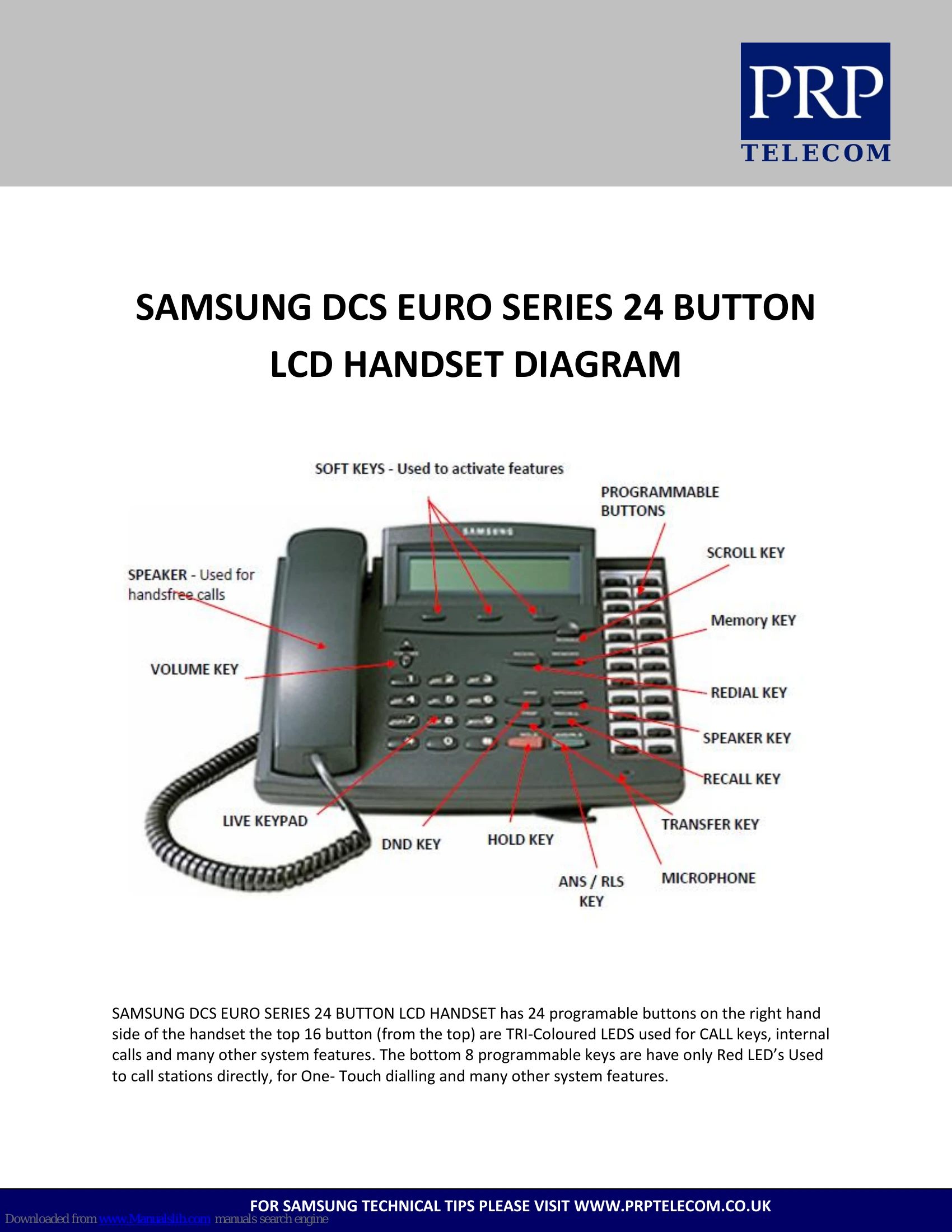
  • Programmable Keys: Keys with designation strips can be programmed for specific functions.
  • LCD Display: Shows call information, feature menus, etc.
  • Volume Controls: Adjust ringer, speaker, and handset volume using VOLUME Up/Down keys.
  • Hot Keypad: Allows dialling without lifting the handset or pressing SPEAKER key (if enabled).
  • Transferring Calls: Press TRSF key, dial destination, and hang up (blind transfer) or wait for answer and announce (screened transfer).
  • Conference Calls: Connect up to five parties using the CONF key.
  • Call Forwarding: Set calls to forward under various conditions (e.g., always, busy, no answer).
  • Speed Dialling: Store and dial frequently used numbers.

Customisation:

  • Ring Tone: Select from eight different ring tones.
  • Passcode: Change your default passcode.
  • Answer Mode: Set how you receive internal calls (Ring, Auto Answer, Voice Announce).

Troubleshooting and error codes

Problem Possible Cause Solution
No Dial Tone Line in use or system fault. Wait and try again. Contact system administrator if problem persists.
Cannot Make Outside Call No available outside line, or requires authorization/account code. Try another line, or enter required code. Contact system administrator for details.
Cannot Make Internal Call Extension busy or out of service. Wait and try again, or use callback features.
Call Not Answering Extension busy, in DND, or Unreachable. Use Busy Extension Callback or Camp-On features. Check extension status.
Feature Not Working Key not programmed, incorrect access code, or feature not enabled. Check programming with system administrator, verify access codes, or consult manual for correct procedure.
Privacy Policy