Brand: SAMSUNG
Category: Other
Document Type: Manual
Language: EN
Brand: SAMSUNG
Category: Other
Document Type: Manual
Language: EN
Uploaded: Nov. 21, 2025, 9:23 p.m.
Provides information on the Arbitration Agreement, One-year Limited Warranty, and End User License Agreement.
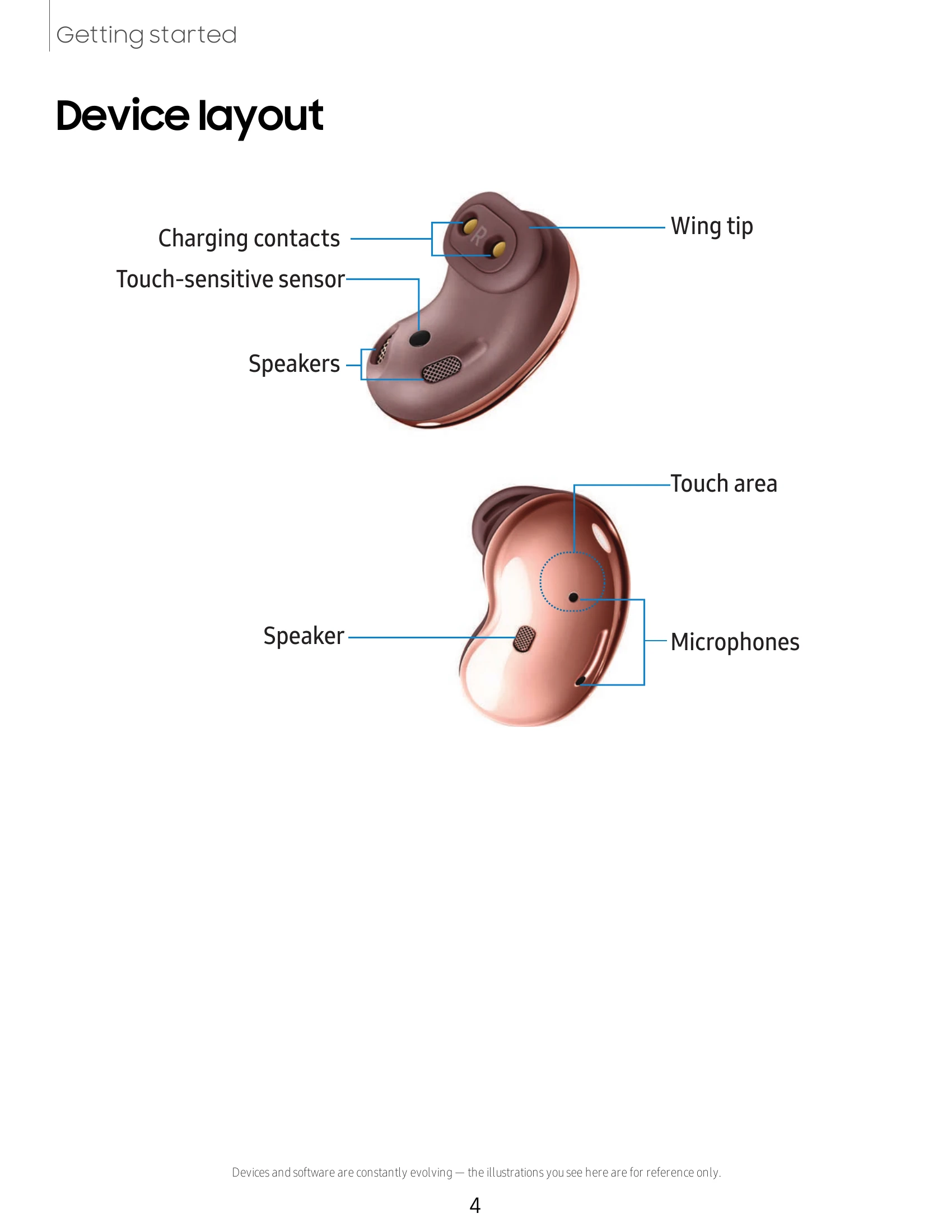
Device layout: Familiarize yourself with the charging contacts, touch-sensitive sensor, speakers, wing tip, touch area, and microphones of your Galaxy Buds Live.
Set up your device: Charge the battery by placing the earbuds in the charging case and connecting to a power source. Utilize Wireless PowerShare to charge the case using a compatible Samsung smartphone.
Attach and wear the earbuds: Select the correct wing tip size for a comfortable fit and insert the earbuds into your ears, tucking the top half to secure them.
Couple earbuds: If you lose an earbud, you can buy a replacement and couple it with the existing one by following a specific pairing process.
Start using your device: Connect your earbuds to your phone by installing and using the Galaxy Wearable app. Follow the on-screen prompts to complete the connection.
Battery level: Monitor the battery status of your earbuds and charging case within the app.
Noise canceling: Enable or disable noise canceling to reduce ambient sounds.
Equalizer: Select from different equalizer presets to customize your audio experience.
Touch controls: Customize the touch area on your earbuds for various functions like music playback, call management, and app shortcuts. You can also block touch controls to prevent accidental actions.
Read notifications aloud: Have text notifications from your phone read aloud on your earbuds.
Advanced: Explore features like Bixby voice wake-up and seamless earbud connection for enhanced functionality.
Labs: Access experimental features like gaming mode and relieve pressure with ambient sound.
Find my earbuds: Use the app to help locate misplaced earbuds.
General: Configure general settings, including resetting your earbuds to factory default values.
Earbuds software update: Keep your earbuds up-to-date with the latest software versions.
Tips and user manual: Access useful tips and the complete user manual.
About earbuds: View device information, legal details, and software and battery information.
Access helpful resources through videos, tips, Samsung Care, or by talking to an agent.
Review arbitration agreements, warranty information, and safety guidelines.
| Problem | Solution |
|---|---|
| Earbuds are not coupled. | Insert the earbuds into the charging case. The earbud battery indicator light will flash red. Tap and hold the touch area on both earbuds for seven seconds or more. When the earbud battery indicator light flashes green and then turns off, the earbuds are coupled. |
| Touch controls are unresponsive. | Place the earbuds in the charging case for seven seconds or more to restart them. |
| Charging error. | Reconnect the case and earbuds. If the error occurs again, contact a Samsung Service Center for service support. |