Brand: SAMSUNG
Category: Other
Document Type: Manual
Language: EN
Brand: SAMSUNG
Category: Other
Document Type: Manual
Language: EN
Uploaded: Nov. 21, 2025, 7:34 p.m.
Manual Publish Date: 2005-09-01
A one-year warranty covers defective products, with repair or replacement at no charge.
| Symptoms | Remedies |
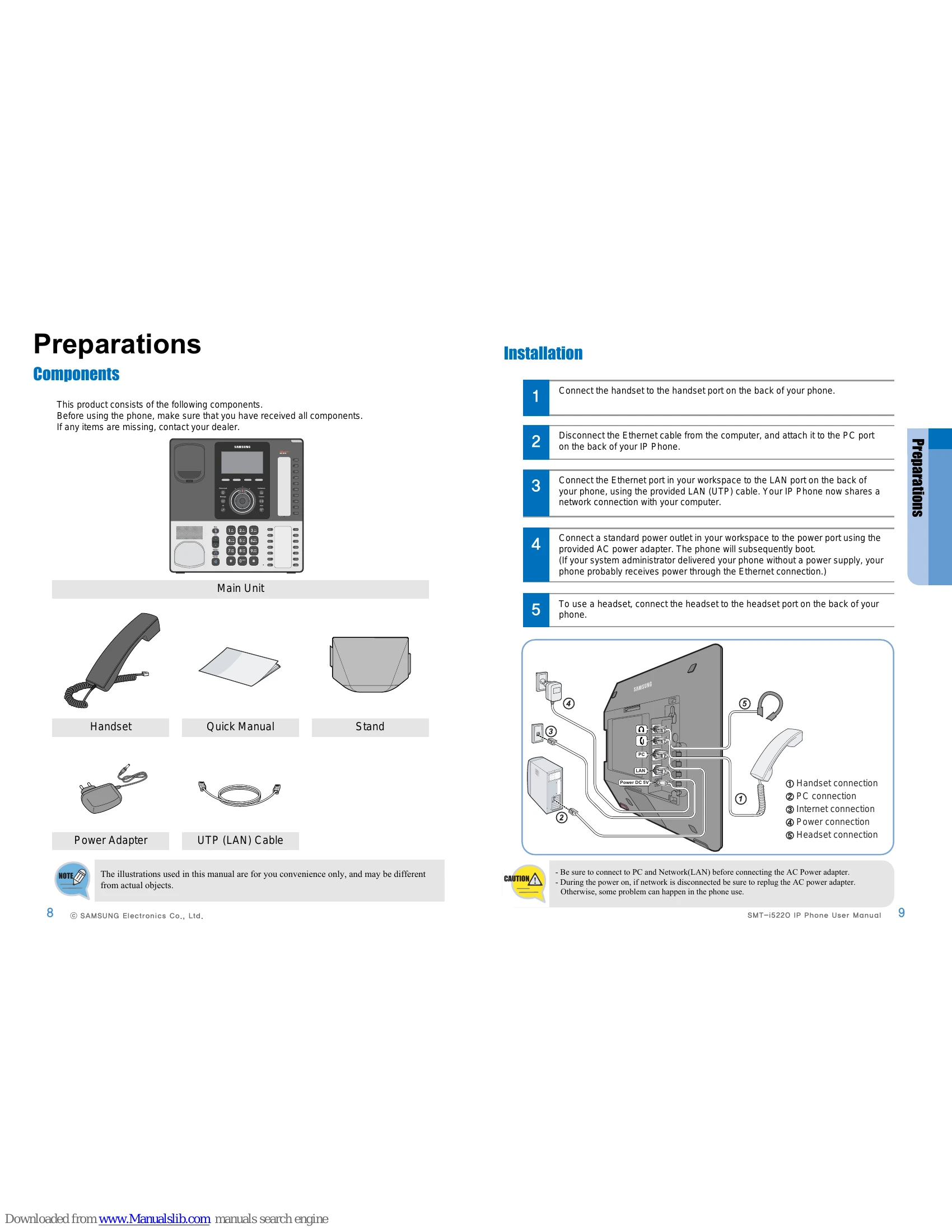
| The phone does not boot. | Check if your phone is correctly connected. Check if the adapter is correctly installed. Refer to page 9. Unplug the adapter, and then replug the adapter after for more 10 seconds. |
| The phone does not work after booting. | Check if your phone's IP address is duplicated with other unit. The Network information inquires to administrator. Check if your phone is correctly installed. Refer to page 9. |
| No sound dial ready tone. | Check if the phone is correctly installed. Refer to page 9. Check if the phone's network's setting is correctly setted. |
| No display on the screen. | Check if the phone is correctly installed. Refer to page 9. |
| No sound ring tone. | Press the Volume + to increase the ringer volume. Refer to page 27. |
| I hear many noises during a call. | Lift the handset to change to handset mode during a call. |
| I hear many noises while using speakerphone. | Your IP Phone is too near from another phone. Relocate the your IP phone at 1 m cover from another phone. |