Manual for SP-R6150

Manual for SP-R6150

Brand: SAMSUNG

Category: Other

Document Type: Manual

Language: EN
Uploaded: Nov. 21, 2025, 7:15 p.m.

Manual Publish Date: 2001-01-01

Warranty Information

Samsung DECT Products come with a 12-month return-to-base warranty.

Getting Started

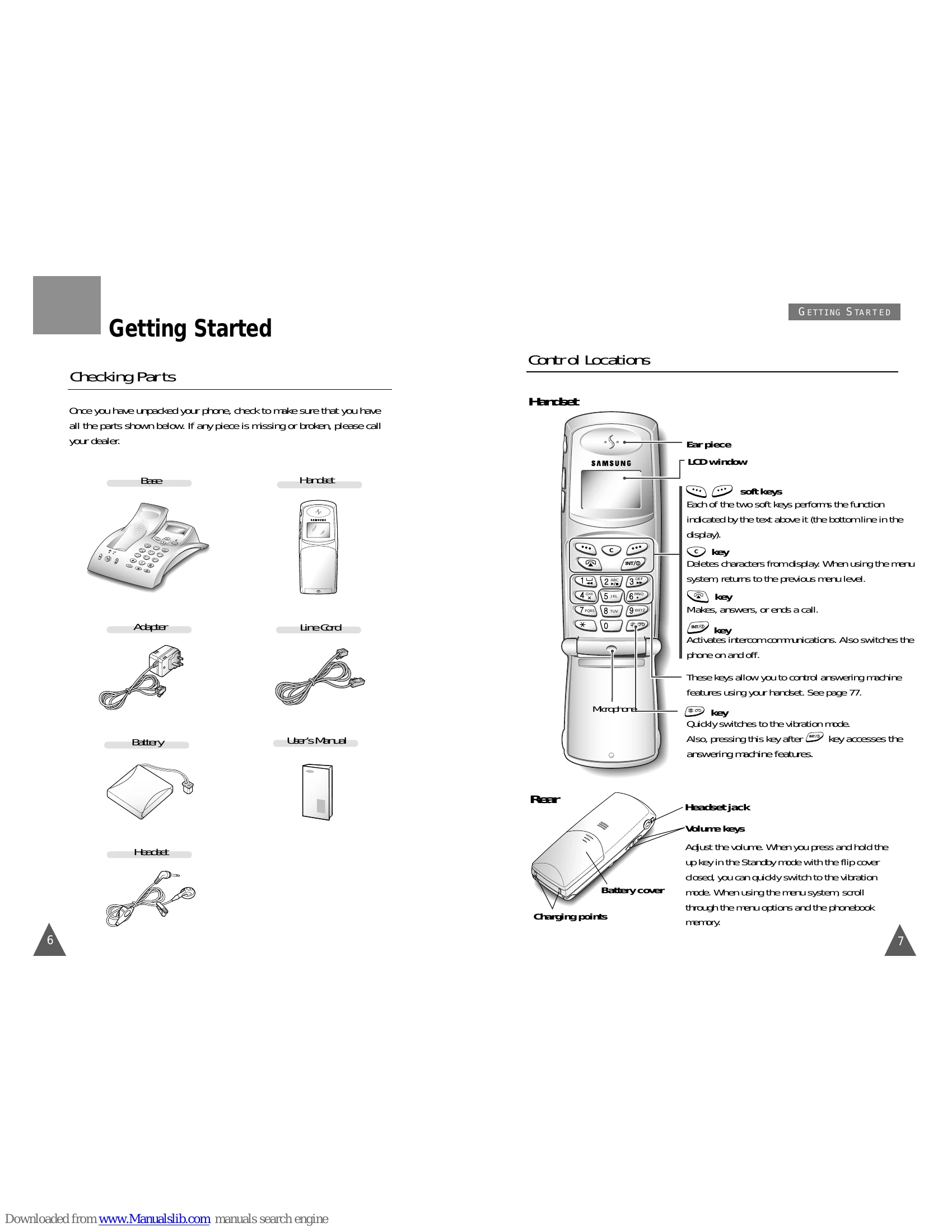
  • Checking Parts: Verify all components are present after unpacking.
  • Control Locations: Familiarize yourself with handset and base controls.
  • Connecting Lines: Connect telephone line cord and power adapter.
  • Installing Handset Batteries: Insert rechargeable Ni-MH battery.
  • Charging the Handset: Fully charge the handset in the base unit before initial use (more than 10 hours).
  • Turning the Handset On/Off: Use the INT/ key to turn on/off.
  • LCD Window Icon Descriptions: Understand icons on handset and base displays.
  • Choosing Dial Mode: Select between Tone/Pulse dialing.
  • Using the Headset: Connect and use the headset for hands-free calls.

General Functions

  • Making a Call: Dial numbers using the handset or base.
  • Camp On Busy: Wait for line availability for calls between handsets.
  • Last Number Redial: Redial the last dialed number or any of the last 10.
  • Speed Dial: Assign and dial numbers using speed dial keys.
  • Receiving a Call: Answer calls on handset or base.
  • Caller ID Display: View caller's name and number.
  • Call Select: Assign call select numbers for selective answering.
  • Battery Level Indicator: Monitor battery status.
  • Out of Range Indicator: Check signal strength.
  • Adjusting Voice Volume: Control earpiece and speaker volume.
  • Adjusting Key Volume: Adjust key beep volume on the handset.
  • Quick Switching to Vibration Mode: Mute ringer instantly.
  • Registered Recall: Place new calls or transfer calls using PABX.
  • Tone Dial Switchover: Switch between tone and pulse dialing.

Troubleshooting and error codes

Symptom Check
No operation • Check that the power adapter is properly connected.
• Check that the telephone line cord is properly connected.
• Check that the handset is fully charged.
• Check that the handset batteries are installed properly.
No dial tone • Check that the telephone line cord is properly connected.
Check that the power adapter is properly connected.
Warning beep occurs when making a call. • Check that the handset is not too far from the base.
• Check that the handset batteries are not in low status.
The handset seems to have very short battery life. Clean the charging points.
Consistently short battery life may indicate that replacement of the batteries is necessary.
Privacy Policy