Brand: SAMSUNG
Category: TV
Document Type: Manual
Language: EN
Brand: SAMSUNG
Category: TV
Document Type: Manual
Language: EN
Uploaded: Nov. 21, 2025, 8:49 p.m.
Manual Publish Date: 2006-08-16
Important warranty information regarding television format viewing is provided.
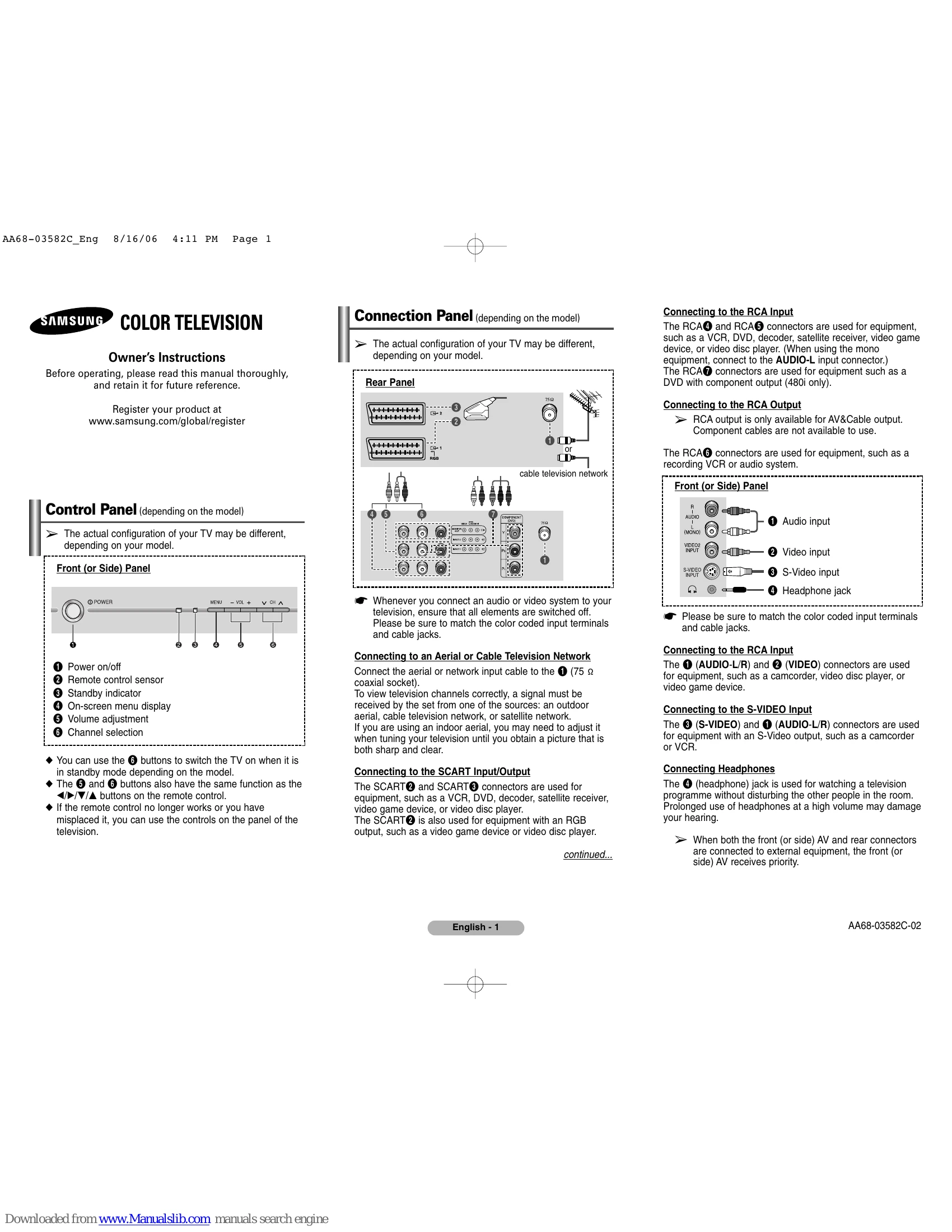
Connect external devices like VCRs, DVD players, or game consoles using RCA, SCART, or S-Video inputs. Connect to an antenna or cable network for TV channels. Headphones can be connected for private listening.
The remote control allows you to power the TV on/off, change channels, adjust volume, and access menus. Buttons on the TV panel offer similar functionality, especially if the remote is lost or not working.
Use the MENU button to access on-screen menus for Input, Picture, Sound, Channel, and Setup. Use arrow buttons to navigate and ENTER to select options. EXIT returns to normal viewing.
The Plug & Play feature guides you through initial setup, including language and area selection. Other setup options include Clock, Sleep Timer, On/Off Timers, Child Lock, and Picture/Sound settings.
Scan for channels automatically (Auto Store) or manually store them. You can also add or delete channels, and sort them by preference.
Access teletext information for written services. The troubleshooting section provides steps to resolve common issues like no sound or picture, or remote control malfunctions.