Manual for LN32D4003

Manual for LN32D4003

Brand: SAMSUNG

Category: TV

Document Type: Manual

Language: EN
Uploaded: Nov. 21, 2025, 6:37 p.m.

Warranty Information

Samsung provides a limited warranty for its products, covering manufacturing defects in material or workmanship.

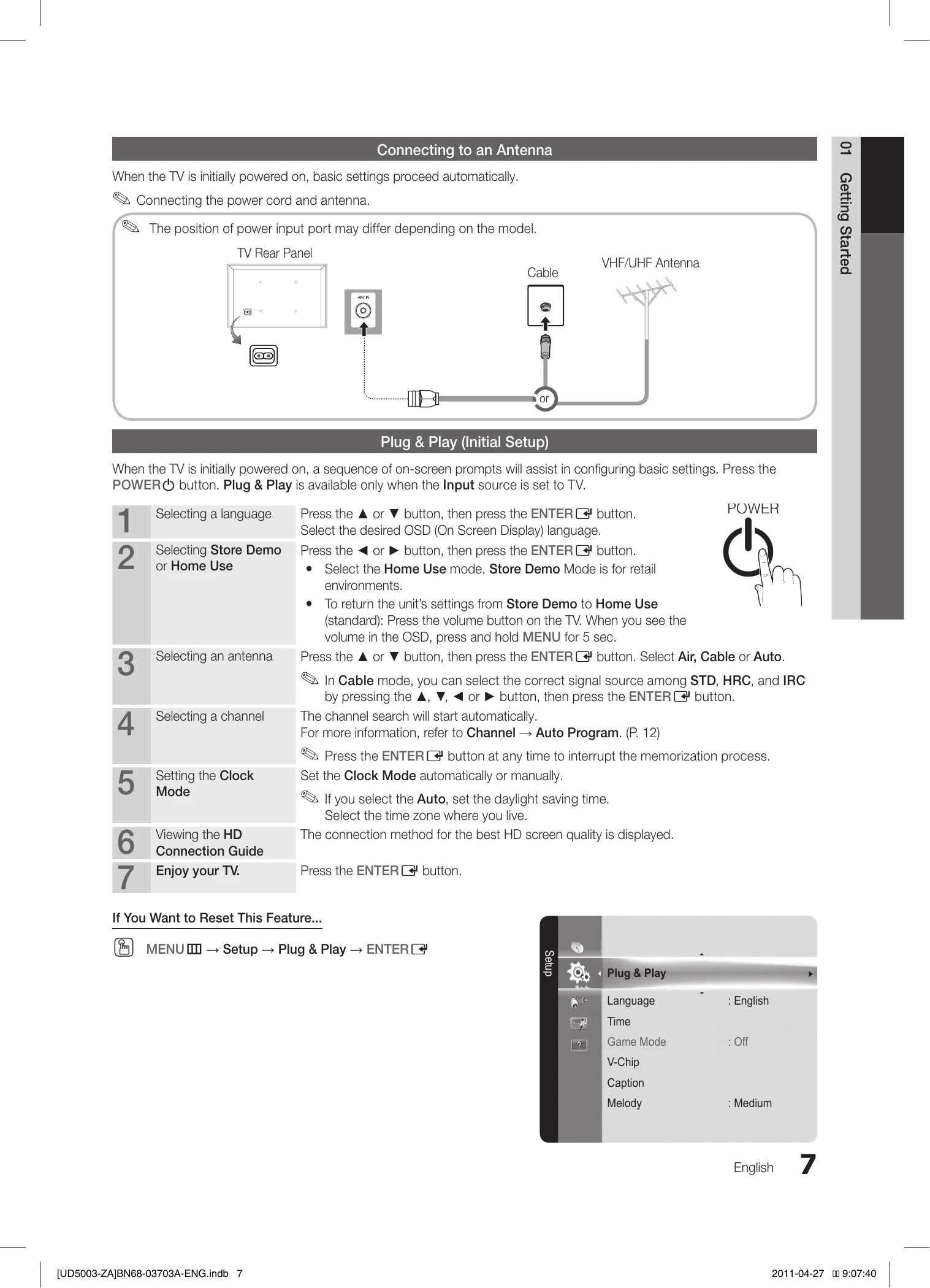
Getting Started

Covers initial setup, features, and accessories.

Connections

Details on connecting various AV devices using HDMI, Component, and Composite cables.

Basic Features

Explains menu navigation, channel management (seeing, favorite, memorizing, editing), picture settings (preset modes, advanced settings, options), and sound settings (preset modes, equalizer, SRS TruSurround HD).

Advanced Features

Focuses on Media Play for photos and music via USB, and setup options for slideshows and music playback.

Other Information

Includes wall mount installation, securing the TV to the wall, anti-theft lock, troubleshooting common issues, storage and maintenance, specifications, and license information.

Troubleshooting and error codes

Issues Solutions and Explanations
Poor picture
  • Perform the Picture Test.
  • If test image is proper, poor picture may be caused by the source or signal.
The TV image does not look as good as it did in the store.
  • Upgrade to a digital set top box if using analog cable/satellite.
  • Use HDMI or Component cables for HD quality.
  • Try HD stations.
  • Many HD channels are upscaled from SD.
  • Adjust video output resolution to 1080i or 720p.
The picture is distorted: macroblock error, small block, dots, pixelization.
  • Compression of video content can cause distortion.
  • Low signal level can cause distortion.
  • Mobile phones near the TV may cause noise.
Color is wrong or missing.
  • Check component cable connections.
  • Adjust Picture options (mode, color, brightness, sharpness).
  • Adjust Energy Saving option.
  • Reset picture settings.
There is poor color or brightness.
  • Adjust Picture options.
  • Adjust Energy Saving option.
  • Reset picture settings.
There is a dotted line on the edge of the screen.
  • If picture size is set to Screen Fit, change to 16:9.
  • Change cable/satellite box resolution.
The picture is black and white.
  • Connect the video cable (yellow) to the Green jack of component input.
  • Reset cable box.
  • Set output resolution of cable box to 1080i or 720p.
When changing channels, the picture freezes or is distorted or delayed.
  • Reconnect AC cord and wait for cable box reboot (up to 20 minutes).
  • Set cable box output resolution to 1080i or 720p.
Sound Problem
  • Perform Sound Test.
  • If audio is OK, problem may be from source or signal.
  • Check volume of connected device.
  • Check external device's audio output option (e.g., HDMI).
  • Use separate audio cable for DVI to HDMI.
  • Reboot connected device.
The speakers are making an inappropriate noise.
  • Check cable connections.
  • Ensure video cable is not connected to audio input.
  • Check signal information (low signal may cause distortion).
  • Perform Sound Test.
No Picture, No Video
  • Ensure AC power cord is secure.
  • Check wall outlet.
  • Try POWER button on TV.
  • Ensure Sleep Timer is Off.
  • Check PC power settings.
The TV will not turn on.
  • Ensure AC power cord is secure.
  • Check wall outlet.
  • Try POWER button on TV.
  • Ensure Sleep Timer is Off.
  • Check PC power settings.
The TV turns off automatically.
  • Ensure Sleep Timer is Off.
  • Check PC power settings.
  • Ensure AC power cord is secure.
  • If no signal after 10-15 mins on antenna/cable, TV turns off.
There is no picture/video.
  • Check cable connections.
  • Set external device video output to match TV input (e.g., HDMI to HDMI).
  • Ensure connected devices are powered on.
  • Select correct TV source using SOURCE button.
  • Reboot connected device.
RF(Cable/Antenna) Connection
The TV is not receiving all channels.
  • Ensure coaxial cable is secure.
  • Try Auto Program (select Auto, correct Cable TV signal type).
  • Verify antenna position.
No Caption on digital channels.
  • Change Caption Mode to Service 1 to CC1.
  • Some channels may not have caption data.
The picture is distorted: macroblock, error, small block, dots, pixelization.
  • Video compression can cause distortion.
  • Low signal can cause distortion.
Others
Purple/green rolling horizontal bars and buzzing noise from the TV speakers with Component cable connection.
  • Remove set-top-box audio connections. If buzzing stops, set-top-box has grounding issue.
  • Replace Component cables with HDMI.
The picture will not display in full screen.
  • HD channels with upscaled SD (4:3) content show black bars.
  • Movies with different aspect ratios show black bars.
  • Adjust picture size on external device or TV.
The remote control does not work.
  • Replace remote batteries.
  • Clean remote transmission window.
  • Point remote directly at TV from 5-6 feet away.
Privacy Policy