Search
Manual for LN40C610N1F
Brand:
SAMSUNG
Category:
TV
Document Type:
Manual
Language:
EN
Uploaded:
Nov. 21, 2025, 7:23 p.m.
Download Manual
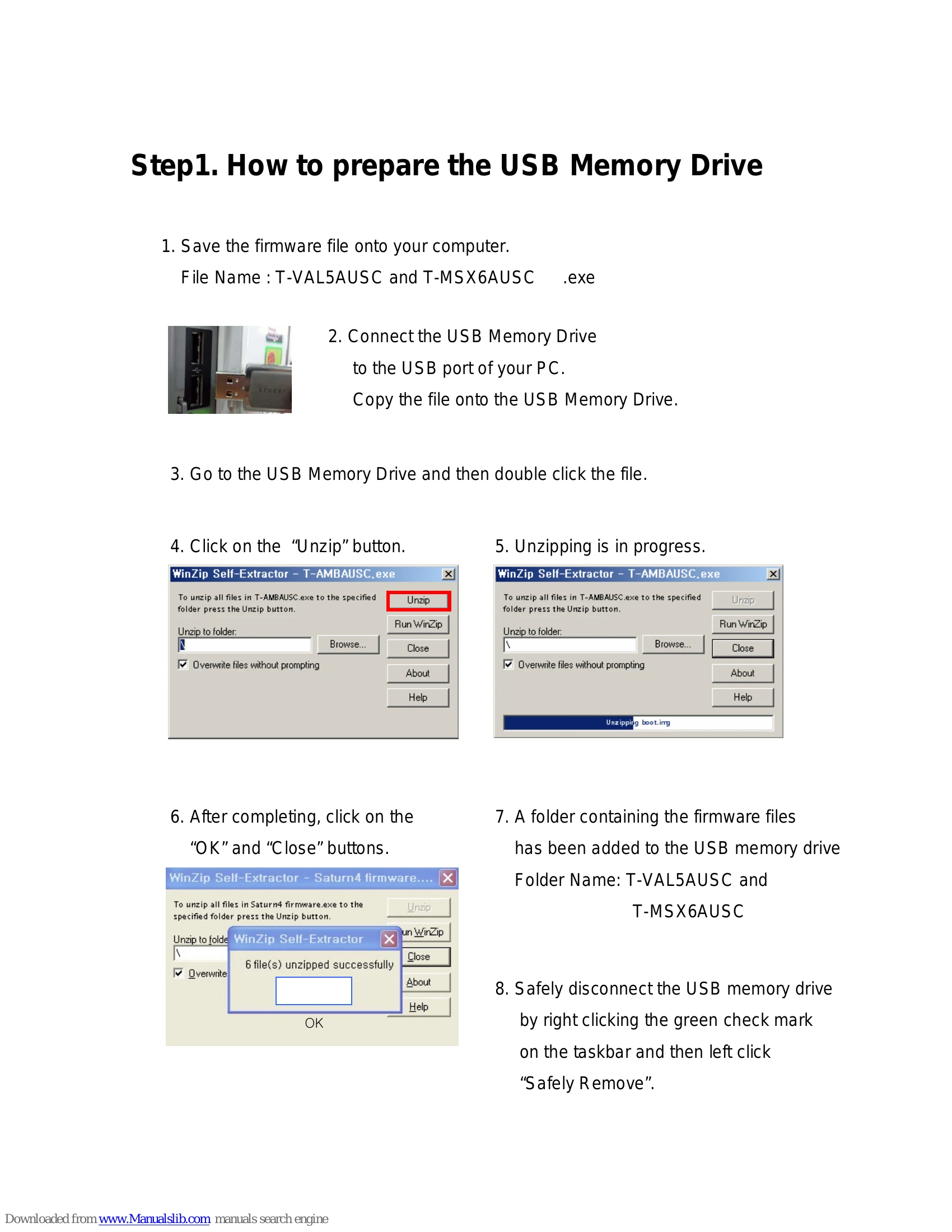
How to prepare the USB Memory Drive
Save the firmware file onto your computer.
Connect the USB Memory Drive to the USB port of your PC and copy the file onto it.
Go to the USB Memory Drive and double click the file.
Click "Unzip".
After unzipping is complete, click "OK" and "Close".
Safely disconnect the USB memory drive.
How to upgrade the firmware
Turn the TV on.
Insert the USB Memory Drive into the TV's USB port.
Press MENU, navigate to "Support", then press ENTER.
Select "Software Upgrade", then press ENTER.
The TV will scan for the USB.
Confirm the upgrade when prompted.
The TV will automatically restart after the upgrade is complete.
Privacy Policy