Brand: SAMSUNG
Category: TV
Document Type: Manual
Language: EN
Brand: SAMSUNG
Category: TV
Document Type: Manual
Language: EN
Uploaded: Nov. 21, 2025, 6:40 p.m.
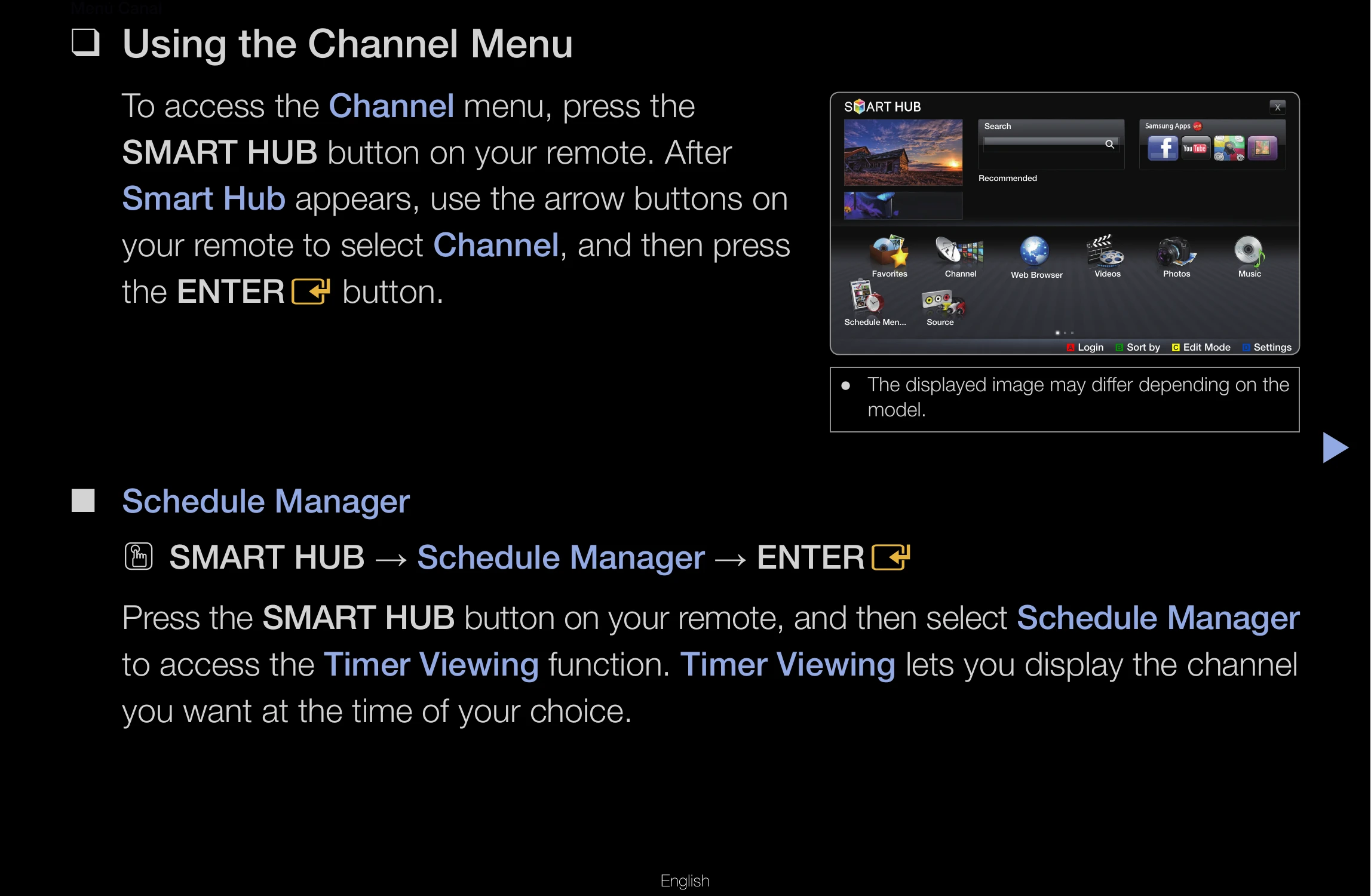
To access the Channel menu, press the SMART HUB button on your remote. After Smart Hub appears, use the arrow buttons on your remote to select Channel, and then press the ENTER button.
Press the SMART HUB button on your remote, and then select Schedule Manager to access the Timer Viewing function. Timer Viewing lets you display the channel you want at the time of your choice.
You can set the TV to display a desired channel automatically on a day and at a time of your choice. You must set the current time first using the Time → Clock function in the System menu.
The Channel List contains the channels your TV displays (Added Channels) when you press the CH LIST button on your remote. On the Channel List, you can view Added Channels, channel information, Favorites, and manage channels.
Using the Channel function, you can add channels, delete Added channels, set Favorite channels, use the program guide for digital broadcasts and change between the All Channels and Added Ch. screen.
Setting channels you watch frequently as favorites. Select the Edit Mode icon, then press ENTER to select a channel as a favorite. Press ENTER again to deselect. Select Edit Favorites at the bottom of your screen, then press ENTER. Highlight a group and press ENTER. Select OK, press ENTER, and then press ENTER again.
Select the Edit Mode icon, then press ENTER. Select a channel and press ENTER. Select Delete, press ENTER, then press ENTER again.
Add/Delete: Add or delete channels from the Added Channel list. To add, select All Channels, press ENTER, select a greyed-out channel, press TOOLS, select Add, press ENTER, and then press ENTER again. To delete, select Added Channels, press ENTER, select a greyed-out channel, press TOOLS, select Delete, press ENTER, and then press ENTER again.
Highlight a channel, press TOOLS, select Edit Favorites, press ENTER. Highlight a group, press ENTER. Select OK, press ENTER. The TV displays a "★" symbol next to the channel.
Highlight a favorite channel, press TOOLS, select Edit Favorites, press ENTER. Highlight the group with a green square, press ENTER, then press ENTER again. Select OK, press ENTER, and then press ENTER again.
Assign a name of up to five characters to an analog channel.
View details on the program being aired on the selected digital channel.
Refer to the "Issues" and "Solutions and Explanations" sections for troubleshooting various problems such as picture issues, sound problems, connection errors, and 3D display problems.
A Kensington Lock is a device to physically fix your TV in place in public. Wrap the cable around an object and attach the lock to the Kensington slot on the back of the TV.
Information about trademarks and patents for Dolby, SRS, and DTS technologies.
Information about DivX Certified® devices and registration for DivX Video-on-Demand.
Open Source Licenses are available on the product menu.
| Issues | Solutions and Explanations |
|---|---|
| There is a dotted line on the edge of the screen. |
|
| The picture is black and white. |
|
| When changing channels, the picture freezes or is distorted or delayed. |
|
| 3D | |
| The 3D Active Glasses are not working correctly |
|
| The 3D images don't look quite right. |
|
| The batteries in the 3D glasses don't last |
|
| Sound Problem | |
| There is no sound or the sound is too low at maximum volume. |
|
| The picture is good but there is no sound. |
|
| The speakers are making an inappropriate noise. |
|
| RF (Cable/Antenna) Connection | |
| The TV is not receiving all channels. |
|
| No caption on digital channels. |
|
| The picture is distorted: macro block error, small block, dots, pixelization. |
|
| PC Connection | |
| A “Mode Not Supported” message appears. |
|
| “PC” is always shown on the source list, even if a PC is not connected. |
|
| The video is OK but there is no audio. |
|
| Network Connection | |
| The wireless network connection failed. |
|
| Software Upgrade over the network fails. |
|
| Others | |
| Purple/green rolling horizontal bars and buzzing noise from the TV speakers with a Component cable connection. |
|
| The picture won't display in full screen. |
|
| A “Mode Not Supported” message appears. |
|
| Caption on TV menu is greyed out. |
|
| There is a plastic smell from the TV. |
|
| The TV Signal Information is unavailable in the Self Diagnosis menu. |
|
| The TV is tilted to the side. |
|
| The channel menu is greyed out (unavailable). |
|
| Your settings are lost after 30 minutes or every time the TV is turned off. |
|
| You have intermittent loss of audio or video. |
|
| You see small particles when you look closely at the edge of the frame of the TV. |
|
| The PIP menu is not available. |
|
| POP (TV's internal banner ad) appears on the screen. |
|