Manual for CDP-1100

Manual for CDP-1100

Brand: SANYO

Category: Audio

Document Type: Manual

Language: EN
Uploaded: Nov. 21, 2025, 8:09 p.m.

Warranty Information

The equipment is guaranteed for 12 months against faulty material or workmanship.

  • Power Supply: Use AC adaptor (DC 6V) or rechargeable/alkaline batteries. Ensure correct polarity when installing batteries.
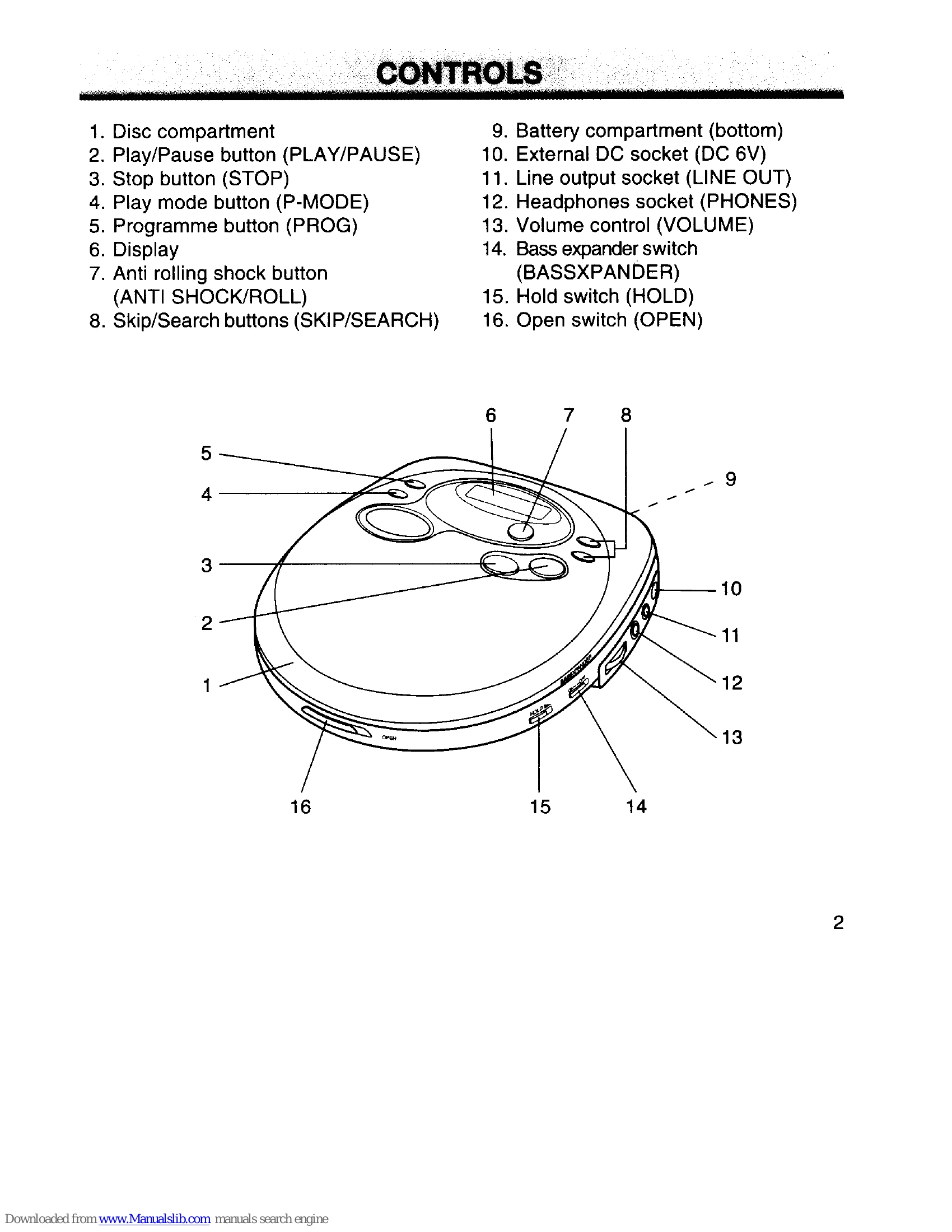
  • Controls: Familiarize yourself with buttons for Play/Pause, Stop, Skip, Mode, Volume, etc.
  • Disc Handling: Handle discs by the edge, avoid touching the playing surface, and keep them clean and protected from heat/humidity.
  • Playing a Disc: Connect headphones, open the lid, place the disc on the pivot, close the lid, and press Play/Pause. Adjust volume as needed. Press Stop to end play.
  • Programmed Play: Program up to 24 tracks in any order using the PROG button.
  • Various Play Modes: Select modes like Repeat One, Repeat All, Introscan, and Random Play using the P-MODE button.
  • Car Cassette Adaptor: For CDP-1200CR, use the adaptor to play CDs through your car stereo.
  • Line Out Socket: Connect to a recorder or speakers using a patch cable.
  • Cleaning: Clean the pickup lens with a camera lens blower and the cabinet with a soft, damp cloth.

Troubleshooting and error codes

Troubleshooting Steps
If the operating buttons do not function when pressed
Check whether the HOLD switch is on or not.
Remove the batteries and/or disconnect the AC adaptor from the unit. Wait a few seconds, then reinstall the batteries or reconnect the AC adaptor.
If the buttons still do not function, insert new batteries or charge the rechargeable battery.
Privacy Policy