Manual for CDP-150

Manual for CDP-150

Brand: SANYO

Category: Audio

Document Type: Manual

Language: EN
Uploaded: Nov. 21, 2025, 7:56 p.m.

Warranty Information

None

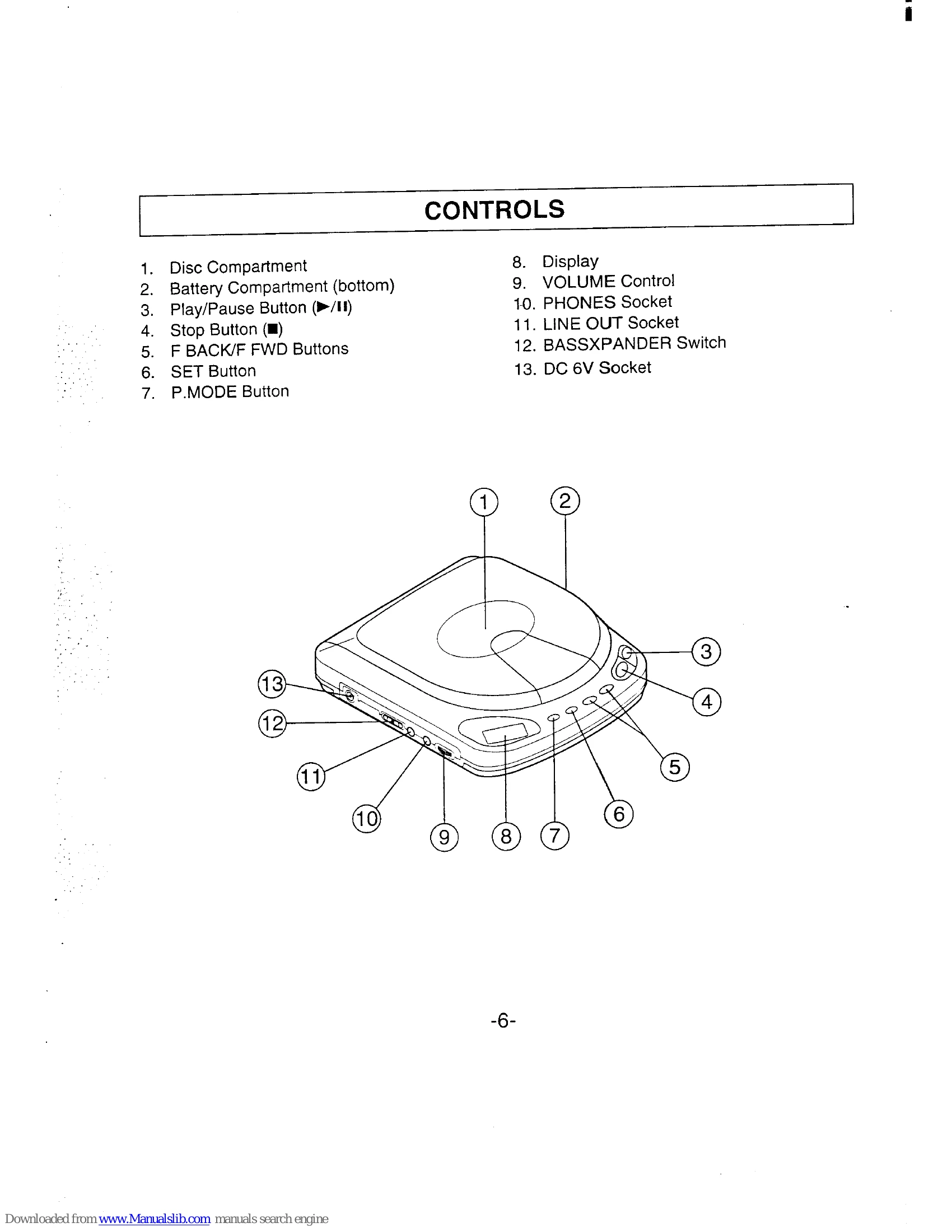
  • Playing a Disc: Plug in headphones, open the disc compartment, place the disc with the labeled side up on the spindle, close the compartment. Press Play/Pause to start. Adjust volume and Bassxpander as desired. Press Stop to end play.
  • Track Search: Use F BACK/F FWD buttons to skip to desired tracks or scan at high speed.
  • Programmed Play: Program tracks in any order (up to 16). Use P.MODE and SET buttons to select and program tracks. Check program, or start programmed play.
  • Repeat Play: Select Single Track Repeat, All Tracks Repeat, or Program Repeat using the P.MODE button.
  • Recording: Connect LINE OUT to a cassette recorder or stereo system for recording or playback through speakers.
  • Cleaning: Clean pickup lens with a blower, and cabinet with a soft, damp cloth.

Troubleshooting and error codes

PROBLEMPOSSIBLE CAUSEREMEDY
Unit does not operate. Batteries are exhausted or not installed. Install new batteries or recharge the nickel-cadmium battery.
No sound. Volume is turned down. Adjust the VOLUME control.
Disc is not played. Disc is dirty, scratched, or inserted incorrectly. Clean or replace the disc. Ensure correct insertion.
Skipping or noise. Disc is dirty, scratched, or warped. Clean or replace the disc.
Privacy Policy