Brand: SANYO
Category: Audio
Document Type: Manual
Language: EN
Brand: SANYO
Category: Audio
Document Type: Manual
Language: EN
Uploaded: Nov. 21, 2025, 8:40 p.m.
12-month guarantee from date of sale for faulty material or workmanship, free repair or replacement.
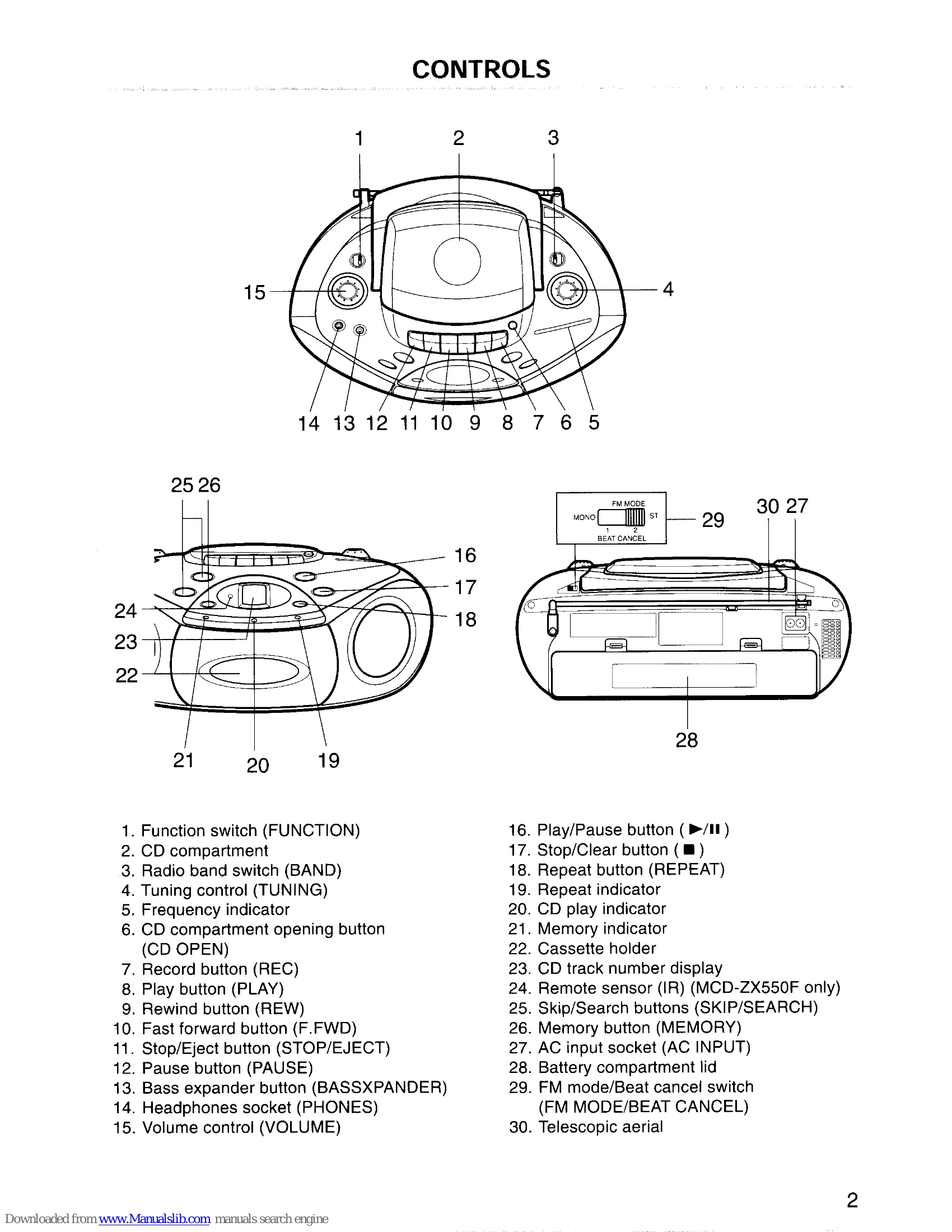
Adjusting Volume: Turn the VOLUME control.
Bass Expander: Press the BASSXPANDER button to ON for enhanced bass sound.
Headphones: Connect stereo headphones to the PHONES socket. Speakers will automatically disconnect.
Note: "00" appears if disc is upside down or not loaded. CD player will not operate.
| Possible Cause | Remedy |
|---|---|
| Unit does not operate. | Connect the AC power cord or install batteries correctly. |
| No sound. | Check the volume control. Check if headphones are plugged in. |
| CD does not play. | Ensure "CD" function is selected. Check if the disc is loaded correctly. Clean the disc. |
| Tape does not play. | Ensure "TAPE" function is selected. Check if the cassette is inserted correctly. Check if the tape is protected from erasure. |
| Radio does not play. | Ensure "RADIO" function is selected. Check antenna connection. |