Manual for VPC-C40

Manual for VPC-C40

Brand: SANYO

Category: Camcorder

Document Type: Manual

Language: EN
Uploaded: Nov. 21, 2025, 6:48 p.m.

Warranty Information

No warranty information is provided in the accessible pages.

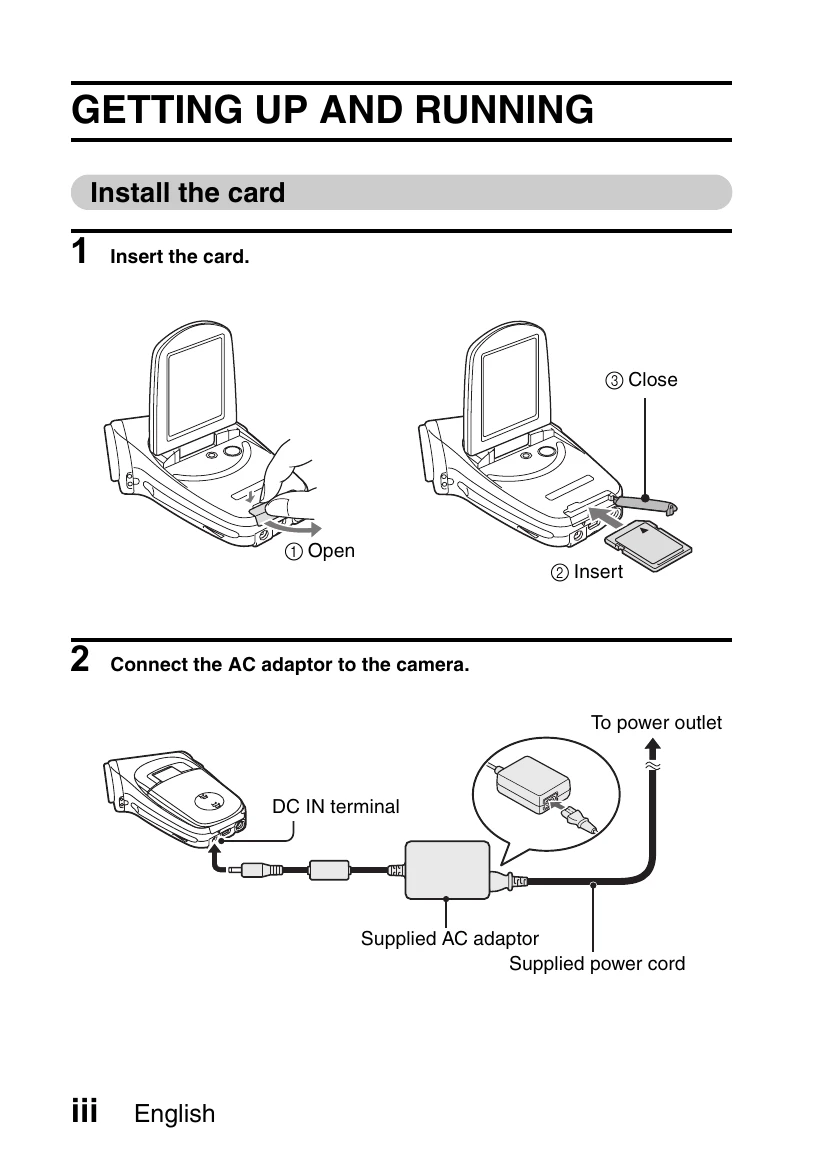
Getting Up and Running

  1. Install the card by opening the slot, inserting the card, and closing the slot.
  2. Connect the AC adapter to the camera's DC IN terminal and then to a power outlet.

Shooting

Video clip recording

  1. Open the monitor unit and press the ON/OFF button for at least 1 second to turn the camera on.
  2. Set the main switch to REC.
  3. Press the video clip recording button. Press again to stop.

Still image photography

  1. Open the monitor unit and press the ON/OFF button for at least 1 second to turn the camera on.
  2. Set the main switch to REC.
  3. Press the still image shooting button to capture the image.

Playback

Video clip playback

  1. Set the main switch to PLAY.
  2. Toggle the SET button to select the video clip and press SET button to play.

Still image playback

  1. Set the main switch to PLAY.
  2. Toggle the SET button to select the image and press SET button to view.

When you are finished using the camera...

Press the ON/OFF button to turn the camera off.

Troubleshooting and error codes

Color Multi-indicator status Camera status
Green Lit Connected to computer or printer (USB)
Flashing Power save mode active
Red Lit Charging
Slow Flashing Battery charge error (overcharged or defective battery)
Fast Flashing During self-timer photography
Very fast Accessing data
Orange Lit Connected to TV/VIDEO (AV)
Privacy Policy