Brand: SANYO
Category: Camcorder
Document Type: Manual
Language: EN
Brand: SANYO
Category: Camcorder
Document Type: Manual
Language: EN
Uploaded: Aug. 10, 2025, 12:14 a.m.
Sanyo Electric shall not be held responsible for any problems resulting from the use of this camera.
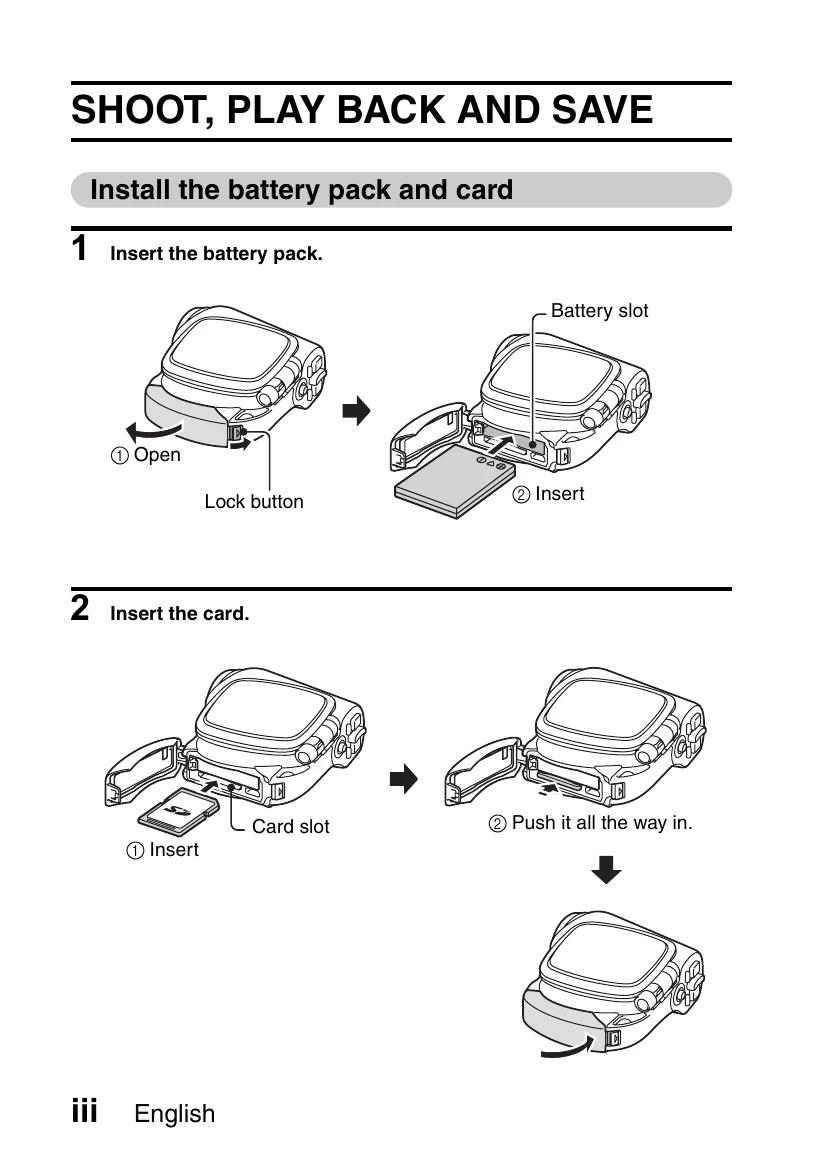
1. Install the battery pack and card: Open the battery slot, insert the battery pack, and close the slot. Insert the memory card into the card slot and push it all the way in.
2. Shooting video clips: Open the monitor unit to turn on the camera. Press the video clip recording button to start recording. Press it again to stop.
3. Still image photography: Open the monitor unit to turn on the camera. Press the still image shooting button to capture an image.
4. Playback: Press the REC/PLAY button. Use the SET button to navigate through video clips or still images.
5. Burn video clips to DVD (Windows XP): Insert the supplied CD-ROM. Install the desired application program (Photo Explorer or DVD MovieFactory). Connect the camera to the computer via USB. Use the software to transfer and burn video clips to a DVD.
| Column 1 Header | Column 2 Header | Column 3 Header | Column 4 Header |
|---|---|---|---|
| Row 1, Cell 1 | Row 1, Cell 2 | Row 1, Cell 3 | Row 1, Cell 4 |
| Row 2, Cell 1 | Row 2, Cell 2 | Row 2, Cell 3 | Row 2, Cell 4 |
| Row 3, Cell 1 | Row 3, Cell 2 | Row 3, Cell 3 | Row 3, Cell 4 |