Manual for VPC-CA8EX

Manual for VPC-CA8EX

Brand: SANYO

Category: Camcorder

Document Type: Manual

Language: EN
Uploaded: Nov. 21, 2025, 7:38 p.m.

Warranty Information

Refer to the separate booklet "SAFETY MANUAL" for warranty information.

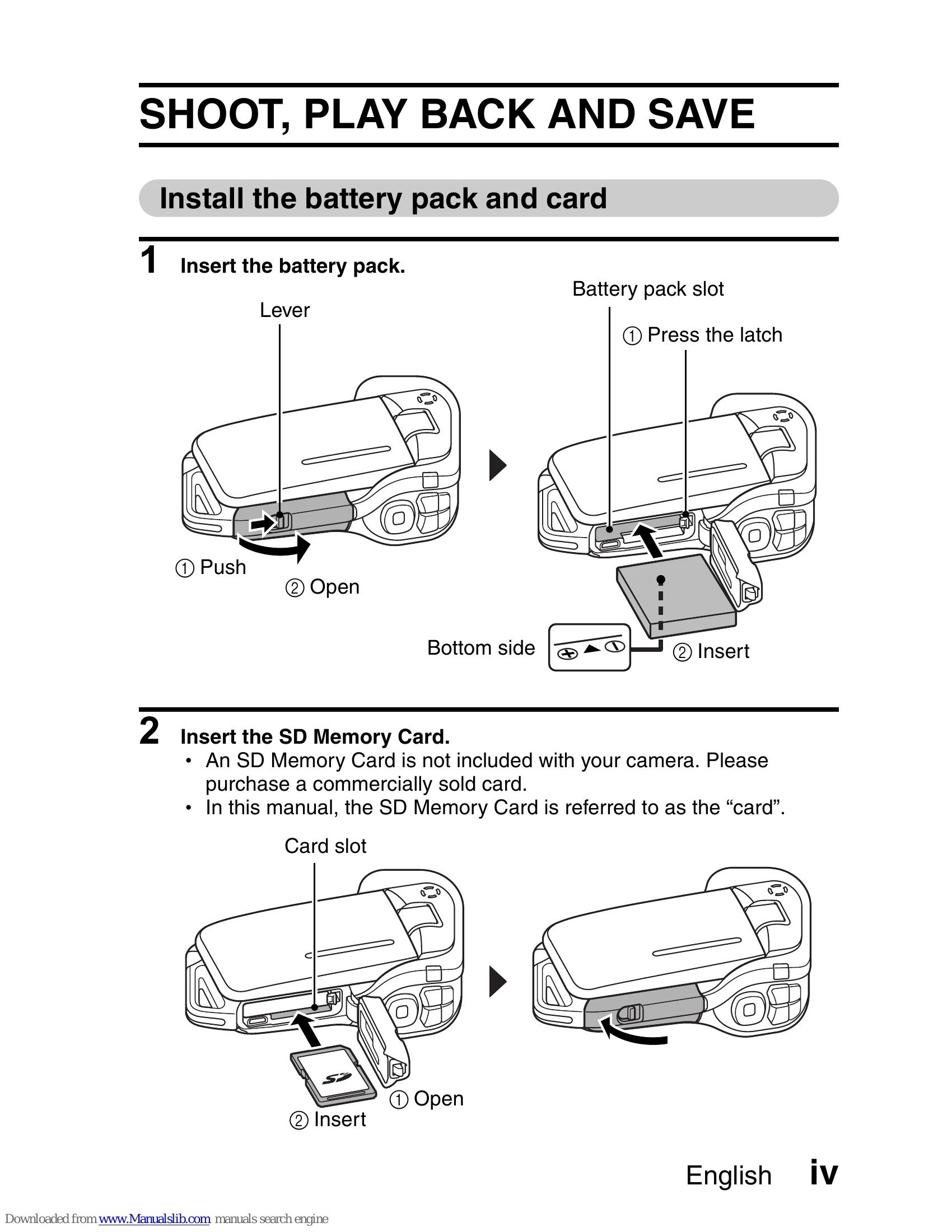
Install the battery pack and card

  1. Insert the battery pack by pressing the latch and opening the compartment, then inserting the battery and closing it.
  2. Insert the SD Memory Card by opening the card slot, inserting the card, and closing the slot.

Shooting

Video clip recording

  1. Turn on the camera by opening the monitor unit and pressing the ON/OFF button for at least 1 second.
  2. Press the Record button to start recording. Press it again to stop.

Still image photography

  1. Turn on the camera as described above.
  2. Press the Shoot button to capture a still image.

Playback

Video clip playback

  1. Press the REC/PLAY button.
  2. Use the arrow buttons to select the video clip and press the SET button to play.

Still image playback

  1. Press the REC/PLAY button.
  2. Use the arrow buttons to view images. Press REC/PLAY to return to shooting.

When you are finished using the camera...

Press the ON/OFF button for at least 1 second to turn the camera off.
Privacy Policy