Brand: SANYO
Category: Camcorder
Document Type: Manual
Language: EN
Brand: SANYO
Category: Camcorder
Document Type: Manual
Language: EN
Uploaded: Aug. 10, 2025, 12:14 a.m.
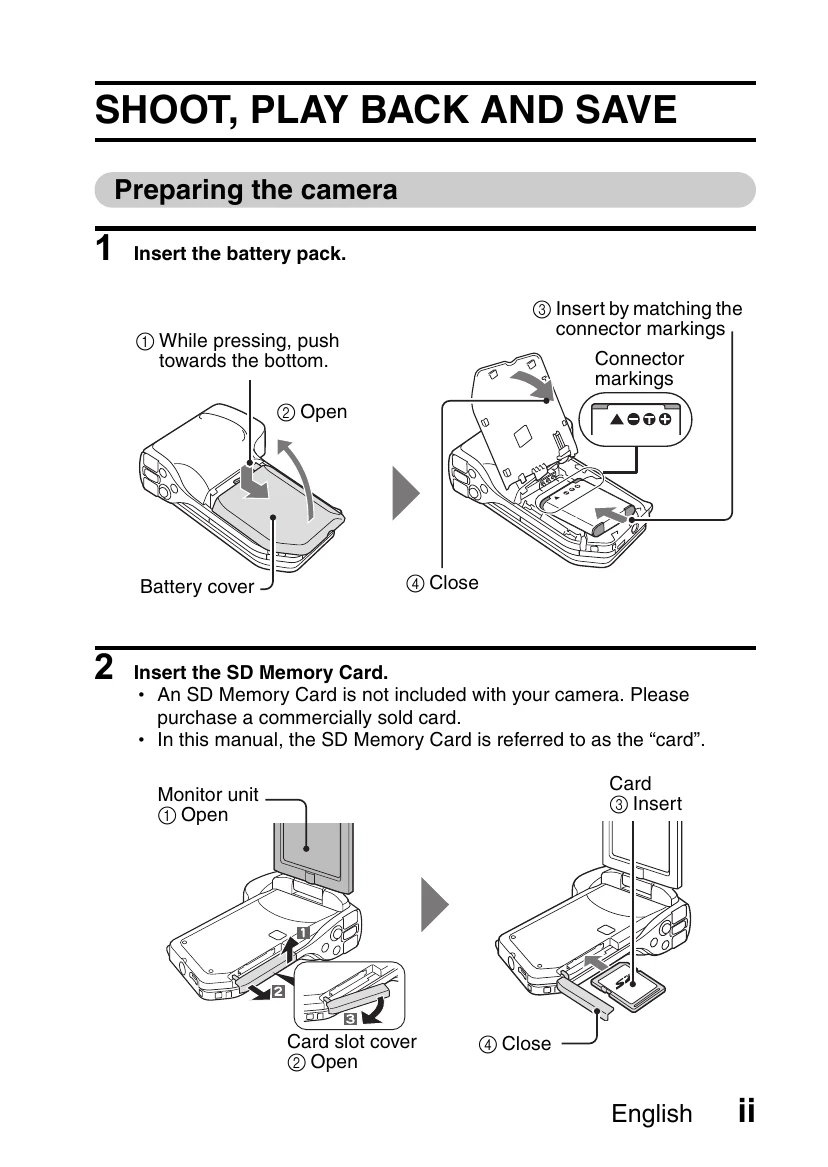
1. Inserting the Battery Pack: Press the battery cover release button, open the cover, align the connector markings on the battery with those in the compartment, and insert the battery pack. Close the cover.
2. Inserting the SD Memory Card: Open the monitor unit, open the card slot cover, insert the SD memory card, and close the cover.
1. Turning on the Camera: Press and hold the ON/OFF button for at least 1 second.
2. Recording: Press the REC button to start recording a video clip and press it again to stop. Press the PHOTO button to capture a still image.
1. Entering Playback Mode: Press the REC/PLAY button.
2. Selecting Images: Use the SET button (left, right, up, down) to move the orange frame over the desired image. Press the SET button to play.
3. Returning to Recording Mode: Press the REC/PLAY button.