Manual for VPC-E1

Manual for VPC-E1

Brand: SANYO

Category: Camcorder

Document Type: Manual

Language: EN
Uploaded: Aug. 10, 2025, 12:14 a.m.

Warranty Information

Sanyo Electric is not responsible for problems resulting from improper use or unauthorized repairs.

Basic Operation

Getting Started: Shooting/Recording

  • Recording Video Clips: Press the [■] button to start, press again to stop.
  • Shooting Still Images: Press the [■] button to capture.
  • Shoot Still Image While Recording Video Clip: Refer to page 52.
  • Audio Recording and Playback: Refer to page 54.

Optimizing Photo Quality

  • Video Clip Image Quality: Adjust settings on page 67.
  • Still Image Resolution: Adjust settings on page 68.

Convenient Functions

  • Log Date and Time: Use DATE AND TIME SETTING (page 32) and SCREEN DISPLAY (page 35).
  • Zoom: Use USING THE ZOOM (page 57).
  • Close-up Photography: Use FOCUS RANGE (page 78).
  • Compensate Camera Shake: Use MOTION COMPENSATION (page 76).
  • Reduce Video Clip Flicker: Use FLICKER-REDUCTION (page 132).
  • Set Color/Contrast: Use ADJUST THE IMAGE QUALITY (page 131).

Additional Functions

  • Accurate Focus: Use manual focus (page 79) or FOCUS AREA SETTING (page 80).
  • Vertical Photos: Adjust resolution on page 68.
  • Reduce Noise: Use NOISE-REDUCTION FUNCTION (page 129).

Troubleshooting and error codes

Problem Cause Solution
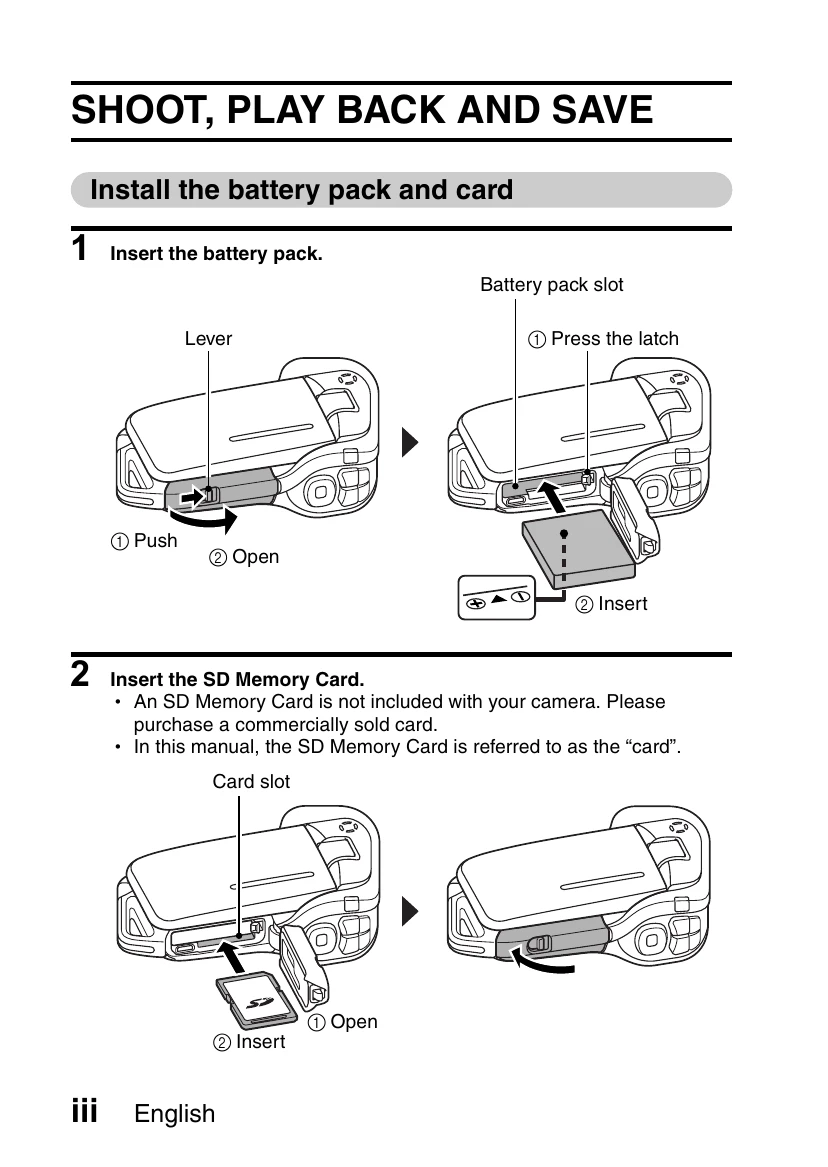
Camera does not turn on. Battery is not loaded or is depleted. Load the battery pack. Charge the battery pack.
Cannot record or playback. SD Memory Card is not inserted or is full. Insert the SD Memory Card. Delete unnecessary files or insert a new card.
Images are blurred. Autofocus is not activated properly. Press the shutter button halfway to activate autofocus. Ensure the subject has not moved after focus is locked. Check focus settings for correct distance.
Privacy Policy