Manual for VPC-HD100

Manual for VPC-HD100

Brand: SANYO

Category: Camcorder

Document Type: Manual

Language: EN
Uploaded: Nov. 21, 2025, 7:37 p.m.

Warranty Information

Refer to your dealer for specific warranty information regarding this product.

GETTING STARTED

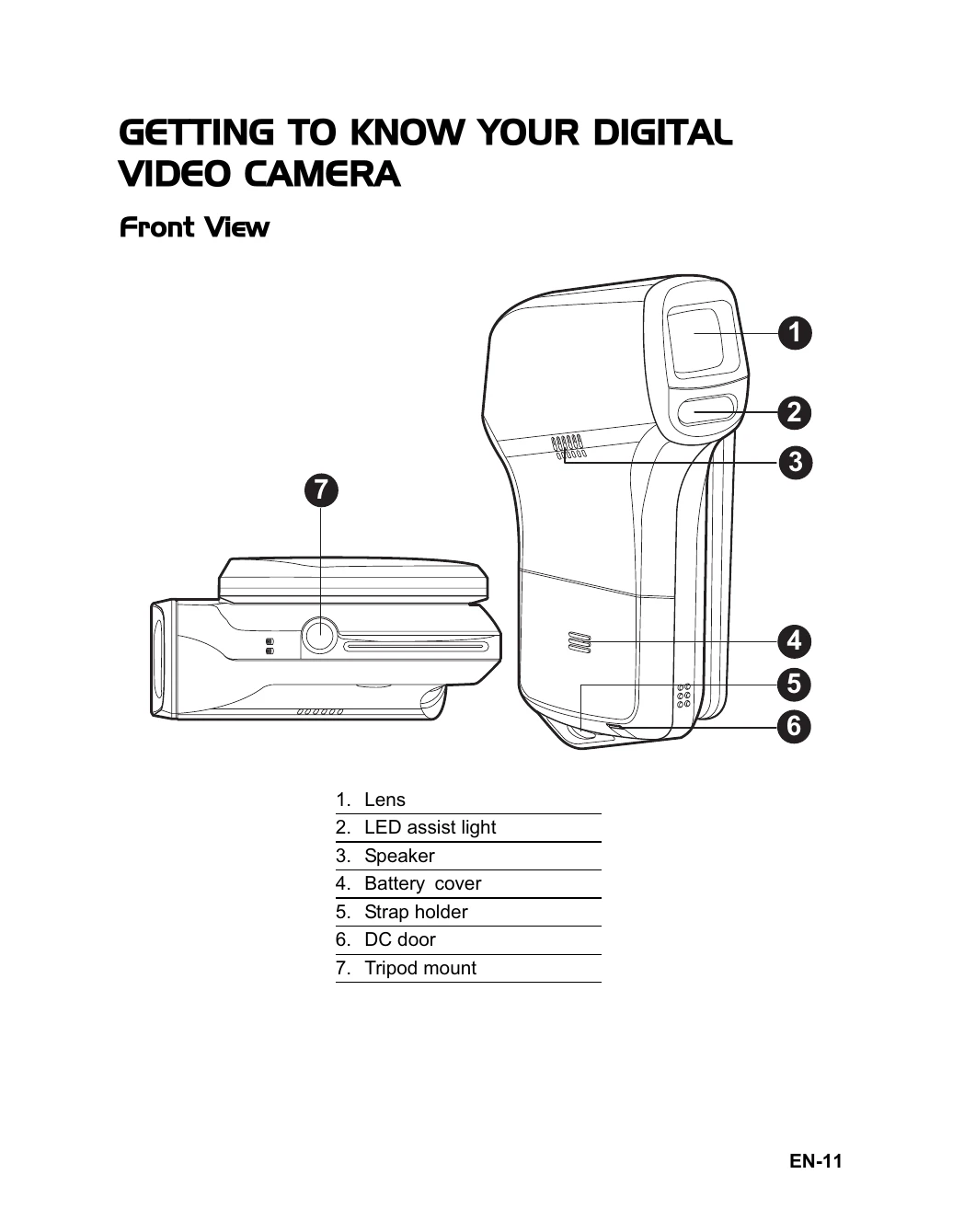
  • Preparation: Attach camera strap, open battery cover, insert battery, and insert SD/SDHC memory card. Format the memory card before initial use.
  • Charging the Battery: Insert battery into charger, connect power cord to wall outlet. LED indicates charging status. Remove battery after charging.
  • Turning Power On/Off: Press the power button to turn on/off. Camera may auto-off after inactivity.
  • Handling the Camera: Open and rotate LCD panel for best viewing angle. Avoid blocking lens or lights. Close panel when not in use.
  • Setting Date/Time & Language: Access Setup menu via MENU button to set date/time and choose language.

CAPTURE MODE

  • Recording Video Clips: Press power, compose image, press record button to start, press again to stop.
  • Capturing Still Images: Press power, switch to capture mode, compose image, press shutter button.
  • Zoom Function: Use T/Q buttons for optical and digital zoom.
  • Assist Light: Press button to turn on/off in capture/video mode for low light.
  • Face Detection: Toggle for icon, press shutter halfway to focus, fully to capture.
  • Manual White Balance: Access W.Balance menu, select New WB, point camera at white surface, press shutter.

AUDIO MODE

  • Recording Audio: Switch to audio mode, press record button.
  • Playback Audio: Select audio clip, press play button. Use W/T buttons for volume.

PLAYBACK MODE

  • Playback Video/Images: Press play button, select file, press play. Use W/T for volume (video). Use T/Q for zoom (images).
  • Playback on TV: Connect AV or YPbPr cable.
  • Thumbnail/Slide Show: View thumbnails, start slideshow.
  • Protect/Delete Files: Protect files from deletion or delete them.

MP3 MODE

  • Playback MP3: Switch to MP3 mode, select file, press play. Use W/T for volume.

MENU OPTIONS

  • Video/Capture/Playback/MP3/Setup Menus: Adjust various settings for recording, playback, and camera environment.

TRANSFERRING FILES

  • Connect via USB, access removable disk, copy/paste files.

Troubleshooting and error codes

Symptom Cause Solutions / Corrective Actions
The power does not come on. The battery is not inserted. Insert the battery correctly.
The battery is exhausted. Recharge the battery.
The battery or video camera feels warm. Long period of continuous use of the video camera. -
Even if press the shutter button, the digital video does not shoot. The SD/SDHC memory card does not have any free capacity. Insert a new SD/SDHC memory card, or delete unwanted files.
The video camera is not in shooting mode. Set the video camera to shooting mode.
The video camera cannot focus. The SD/SDHC memory card is write-protected. Remove the write-protection.
The lens is dirty. Wipe clean with a soft, dry cloth or lens paper.
Files cannot be deleted. The distance to the subject is smaller than the effective range. Place your subject within the effective focus range.
The file is protected. Cancel protection.
Cannot download images. The SD/SDHC memory card is write-protected. Remove the write-protection.
The free space on the hard disk in your computer may be insufficient. Check whether the hard disk has a space for running Windows, and if the drive for loading image files has a capacity at least that of the memory card inserted in the video camera.
Privacy Policy