Parts/Service for PDG-DWL2500

Parts/Service for PDG-DWL2500

Brand: SANYO

Category: Commercial Solutions

Document Type: Parts/Service

Language: EN
Uploaded: Nov. 21, 2025, 9:20 p.m.

Warranty Information

This manual is for service and does not contain warranty information.

  • Maintenance: Includes procedures for replacing the filter, lamp, resetting counters, and cleaning various parts like the color wheel, reflecting mirror, projection window, and cabinet.
  • Security Functions: Details on key lock, PIN code lock, and logo PIN code lock, including resetting procedures.
  • Standby Modes: Explains Eco and Network standby modes and their restricted functions.
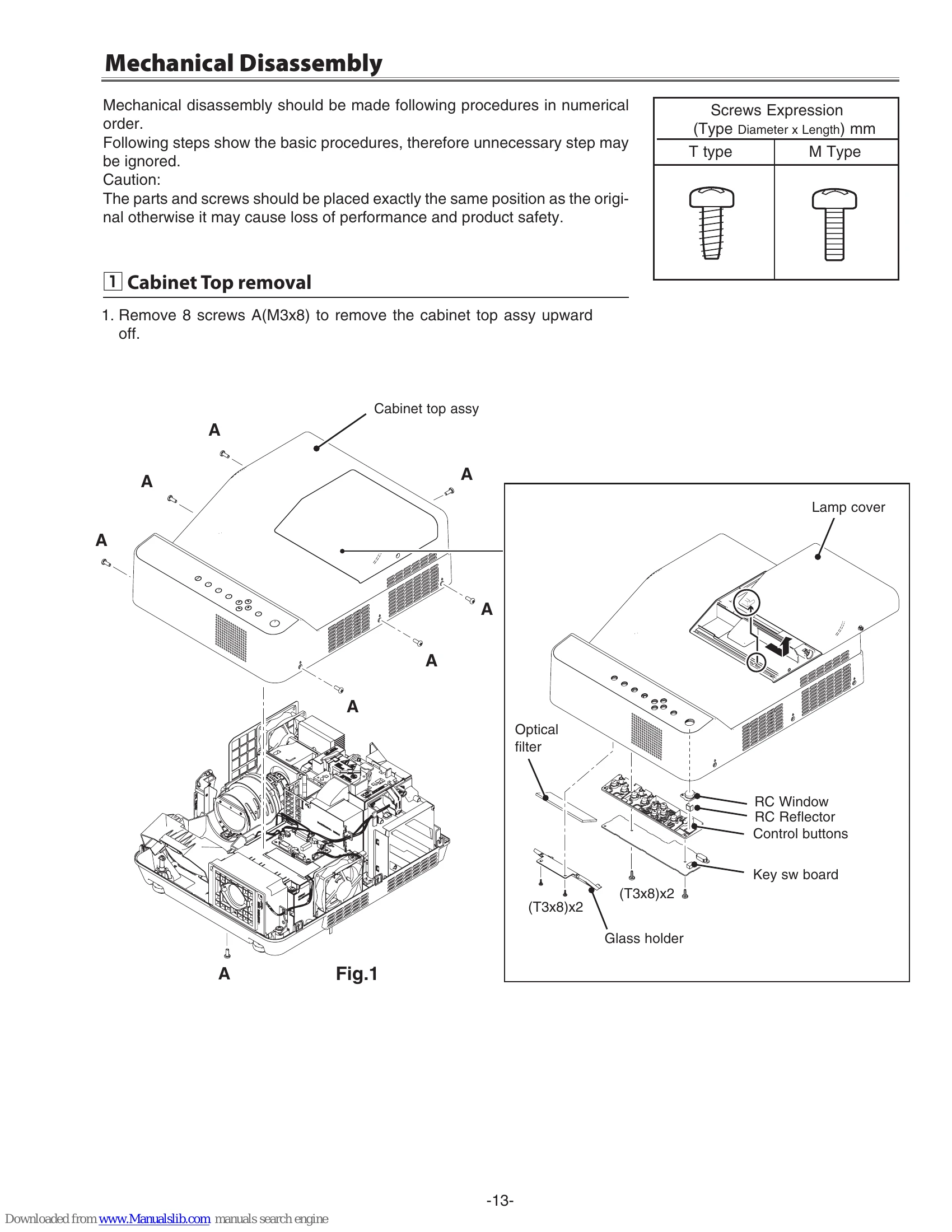
  • Mechanical Disassembly: Step-by-step instructions with diagrams for removing components such as the cabinet top, optical unit, fans, boards, and shields.
  • Adjustments: Covers adjustments needed after parts replacement, main board replacement considerations, and operation of the service adjustment menu.
  • Diagrams & Drawings: Includes component descriptions, reading of schematic diagrams, pin descriptions, and printed wiring board diagrams.

Troubleshooting and error codes

Indicators and Projector Condition
POWER WARNING TEMP. LAMP REPLACE Indicator Condition Possible Causes and Corrective Actions
I/O Off Off No Power
  • AC power cord is not connected. Connect the AC power cord.
  • The projector is not turned on. Press the ON/STAND-BY button.
  • The Fuse is blown. Replace the fuse (See page 5).
  • The Power Supply Unit is failed. Contact the service station.
I/O On Off Normal Operation
  • No corrective action needed.
Flashing Flashing Off Power failure, Fan failure detection
  • The POWER and WARNING TEMP. indicators are flashing. It may detect the abnormal temperature inside the projector. Check the following possible causes and wait until the POWER indicator stops flashing, and then try to turn on the projector.
  • If the WARNING TEMP. indicator lights red, it may detect the cooling fans or power supply circuits. Check fans operation and power supply lines referring to the chapter "Power supply & protection circuit" in the Chassis Block Diagram section.
  • Possible causes: Air filters are clogged with dust particles. Remove dust from the air filters. Ventilation slots of the projector are blocked. Reposition the projector so that ventilation slots are not obstructed. Check if projector is used at higher temperature place (Normal operating temperature is 5 to 40 °C or 41 to 104°F).
Off On Off Warning temperature
  • The projector is shut down to protect the inside of the projector and the WARNING TEMP. indicator lights red. Unplug the AC power cord and reconnect it, and then turn the projector on once again to verify operation. If the projector cannot be turned on and the WARNING TEMP. indicator still lights red, unplug the AC power cord and contact the service station.
Off Off Yellow Lamp replacement required
  • The LAMP REPLACE indicator lights yellow when the projection lamp reaches its end of life. Replace the lamp with a new one promptly. Reset the lamp counter after replacement (See page 8 & 9).
Privacy Policy