Manual for Cyber-shot DSC-V3

Manual for Cyber-shot DSC-V3

Brand: SANYO

Category: Digital Camera

Document Type: Manual

Language: EN
Uploaded: Nov. 21, 2025, 6:38 p.m.

  • INTRODUCTION: Covers camera features like 5.0 Megapixels, Auto flash, 2.4" TFT monitor, optical and digital zoom, internal memory, SD/SDHC card support, USB connection, DPOF functionality, provided editing software, and PictBridge support.
  • Package Contents: Lists the items included in the kit box.
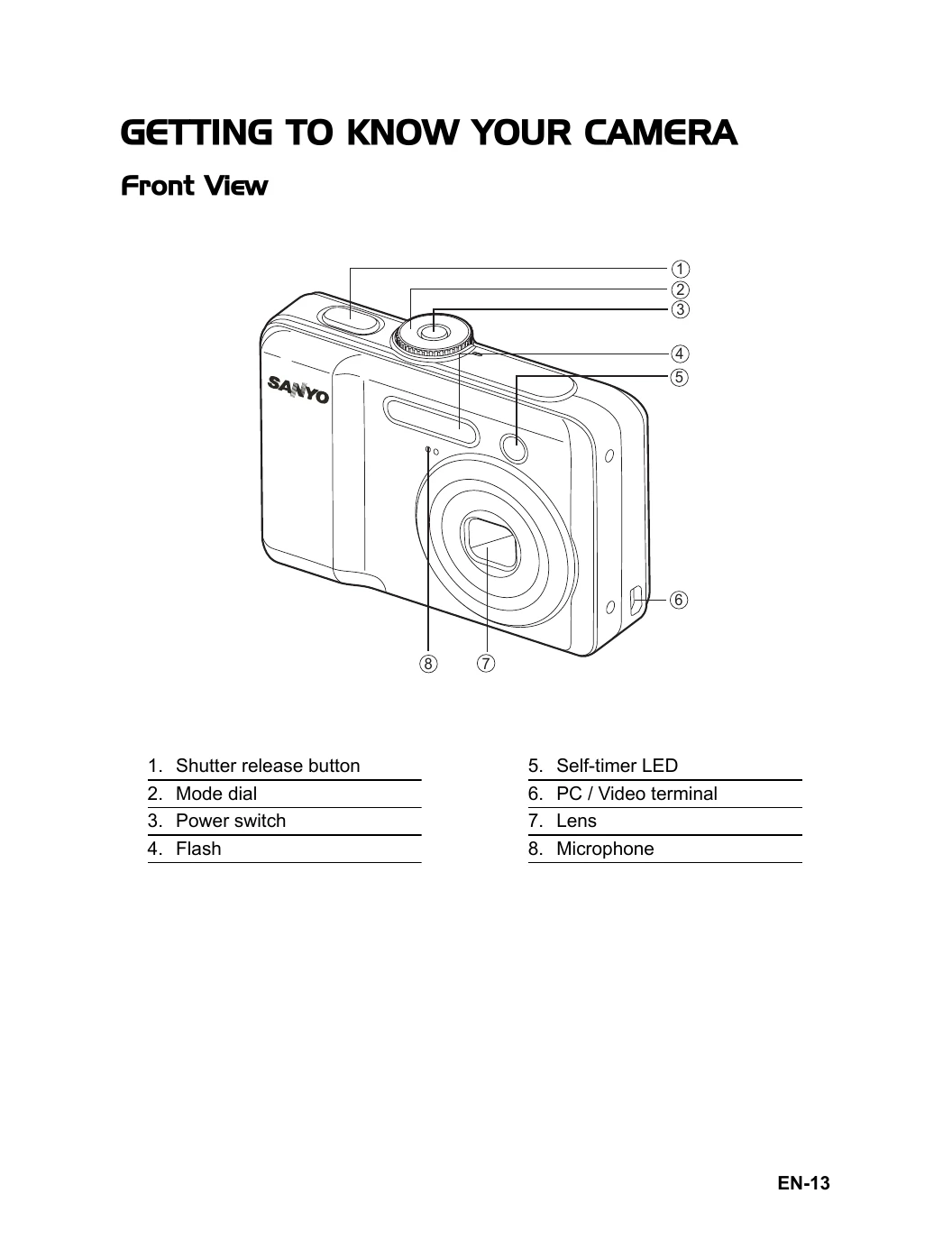
  • GETTING TO KNOW YOUR CAMERA: Details the front and rear views of the camera, identifying all buttons and ports.
  • LCD Monitor Information: Explains the various icons and information displayed on the LCD screen in different modes (Camera Mode, Flash Mode, Capture Mode, Focus Mode, etc.).
  • PREPARING THE CAMERA: Provides instructions on installing batteries and inserting/removing SD/SDHC memory cards. It also covers attaching the camera strap and explains the LED indicators.
  • GETTING STARTED: Guides the user on turning the camera on/off, choosing the screen language, setting the date and time, and formatting memory cards.
  • PHOTOGRAPHY MODE: Explains various shooting settings like Image Size, Quality, White Balance, ISO, Metering, Digital Zoom, and Quick View.
  • CAPTURE MODE: Details settings for Burst, Auto Bracket, Self-Timer, and EV Compensation.
  • PLAYBACK MODE: Covers basic and advanced playback functions such as viewing, magnifying, thumbnail display, slideshow, resizing, deleting, protecting images, and setting DPOF.
  • TRANSFERRING RECORDED IMAGES AND VIDEOS TO YOUR COMPUTER: Instructions on connecting the camera and downloading files.
  • EDITING SOFTWARE INSTALLATION: Guides on installing provided software.
  • MENU OPTIONS: Details the Camera Menu, Movie Menu, Playback Menu, and Setup Menu options.
  • SPECIFICATIONS: Lists the technical specifications of the camera.
  • TROUBLESHOOTING GUIDE: Provides solutions for common problems.
  • POSSIBLE NUMBER OF RECORDABLE IMAGES: Shows storage capacity based on resolution, quality, and memory card size.
  • CONNECTING TO A PICTBRIDGE-COMPATIBLE PRINTER: Instructions for direct printing from the camera.

Troubleshooting and error codes

Symptom Possible causes Solutions / Corrective Actions
Power does not turn on.
* The battery has run out.
* The battery is not oriented correctly.
* The battery cover is not closed properly.
* Load new or fully charged battery.
* Load the battery in the correct direction.
* Close the battery cover correctly.
Camera suddenly powers down.
* The function of [Auto Shut Down] in the mode has been activated.
* The battery has run out.
* Turn the power back on and set the option of [Auto Shut Down] to [Off].
* Load new or fully charged battery.
Image is not captured when the shutter release button is pressed.
* The camera is in the or mode.
* Memory is full.
* Rotate the mode dial to A, P, , or .
* Transfer the desired files to your computer and then delete unnecessary files, or use a different memory card.
Flash does not fire.
* Flash off is selected in flash mode.
* 10+2 sec. Self-timer is selected in self-timer mode.
* The [Capture Mode] is set to [Burst] or [AEB].
* The camera is in the (video) mode.
* Select a different flash mode.
* Select [Single] in the [Capture Mode].
* Switch the mode dial to another mode.
Continuous shooting is not possible.
* The capacity of the built-in memory or SD/SDHC memory card is full.
* Insert SD/SDHC memory card with available space or delete unwanted images.
Cannot transfer files over a USB connection.
* USB cable is not connected securely.
* USB driver is not installed.
* Camera is turned off.
* Check all connections.
* Install the USB driver on your computer.
* Turn on the camera.
Privacy Policy