Brand: SANYO
Category: Phone
Document Type: Quick Start Guide
Language: EN
Brand: SANYO
Category: Phone
Document Type: Quick Start Guide
Language: EN
Uploaded: Nov. 21, 2025, 6:22 p.m.
Refer to the instruction manual for warranty details.
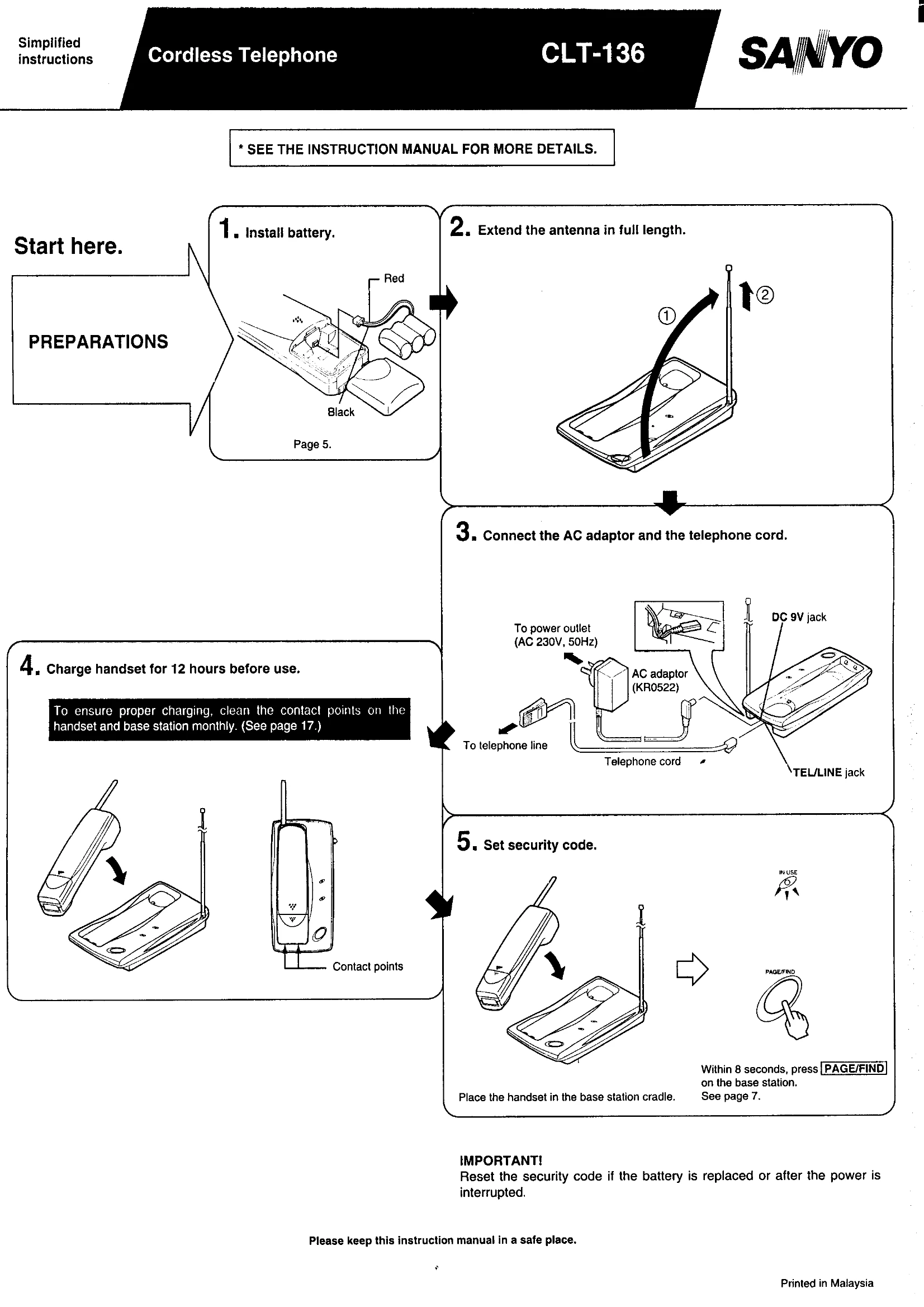
Start here.
Answering an incoming call:
Placing a call:
NOTE: If you experience noise or interference during a call, press the CHANNEL button on the handset to select a clear channel.
REMEMBER: Clean contact points regularly, reset security code after battery replacement or power interruption, ensure CHARGE indicator lights during charging, and press CHANNEL for noise reduction.
| If the phone doesn't work at all | Incoming calls do not ring on handset | Reception is noisy (interference, hum or static) |
|---|---|---|
| • Security code may have been canceled. To reset, see page 7. • AC adaptor may not be plugged into a wall outlet or to the base station. • Handset battery may be extremely low. If BATT LOW indicator lights in talk mode, recharge battery. • Handset may be too far from base station. Move closer. |
• Base station may be too close to electrical equipment. Try another location. • Handset may be too close to large metal object(s). Move to another location, or change direction while using handset. • Lower base station antenna. |
• Telephone line may not be connected. • Switch to clearer channel. |
|
The operating range seems shorter • Check the base station location for interfering objects. • Extend base station antenna to full length. |
||
|
Handset battery life or standby time seems shorter • Batteries may not be fully charged, due to dirty contact points. Wipe with a soft cloth. • Handset batteries may have been repeatedly recharged before being fully exhausted. Try Battery Refresh. • Battery may need replacing. |
||
|
If phone still does not work • Reset base station and handset as follows: 1. Disconnect AC adaptor, and then reconnect AC adaptor to reset base station. 2. Disconnect then reconnect the handset battery. 3. Reset security code. |
||