Manual for CLT-2420

Manual for CLT-2420

Brand: SANYO

Category: Phone

Document Type: Manual

Language: EN
Uploaded: Nov. 21, 2025, 6:46 p.m.

Warranty Information

One year warranty from Sanyo Canada Inc. against manufacturing defects.

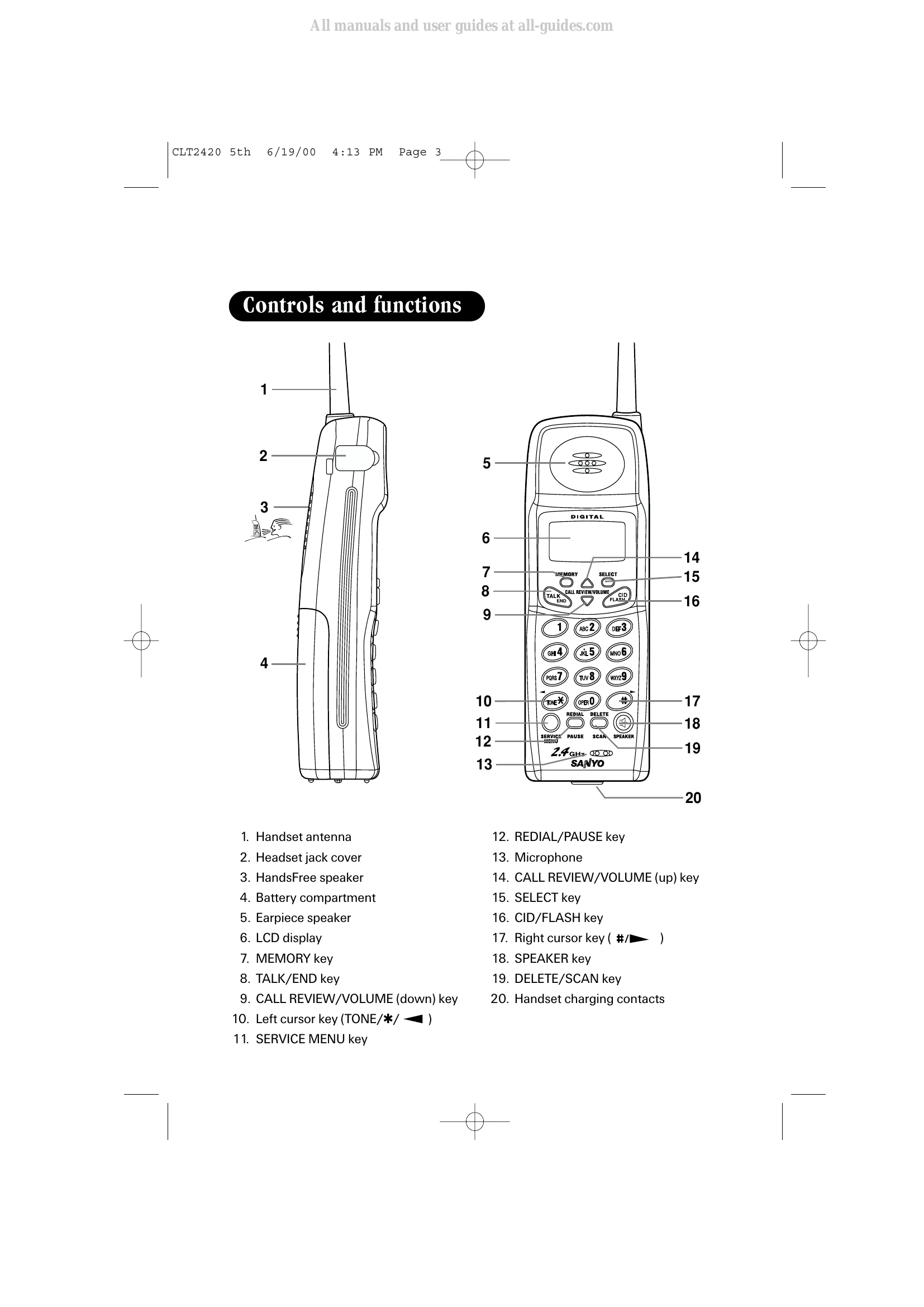
Making a Call: From standby, enter the phone number and press TALK/END. To dial from talk mode, press TALK/END, then enter the number.

Answering a Call: The phone rings, and "Incoming Call" appears. Press TALK/END. You can also press any key when the handset is off the base (Any key answer).

HandsFree Speakerphone: During a call, press SPEAKER to switch to the handset speakerphone. Press SPEAKER again to end the call or TALK/END to return to normal conversation.

Directory: Press and hold MEMORY to store numbers/names. Use arrow keys to navigate and SELECT to confirm.

Redial: Press REDIAL/PAUSE to cycle through the last three numbers dialed. Press TALK/END to dial.

Volume Adjustment: In standby mode, use CALL REVIEW/VOLUME buttons to adjust ringer volume. During a call, use these buttons to adjust earpiece/speakerphone volume.

Troubleshooting and error codes

Symptom Suggestion
The CHARGE/IN USE indicator won't come on when the handset is placed in the base unit.
  • Make sure the AC adaptor is plugged into the base unit and wall outlet.
  • Make sure the handset is properly seated in the base unit.
  • Make sure the charging contacts on the handset and base unit are clean.
Weak and/or scratch sound
  • Make sure that the base unit antenna is in a vertical position.
  • Interference by other electronics equipment such as TVs, computers, microwaves, fluorescent lighting, etc.
  • Move the handset and/or base unit to a different location away from metal objects or appliances and try again.
  • Make sure that you are not too far from the base.
Can't make or receive calls.
  • Check both ends of the base unit telephone line cord.
  • Make sure the AC adaptor is plugged into the base unit and wall outlet.
  • Disconnect the AC adaptor for a few minutes, then reconnect it.
  • Reset the digital security code (See page E41).
  • Make sure TALK/END is pressed.
The handset doesn't ring or receive a page.
  • The battery pack may be weak. Charge the battery on the base unit for at least 15 hours.
  • If the handset still does not work, you may need to replace the battery.
  • The handset may be too far away from the base unit.
  • Place the base unit away from appliances or metal objects.
  • Reset the digital security code (See page E41).
The Caller ID does not display.
  • The call was answered before the second ring.
  • The call was placed through a switchboard.
  • Call your local telephone company to verify your Caller ID service is current.
Privacy Policy