Brand: SANYO
Category: Video
Document Type: Quick Start Guide
Language: EN
Brand: SANYO
Category: Video
Document Type: Quick Start Guide
Language: EN
Uploaded: Nov. 21, 2025, 6:45 p.m.
None
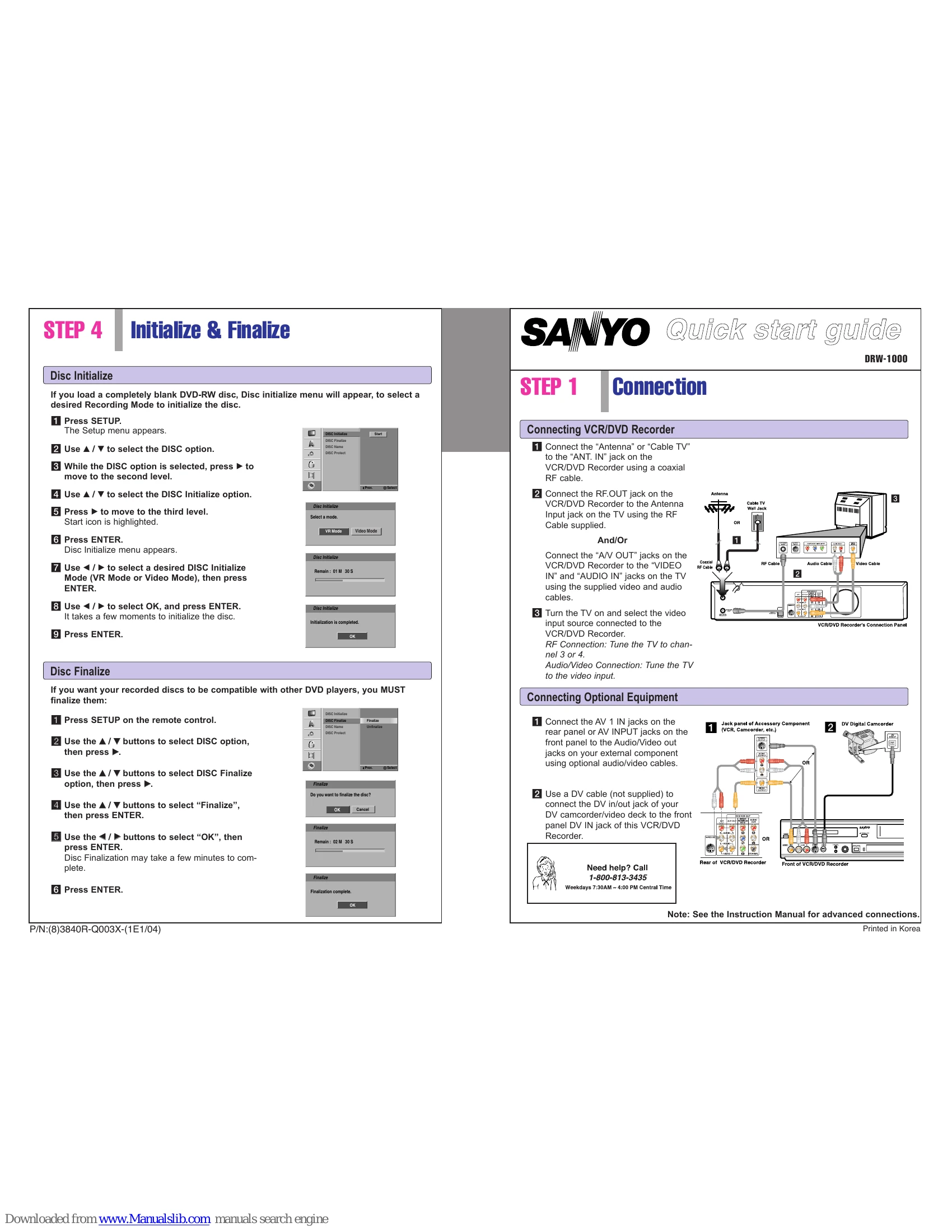
To initialize a blank DVD-RW disc, press SETUP, navigate to the DISC option, then select DISC Initialize. Choose between VR Mode or Video Mode and confirm to initialize the disc.
To make recorded discs compatible with other players, press SETUP, select DISC option, then choose DISC Finalize. Select 'Finalize' and confirm. This process may take a few minutes.
Connect antenna/cable TV to ANT. IN. Connect RF.OUT to TV's Antenna Input. Connect A/V OUT jacks to TV's VIDEO IN and AUDIO IN jacks. Tune TV to channel 3 or 4 for RF, or to video input for A/V connection.
Connect AV 1 IN jacks to external component A/V out jacks. Use a DV cable to connect a DV camcorder to the front panel DV IN jack.
Load a recordable disc. Select VR Mode or Video Mode for DVD-RW. Set the Record Mode (XP, SP, LP). Select the recording source (channel or external input). Press REC to start recording, PAUSE/STILL to pause, and STOP to finish. View recorded content via DISC MENU/LIST.