Parts/Service for PLC-XU4000

Parts/Service for PLC-XU4000

Brand: SANYO

Category: Video

Document Type: Parts/Service

Language: EN
Uploaded: Nov. 21, 2025, 7:01 p.m.

  • Safety Precautions: Includes isolation transformer use, compliance with safety notes, proper installation of protective devices, and thorough inspection before reassembly.
  • Product Safety Notice: Highlights components marked with 'A' as safety-significant and recommends exact part replacement.
  • Service Personnel Warning: Advises eye protection, waiting for lamp cool-down, and avoiding high voltages.
  • Maintenance: Covers filter replacement, filter counter reset, and cleaning of projection lens and cabinet.
  • Lamp Replacement: Details the procedure for replacing the lamp, emphasizing cooling time and safe handling.
  • Security Function Notice: Explains Key lock, PIN code lock, and Logo PIN code lock, with a resetting procedure.
  • Standby Mode Notice: Describes Eco and Network standby modes and their restricted functions.
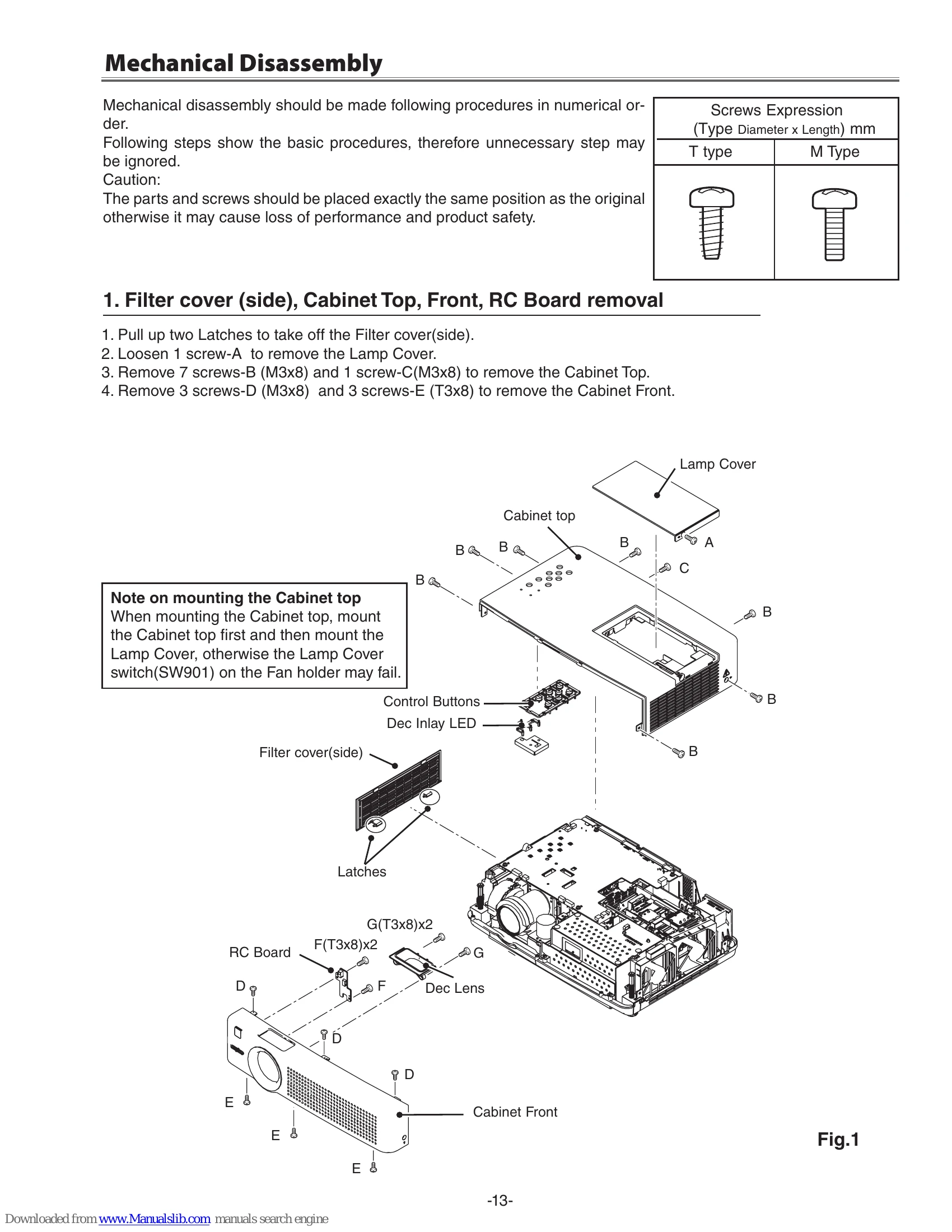
  • Mechanical Disassembly: Provides step-by-step instructions for removing various parts like covers, boards, fans, and the optical unit.
  • Optical Parts Disassembly: Details the removal of LCD Panel/Prism Assy, polarized glass, projection lens, integrator, condenser, and relay lenses.
  • Troubleshooting: Lists common issues like 'No Power', 'No Picture', and 'No Sound' with indicator conditions.

Troubleshooting and error codes

Indicators and Projector Condition Possible Cause Remedy
No Power No power AC power cord is not plugged in.
Fuse is blown. Check the fuse and replace if necessary.
Power supply unit failure. Replace the power supply unit.
No Picture No signal input. Check signal cable connection.
Lamp is not lit. Lamp is not in operation.
Press the ON/STAND-BY button.
Lamp failure. Replace the lamp.
Lamp used time is over. Lamp replacement is required.
Internal failure. Check internal circuits.
Repair or replace the Main Board.
No Sound No audio signal input. Check audio cable connection.
Select the correct input source.
Volume is set to mute or minimum. Adjust volume or turn off mute.
Internal failure. Check internal circuits.
Repair or replace the Audio circuit.
Privacy Policy