Brand: SCP
Category: Phone
Document Type: Manual
Language: EN
Brand: SCP
Category: Phone
Document Type: Manual
Language: EN
Uploaded: Nov. 21, 2025, 6:56 p.m.
Refer to the manual for detailed warranty information regarding your phone and accessories.
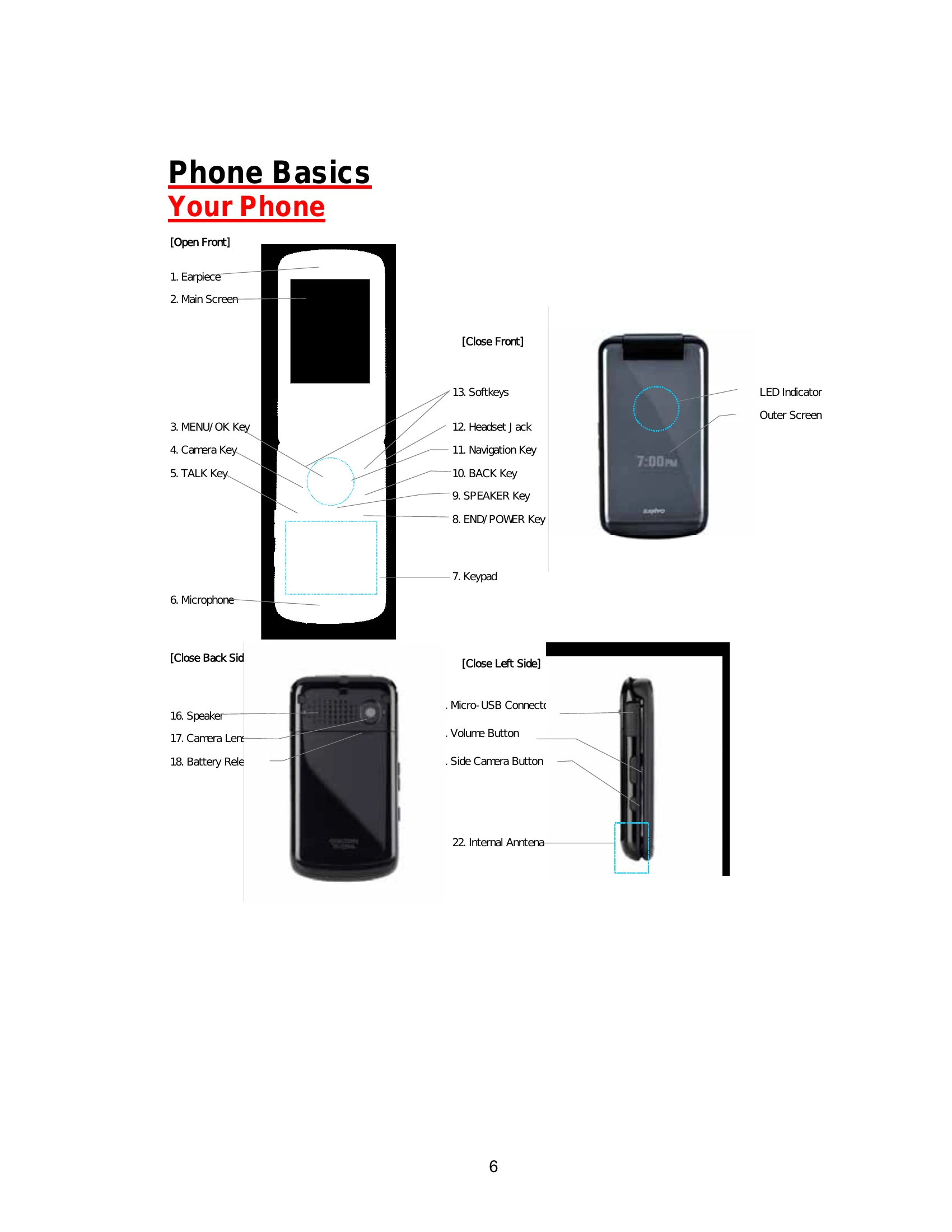
Familiarize yourself with your phone's physical layout and components, including the earpiece, main screen, keypad, menu/OK key, talk key, end/power key, speaker, microphone, camera, and external buttons like volume and side camera keys. Understand the functions of each key for basic operation.
Learn the specific functions of each key: Earpiece for audio, Main Screen for information display, MENU/OK Key for menu navigation and selection, Camera Key for photos, TALK Key for calls, Microphone for audio input, END/POWER Key for on/off and call termination, SPEAKER Key for audio output and speakerphone, BACK Key for deletion and navigation, Navigation Key for scrolling, Headset Jack for accessories, and Softkeys for context-sensitive actions. Also, note the LED Indicator and Outer Screen for status updates.
Understand the various icons that appear on your phone's display, including Service Icons (Signal Strength, No Service, Roaming, Data Service), Status Icons (Battery, Location, Silence All, Vibrate All, Ringer Off, Beep, Ringer and Vibrate, Speaker Mode), Messaging Icons (Email, Multiple Messages, Picture Messages, SMS Voice Messages, Text Messages, Voicemail, Urgent Messages), Bluetooth Icons (Visible, Connected, Enable), and Voice Call Icons (Call in Progress, Missed Call, Bluetooth Device, Headset, Car Kit). Familiarize yourself with these symbols for efficient phone use.
Press and hold the END key to power on your phone. It will automatically enter standby mode once it finds a signal. If no signal is found after 15 minutes, a Power Save feature will activate.
Press and hold the END key for two seconds until the powering-down animation appears on the screen.
Align the battery connectors, insert the battery into the phone, and then secure the battery cover.
Ensure the phone is off. Slide the battery release latch to remove the cover, then lift out the battery.
Charge your battery as soon as possible. Monitor the battery charge level via the indicator on the display. A red indicator and warning tone signal low battery life.
Use the navigation key to scroll through menus. Select menu items by highlighting them and pressing the MENU/OK key. Numbered options can be selected by pressing the corresponding number on the keypad.
Highlight the desired option and press MENU/OK. For numbered options, press the number on the keypad.
Press the BACK key to go to the previous menu. Press END to return to standby mode.
Navigate to MENU/OK > Settings > Phone Info > Phone#/User ID. Alternatively, access it through Contacts: CONTACTS (right softkey) > OPTIONS (left softkey) > Settings > My Name Card.
| Problem | Possible Cause | Solution |
|---|---|---|
| Phone will not turn on | Battery is not charged. | Charge the battery. |
| Unable to make or receive calls | No signal. | Move to an area with better signal strength. Check service provider. |
| Cannot hear caller | Volume too low. | Adjust volume using the Volume Button. |
| Muffled sound during calls | Microphone is blocked. | Ensure the microphone is not obstructed. |