Brand: SHARP
Category: Audio
Document Type: Manual
Language: EN
Brand: SHARP
Category: Audio
Document Type: Manual
Language: EN
Uploaded: Nov. 21, 2025, 8:27 p.m.
Refer to the warranty information provided with the product or contact your dealer.
Basic Playback:
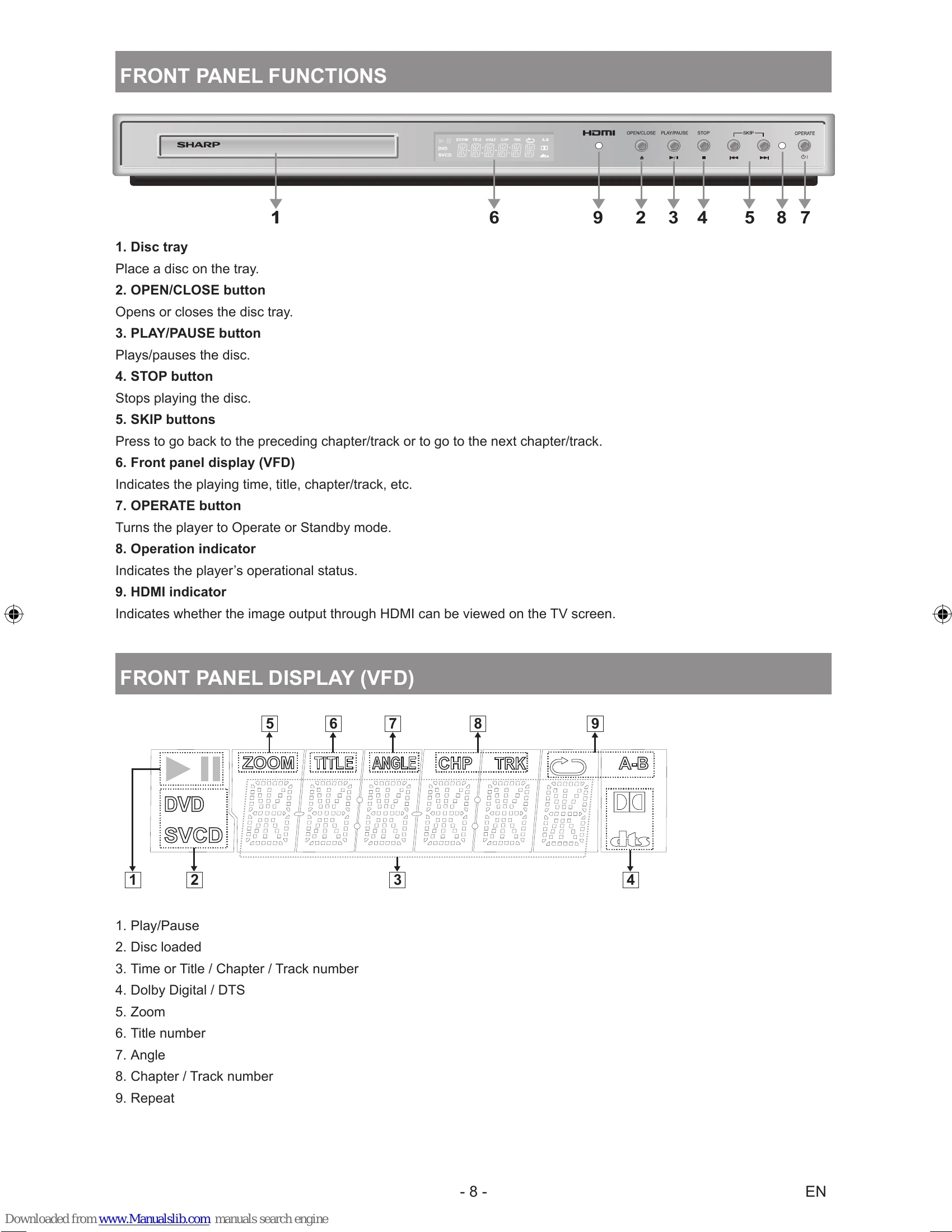
Stopping Play: Press STOP (■) twice to stop play permanently. Pressing STOP once records the point for Resume function.
Fast Forward/Reverse: Use SLOW/SEARCH buttons during playback.
Skip: Use SKIP/FRAME buttons to skip chapters or tracks.
Pause: Press PLAY/PAUSE during playback.
Video Output Settings: Navigate to Setup Menu > Video Setup to adjust TV Type and Video Output (e.g., HDMI, CVBS, Component).
| Problem | Possible Cause | Solution |
|---|---|---|
| The picture quality is poor (DVD) | - DVD surface is damaged (scratches, fingerprints). - DVD is dirty. - DVD incorrectly loaded. - Wet DVD or condensation. |
- Clean the DVD. - Ensure DVD is loaded correctly with the label facing up. - Allow player to dry in Standby mode for 1-2 hours. |
| Disc does not play | - No disc in player. - Disc incorrectly loaded. - Wrong type of disc (e.g., CD-ROM). - Region code mismatch. |
- Insert a disc. - Load disc correctly. - Use supported disc formats. - Ensure DVD region code matches player (Region 5). |
| Wrong OSD language | - Incorrect language selected. | - Select desired language in "Language" setup menu. |
| Sound or subtitles on DVD cannot be changed | - Multilingual sound/subtitles not recorded on DVD. - DVD menu required for changes. |
- Try changing sound/subtitles via DVD menu. - Check if DVD supports changing sound/subtitles. |
| Some functions (Angle, Zoom, etc.) do not work | - Function not available on the disc. - Angle symbol not displayed. |
- Check disc compatibility. - Angle can only be changed when angle symbol is shown. |
| Abnormal or no picture | - Improper connections. - Incorrect remote control usage. - Incorrect "TV Type" or "Video Output" settings. - HDMI resolution incorrect. |
- Check all connections. - Ensure correct buttons are pressed. - Verify "TV Type" and "Video Output" in setup menu. - Adjust HDMI resolution using remote. |
| No sound | - Volume set too low or muted. - Incorrect audio connections. |
- Check volume level. - Ensure sound is not accidentally switched off. - Check audio connector connections (see pages 10-13). |
| Distorted sound | - Incorrect listening mode in audio system. | - Check audio system's listening mode setting. |
| No response from remote control | - Batteries incorrectly positioned. - Batteries exhausted. - Remote control used outside angle/distance limits. |
- Reposition batteries. - Replace batteries. - Operate remote within 30° angle and 6m distance. |
| Nothing works | - Temporary player issue. | - Turn player off and on again. - Unplug player, wait a few minutes, then plug back in. - Contact supplier or technician if problem persists. |