Manual for R-297F

Manual for R-297F

Brand: SHARP

Category: Home Appliances

Document Type: Manual

Language: EN
Uploaded: Nov. 21, 2025, 9:14 p.m.

Warranty Information

Refer to your nearest service center approved by SHARP for any repairs or issues.

Getting Started

1. Plug the oven into a power point and ensure the door is closed. 2. Press the STOP/CLEAR pad to make the oven beep.

Clock Setting

This is a 12-hour clock. 1. Press the TIMER/CLOCK pad. 2. Enter the time of day using the number pads. 3. Press the TIMER/CLOCK pad again.

Stop/Clear

Press STOP/CLEAR once to stop the oven temporarily or clear programming errors. Press STOP/CLEAR twice to cancel a cooking programme.

Manual Operations

**Microwave Time Cooking** 1. Enter desired cooking time. 2. Press INSTANT COOK/START. (Optional) Select power level before pressing INSTANT COOK/START. **Sequence Cooking** Program up to 3 automatic cooking sequences. 1. Enter desired cooking time for the first sequence. 2. Select power level. 3. Enter desired cooking time for the second sequence. 4. Press INSTANT COOK/START. **Instant Cook** 1. Press INSTANT COOK/START pad. 2. Press again to increase cooking time by 1 minute. **Increasing Time During Cooking** During a cooking programme, press INSTANT COOK/START to add cooking time.

Automatic Operations

Follow Menu Guides for best results. **Instant Action** 1. Press the desired Instant Action pad (e.g., Jacket Potato). 2. Open door, turn food, close door. 3. Press INSTANT COOK/START. **Express Defrost** 1. Press EXPRESS DEFROST pad until the desired menu number is displayed. 2. Press INSTANT COOK/START. 3. Open door, turn and rearrange food, close door. 4. Press INSTANT COOK/START. **Easy Defrost** 1. Press EASY DEFROST pad until desired menu number is displayed. 2. Enter weight using number pads. 3. Press INSTANT COOK/START. 4. Open door, turn and rearrange food, close door. 5. Press INSTANT COOK/START.

Other Convenient Features

**Less/More Setting** Adjust automatic menu cooking times by pressing POWER LEVEL pad (once for PLUS, twice for LESS). **Timer** 1. Enter desired time. 2. Once the event occurs (e.g., egg boils), press TIMER/CLOCK pad. **Child Lock** To set: Press TIMER/CLOCK, then press and hold INSTANT COOK/START for 3 seconds. To unlock: Press TIMER/CLOCK, then press STOP/CLEAR. **Demonstration Mode** Press TIMER/CLOCK, then press and hold INSTANT COOK/START for 3 seconds. **Alarm** The oven beeps if food is left inside after cooking.

Troubleshooting and error codes

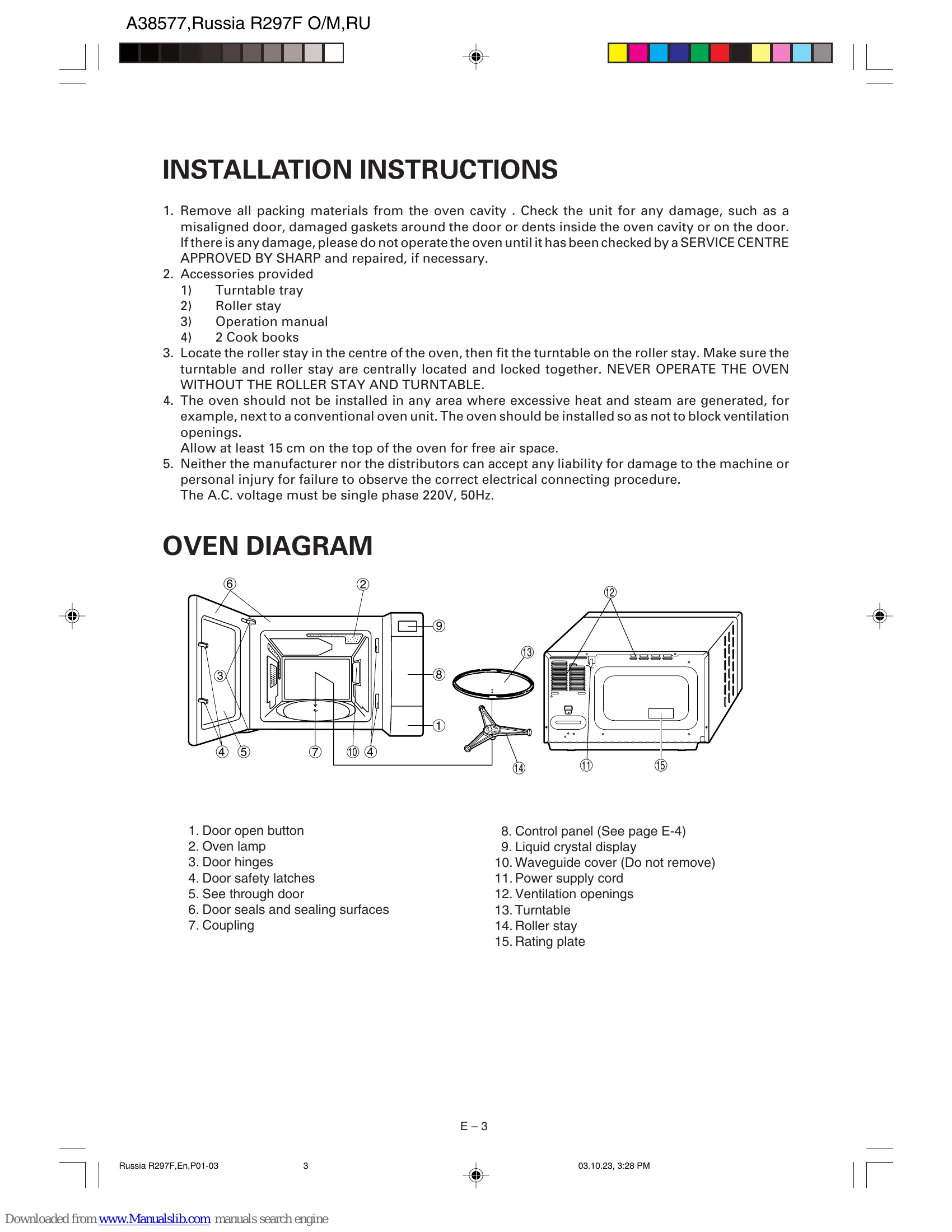
Check Does the display light? When the door is opened, does the oven lamp light? Place one cup of water (approx. 250 ml) in a glass measuring cup in the oven and close the door securely. Oven lamp should go off if door is closed properly. Programme the oven for 2 minutes on HIGH. At this moment: A. Does the oven lamp light? B. Does the cooling fan work? (Put your hand over the rear ventilation openings.) C. Does the turntable rotate? (The turntable can rotate clockwise or counterclockwise. This is quite normal.) D. Does COOK indicator light? E. After two minutes, did an audible signal sound and COOK indicator go off? F. Is the water inside the oven hot?
Answer YES YES YES YES YES YES YES YES
NO NO NO NO NO NO NO NO NO NO

If "NO" is the answer to any of the above questions, please check your wall socket and the fuse in your meter box.

If both the wall socket and the fuse are functioning properly, CONTACT YOUR NEAREST SERVICE CENTER APPROVED BY SHARP.

NOTE: 1. If time in the display is counting down rapidly, check Demonstration Mode. (Please see page E-17 for detail.)

2. If you cook the food over 20 minutes on HIGH power, the microwave power will be automatically reduced to avoid overcooking.

Privacy Policy