Manual for GX17

Manual for GX17

Brand: SHARP

Category: Mobile

Document Type: Manual

Language: EN
Uploaded: Nov. 21, 2025, 7 p.m.

Your Phone

Please check the following carefully. Your phone should come complete with:

  • GSM 900/1800/1900 GPRS phone
  • Rechargeable Li-ion Battery
  • AC Charger
  • CD-ROM
  • User Guide
  • Quick Start Guide

Optional Accessories

  • Li-ion Spare Battery (XN-1BT30)
  • Cigarette Lighter Charger (XN-1CL30)
  • USB Data Cable (XN-1DC30)
  • AC Charger (XN-1QC30, XN-1QC31)
  • Personal Hands-free Kit (XN-1ER20)

The above accessories may not be available in all regions.

For details, please contact your dealer.

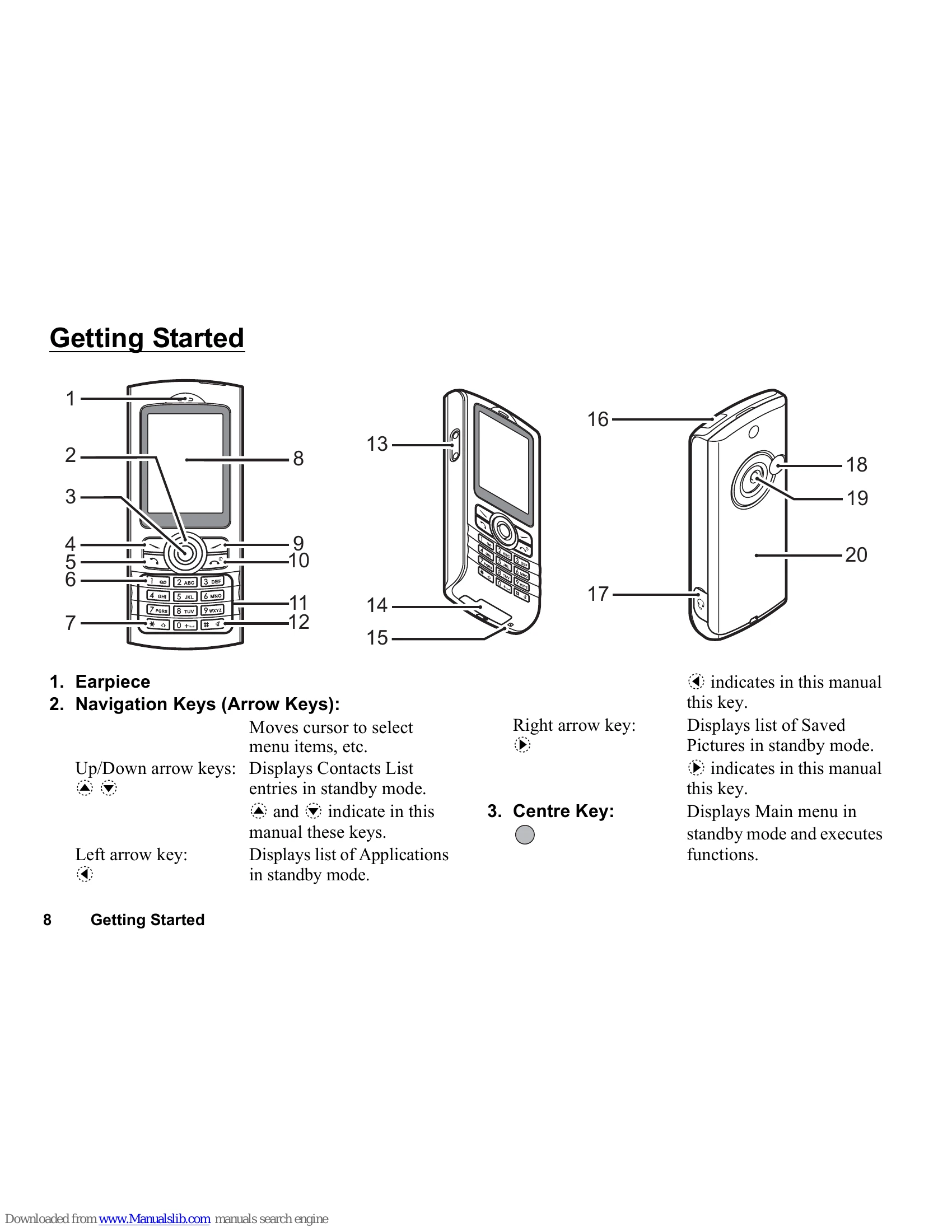
Getting Started

Inserting the SIM Card and the Battery

  1. Remove the battery cover.
  2. Slide the SIM card into the SIM holder.
  3. Hold the battery so that the metal contacts are facing down, slide the guides on the top of the battery into the battery slots, and then insert it.
  4. Replace the battery cover.

Note

  • Always use with the battery cover closed.
  • Make sure that only 3V SIM cards are used.
  • Make sure that the standard accessory battery (XN-1BT30) is used.

Charging the Battery

You must charge the battery for at least 2 hours before using your phone for the first time.

Using the Charger

  1. Remove the cover of the external connector, and connect the charger by pressing both sides indicated with arrows.
  2. Connect the charger to an AC outlet.

When the phone is charging, the animated battery status icon () in the upper right of the screen displays the current status.

Standard charging time: Approx. 2 hours.

Turning Your Phone On and Off

To turn the power on, press and hold for approximately 2 seconds. The standby screen is displayed.

To turn the power off, press and hold for approximately 2 seconds.

Keypad Lock

You can lock the keypad to prevent it from being pressed accidentally.

Locking the Keypad

  1. Press, then [LockKeys] during standby.

The soft and centre keys are not displayed when locked.

To unlock, press * then [Yes].

Troubleshooting and error codes

Problem Solution
Call quality is poor.
  • Your current location may not provide good call quality (i.e., in a car or train). Move to a location where radio signal strength is greater.
  • Check where your account has been registered and where the service is available.
Cannot access network service.
  • Make sure you are correctly subscribed for the Short Message Service, that the network supports this service, and that the Message Centre number is set up correctly. If not, contact your network service provider.
Cannot send or receive Text Messages.
  • MMS settings and configuration may be missing or incorrect or the network does not support it. Check your service provider's access point number. Contact your service provider to confirm the correct settings.
Cannot connect to Multimedia Message service provider.
  • Limited memory available.
  • Delete any unnecessary data.
Call is terminated unexpectedly.
  • Magnetised objects such as health necklaces placed near the phone may terminate the call. Keep your phone away from such objects.
No entries are displayed in the Contacts List
  • Confirm that the Contacts Location setting (Handset or SIM) and View Groups setting are correct.
Fax transmission failure
  • Before transmitting fax data, configure your fax software to use the software flow control.
  • Use of the optional data cable is recommended for transmitting fax data.
Cannot receive OBEX data.
  • The OBEX data can only be received during standby. The message "Please return to standby." is displayed.
Privacy Policy