Brand: SHARP
Category: Mobile
Document Type: Quick Start Guide
Language: EN
Brand: SHARP
Category: Mobile
Document Type: Quick Start Guide
Language: EN
Uploaded: Nov. 21, 2025, 6:08 p.m.
Manual Publish Date: 2022-11-01
The warranty period for a new product is 1 year from the date of purchase.
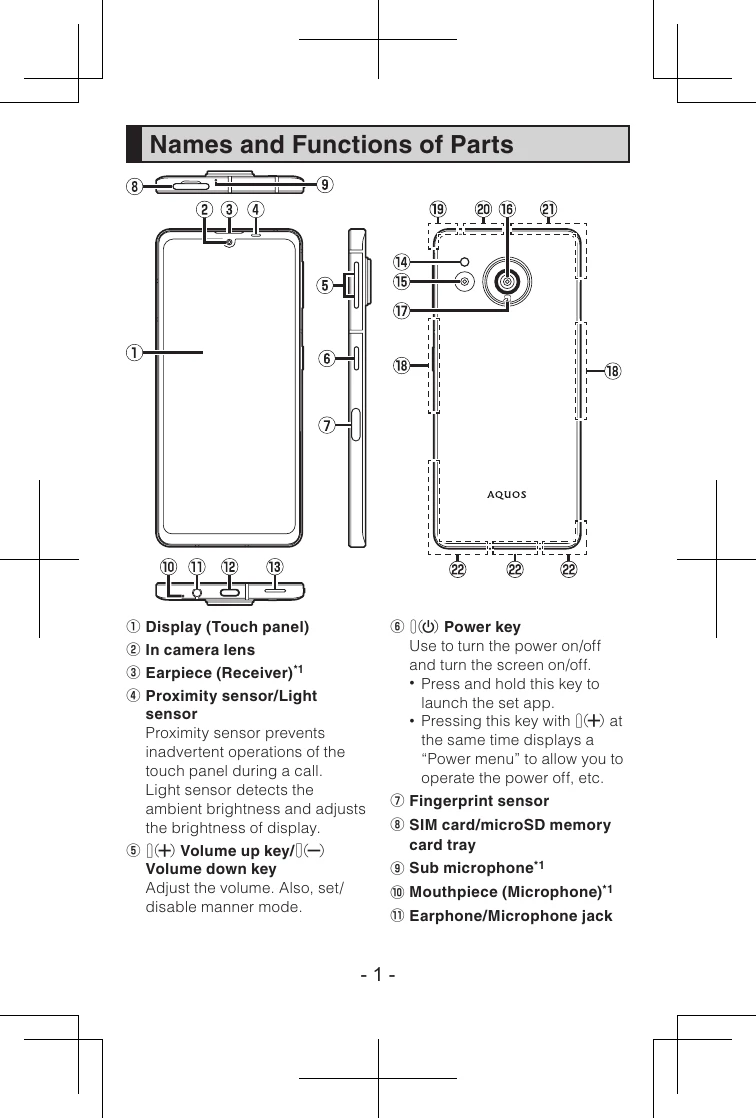
Turning the Power On: Hold down the Power key (⑥) for at least 3 seconds while the product is turned off. The initial setting screen will appear automatically when turned on for the first time or after a factory reset.
Attaching the SIM Card:
Transferring Data: Connect your old smartphone to the product using the included Quick Switch Adapter (sample) to transfer apps and data during the initial setup.