Brand: SIEMENS
Category: Control Unit
Document Type: Manual
Language: EN
Brand: SIEMENS
Category: Control Unit
Document Type: Manual
Language: EN
Uploaded: Nov. 21, 2025, 8:51 p.m.
Manual Publish Date: 2006-10-01
Contact your local Siemens Building Technologies representative for warranty information.
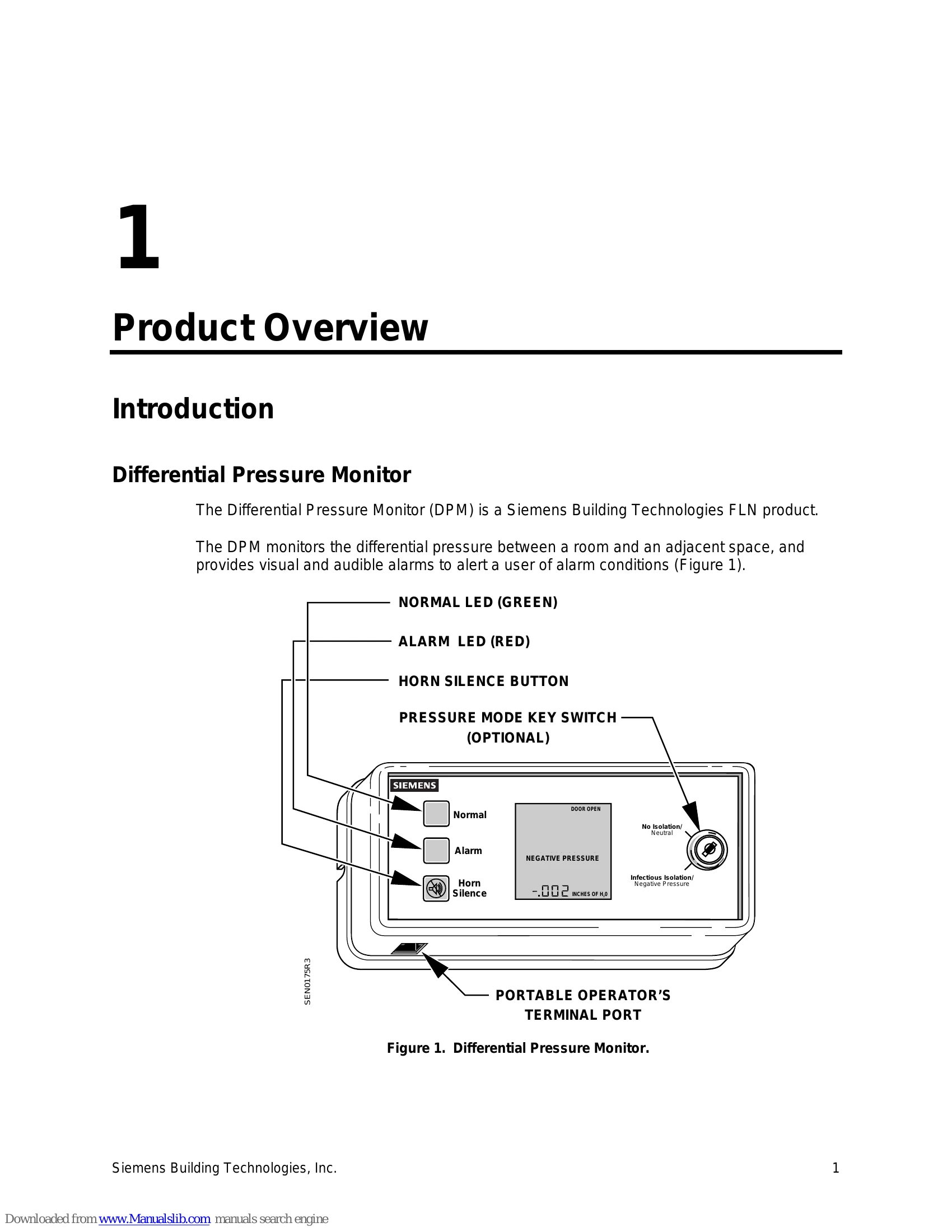
The Differential Pressure Monitor (DPM) is designed to monitor the differential pressure between a room and an adjacent space. It provides visual and audible alarms for alarm conditions.
Key functions include:
The manual also details hardware inputs/outputs, button functions, troubleshooting steps, and error status messages.
| Symptom | Corrective Action |
|---|---|
| DP1 FAIL or DP2 FAIL reads ON at the POT and GENERAL FAILURE is displayed on the LCD. | 1. Check wire connections from RPT to monitor. 2. Check incoming 24 Vac power to the sensor. 3. Contact your local Siemens Building Technologies representative. |
| Wire connections are correct, but monitor displays GENERAL FAILURE on LCD. | 1. Check that the correct application is running. 2. Contact your local Siemens Building Technologies representative. |
| Room pressure is positive (negative) vs. adjacent space, but DIFF PRES1 indicates a negative (positive) value. | 1. Check for drafts affecting sensor reading; relocate sensor if necessary. 2. Toggle SIG1 PHASE (Point 67) from LO to HI or HI to LO. 3. Contact your local Siemens Building Technologies representative. |
| Anteroom pressure is positive (negative) vs. adjacent space, but DIFF PRES2 indicates a negative (positive) value. | 1. Check for drafts affecting sensor reading; relocate sensor if necessary. 2. Toggle SIG2 PHASE (Point 87) from LO to HI or HI to LO. 3. Contact your local Siemens Building Technologies representative. |
| Room switches to a new pressurization mode, resulting in a high or low pressure alarm. | 1. Check and correct pressure alarm limits. 2. Ensure sufficient time for pressure stabilization (SWITCH DELAY). 3. Verify room controls have switched to the new mode. |
| DOOR POSN (Point 32) does not match actual door position. | 1. Toggle DOOR SW MODE (Point 34) to NOPEN or NCLOSE. 2. Contact your local Siemens Building Technologies representative. |
| DOOR POSN (Point 32) does not change value when door position changes. | 1. Verify DOOR SWITCH (Point 28) is set to YES. 2. Check wiring to door contact switch and monitor. 3. Check continuity of door contact switch and wires. 4. Contact your local Siemens Building Technologies representative. |
| Door Alarm is ON whenever the door is used. | 1. Check DOOR DELAY (Point 22) for sufficient time. 2. Contact your local Siemens Building Technologies representative. |
| Monitored room maintains pressure, but monitor keeps going in and out of alarm. | 1. Check and adjust pressure limit points. 2. Check ALARM DELAY (Point 21) for a greater value. 3. Ensure door is closed. 4. Verify mechanical system and terminal box are operating correctly. 5. Contact your local Siemens Building Technologies representative. |