Installation Guide for CFFC1310-LP

Installation Guide for CFFC1310-LP

Brand: SIEMENS

Category: Control Unit

Document Type: Installation Guide

Language: EN
Uploaded: Nov. 21, 2025, 9:26 p.m.

Manual Publish Date: 2003-01-01

Warranty Information

No warranty information is present in the document.

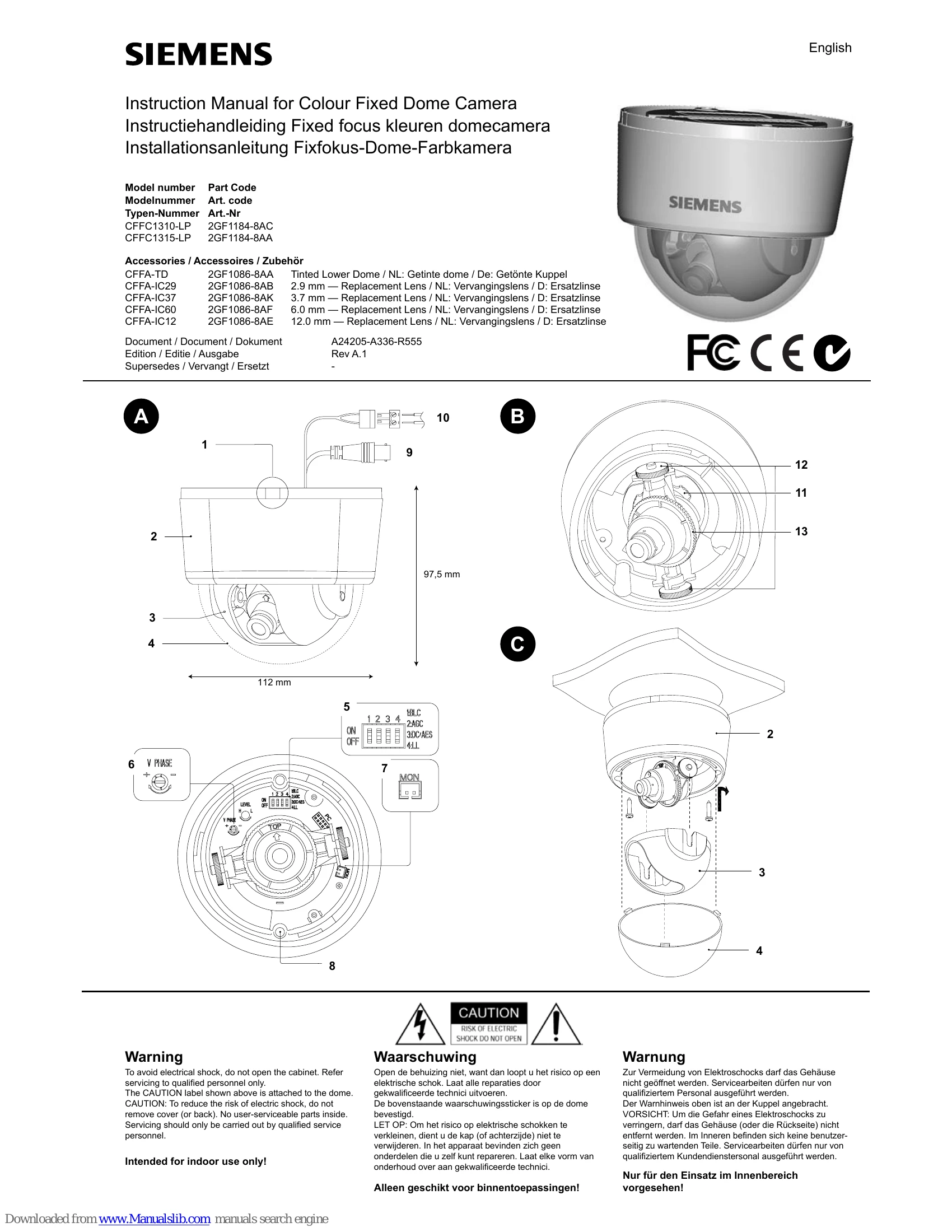
  • Connect the BNC cable to the BNC connector (9) and the power supply cable to the power connector (10) using a 24 V AC or 12 V DC power supply.
  • Mount the camera by placing the template on the mounting surface, marking and drilling holes, inserting wall plugs, and fastening with screws.
  • Adjust the camera position by loosening the locking ring (11) and panning adjustment wheel (12), turning the axial ring (13) for desired angle, then retightening.
  • Set optional features like BLC, AGC, DC/AES, and Line Lock using DIP switches (5).
  • Attach the dome by cleaning joint surfaces, placing the inner liner and dome, then turning clockwise to lock.
Privacy Policy