Brand: SIEMENS
Category: Control Unit
Document Type: Manual
Language: EN
Brand: SIEMENS
Category: Control Unit
Document Type: Manual
Language: EN
Uploaded: Nov. 21, 2025, 6:05 p.m.
Manual Publish Date: 2004-06-23
None
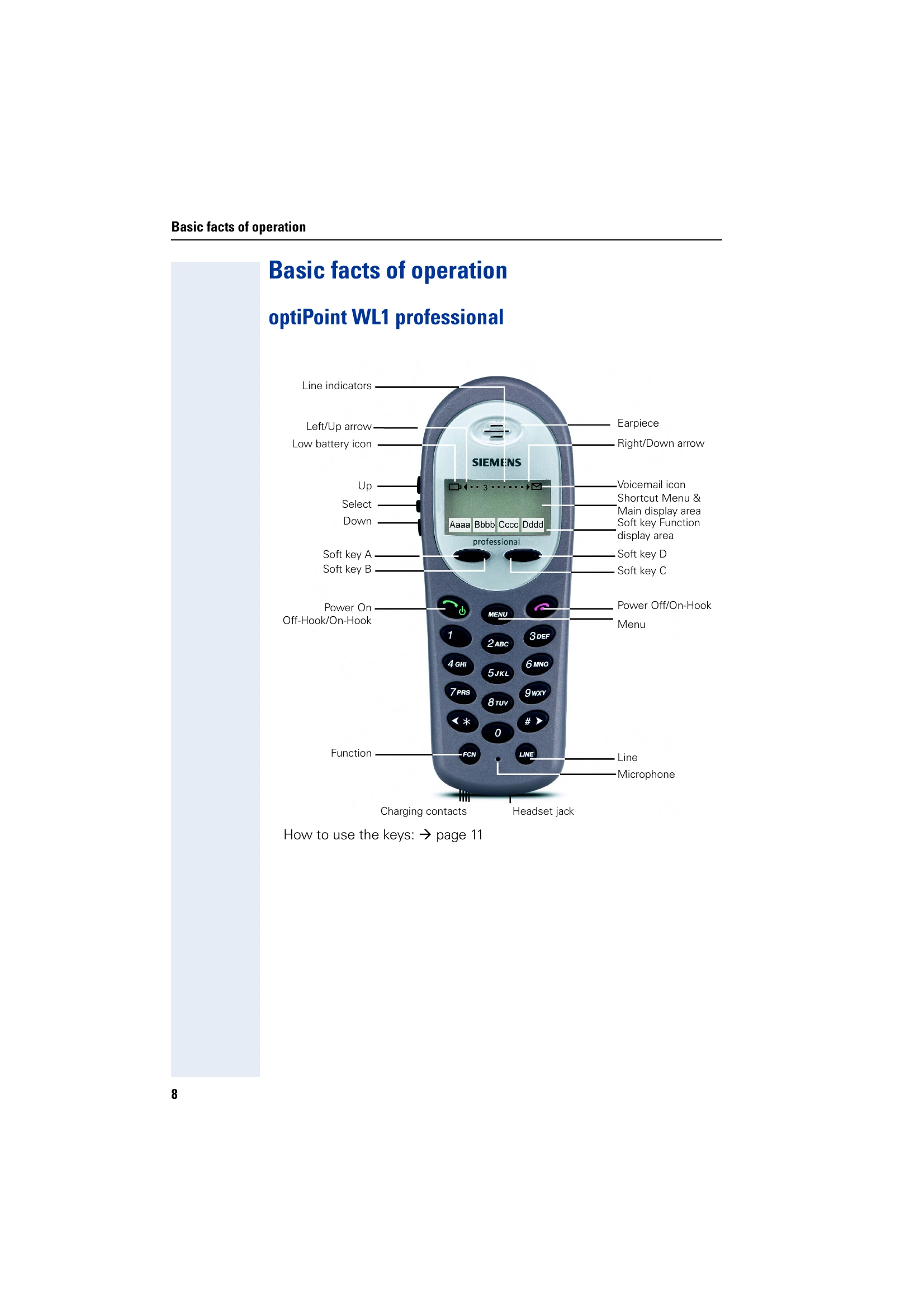
These operating instructions cover the optiPoint WL1 professional and optiPoint W1 professional mobile telephones on the HiPath 4000 communication server. They detail how to use the phones, including basic functions, settings, call handling, and troubleshooting.
Key Features:
| Error Message | Possible Cause | Possible Remedy |
| Time exceeded | Maximum input time was exceeded. Handset was not replaced. | Make entries more quickly, avoid long pauses between keystrokes. |
| Please try later | The system is overloaded, no line is free, queue is full. | Wait and try again later. |
| Currently not accessible | a) Function is currently not available b) No connection under the phone number dialled |
a) Wait and try again later. b) Enter the number correctly or call the attendant console. |
| Not possible or Incorrect input or Nothing stored | Speed-dial number not available, appointment entered incorrectly, entry blocked or not allowed, prerequisite not fulfilled (for example, if there is no second partner for toggling), number dialled was incomplete. | Correct your input, select a permitted option, enter the phone number in full |
| Not authorized or Not allowed | b) Blocked function was called b) Incorrect PIN was entered |
a) Apply to the relevant service personnel for the COS for the blocked function b) Enter the correct PIN |
| Not available | Phone number was not fully entered, the star or hash key was not pressed. | Enter the phone number correctly or as prescribed |
| Do not disturb | Data transfer active | Wait and try again later. |
| No Service | You may be outside of the covered area. | Walk back into the coverage area. The in-service tone indicates service is re-established. If functionality does not return, note the error message and contact your system administrator. |
| 3 chirps (audio) | Probably because the AP has no bandwidth available. | None. This is only a warning, the call will handoff to the best AP once it becomes available. |
| Battery low (Icon and beep) | The battery icon displays and a soft beep will be heard whenever the Battery Pack charge is low. User has 15-30 minutes of Battery Pack life left. | Charge the Battery Pack. |
| Battery low (Message and alarm) | This message will display and an alarm will sound whenever the Battery Pack is critically low. The Wireless Telephone cannot be used until the Battery Pack is charged. | Charge the Battery Pack. |
| Battery Failure | The Battery Pack is not functioning. | Replace the Battery Pack with a new or confirmed Battery pack. Any non-Siemens Battery Packs will not work. |
| DHCP Error 1 | The Wireless Telephone cannot locate a DHCP server. | It will try every 4 seconds until a server is located. |
| DHCP Error 2 | The Wireless Telephone has not received a response from the server for a request for an IP address. | It will retry until a server is found. |
| DHCP Error 3 | The server refuses to lease the Wireless Telephone an IP address. | It will keep trying. |
| DHCP Error 4 | The server offered the Wireless Telephone a lease that is too short. The minimum lease time is 10 minutes but Siemens engineers recommend at least one hour minimum lease time. The Wireless Telephone will stop trying. | Reconfigure the server and power cycle the Wireless Telephone. |
| Erase Failed | Download process failed to erase the memory in the Wireless Telephone. | Operation will retry but may eventually report the error "int. error: 0F". Power cycle the phone. |
| Internal Err. # # | The Wireless Telephone has detected a fault from which it cannot recover. OE = Error while writing the Flash (return Wireless Telephone to factory) OF = No functional code (contact SpectraLink Technical Support) |
Record the error code so it can be reported. Turn the Wireless Telephone off then on again. If error persists, try registering a different Wireless Telephone to this telephone port. If error still persists, contact Siemens Technical Support and report the error |
| Network Busy | All APs are full or busy. | Try the call again later. |
| No Gateway Found | Wireless Telephone not registered on the Gateway. The Gateway is not working. No LAN connection at the AP or Gateway. |
Verify that the Gateway is properly configured. Verify that the Gateway is powered on. If so, follow standard Gateway troubleshooting procedures. Verify Gateway connection to LAN and all APs. |
| No IP Address | Invalid IP | Check the IP address of the Wireless Telephone and re-configure if required. |
| No Net Access | Cannot authenticate/associate with AP. | Verify the AP configuration. Verify that all the WEP settings in the Wireless Telephone match those in the APs. |
| No Net Found | No radio link. No ESSID – Auto-learn not supported (or) Incorrect ESSID AP does not support appropriate data rates. Out of range. Incorrect WEP settings. |
Verify that the AP is turned on. Verify the ESSID of the wireless LAN and enter or Auto-learn it again if required. See Wireless Telephone Configuration section. Check the AP configuration against Configuration Note for AP. Try getting closer to an AP. Check to see if other Wireless Telephones are working within the same range of an AP. If so, check the ESSID of this Wireless Telephone. Verify that all the WEP settings in the Wireless Telephone match those in the APs. |
| No Reg Domain | Regulatory Domain not set. | Configure the Regulatory Domain of the Wireless Telephone. |
| No PBX | No communication with host telephone system. | Displays before the system has synchronized ports with the host telephone system. Should disappear when the ports are correctly wired and programmed. Make sure the proper PBX switch has been selected within the Gateway. |
| Server Busy | Wireless Telephone is attempting to download from a Download Master that is busy downloading other handsets and refusing additional downloads. | None, the Wireless Telephone will automatically retry the download every few seconds. |
| System Locked | System is locked. | Try the call again, system has been locked for maintenance. |
| System Busy | System is busy or out of resources. | All call paths are in use, try the call again in a few minutes. |
| TFTP ERROR(x):yy | A failure has occurred during a TFTP software download. (x) = The file number which was being downloaded; yy is an error code describing the particular failure. | Error code 01, 02 or 07: check the TFTP server configuration. Error code 81: the Wireless Telephone will attempt to download the file again. For other messages, power off the Wireless Telephone, then turn it on again to retry the download. If the error repeats, note it and contact SiemensTechnical Suppor. |
| Updating Code | Wireless Telephone is downloading new software into memory. The number icons at the bottom of the display indicate which file number is currently being downloaded. This message also displays a progress bar. When the progress bar fills the display line the update operation is complete on that file. | None. When the progress bar fills the display line the update operation is complete on that file. Do not turn the Wireless Telephone off during this operation. |
| Waiting | Wireless Telephone has attempted some operation several times and failed, and is now waiting for a period of time before attempting that operation again. | None. The Wireless Telephone is waiting for a specified period of time before attempting that operation again. |