Brand: SIEMENS
Category: Control Unit
Document Type: Manual
Language: EN
Brand: SIEMENS
Category: Control Unit
Document Type: Manual
Language: EN
Uploaded: Nov. 21, 2025, 8:30 p.m.
Manual Publish Date: 2015-09-01
| LED color | LED status | Meaning |
|---|---|---|
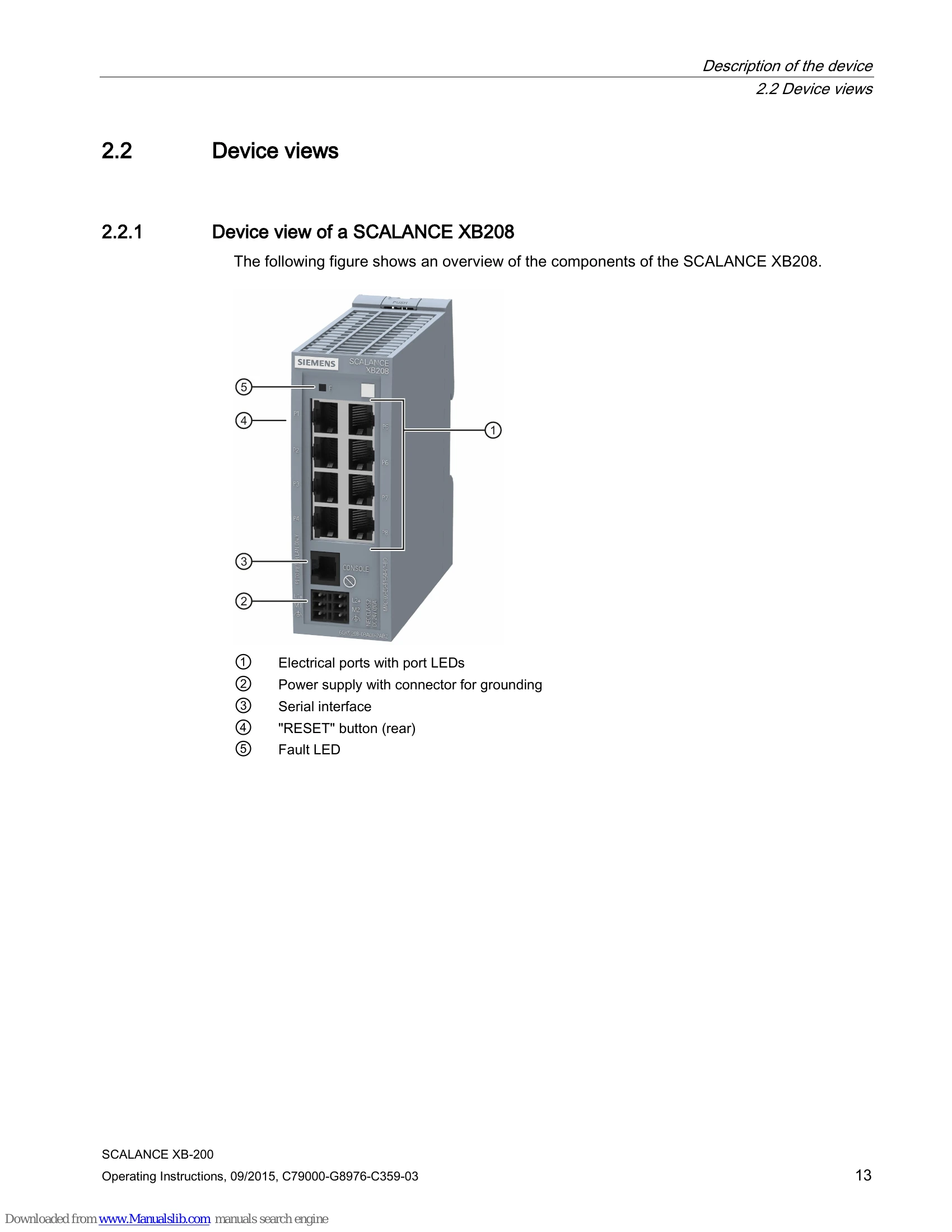
| Fault LED "F" | ||
| Green | Off | The device is a turned off. |
| Green | Lit | The device has not detected a problem. |
| Red | Lit | The device has detected a problem. The connected power supply is too low. Using the WBM and CLI, you can set when the device signals an error and which errors should be signaled. |
| Port LEDs "P" | ||
| RJ-45 ports | ||
| The upper green LED shows the status of the link. | ||
| Green | Lit | link exists |
| Green | Off | No link exists |
| The lower yellow LED shows the status of data reception. | ||
| Yellow | Flashing | Receiving data at port |
| Yellow | Off | Not receiving data at port |
| SC/ST ports | ||
| There is an LED for each SC/ST port. | ||
| Green | Lit | Link exists, data reception at port |
| Green | Off | No link exists |