Brand: SIEMENS
Category: Cooktop
Document Type: Manual
Language: EN
Brand: SIEMENS
Category: Cooktop
Document Type: Manual
Language: EN
Uploaded: Nov. 21, 2025, 7:05 p.m.
None
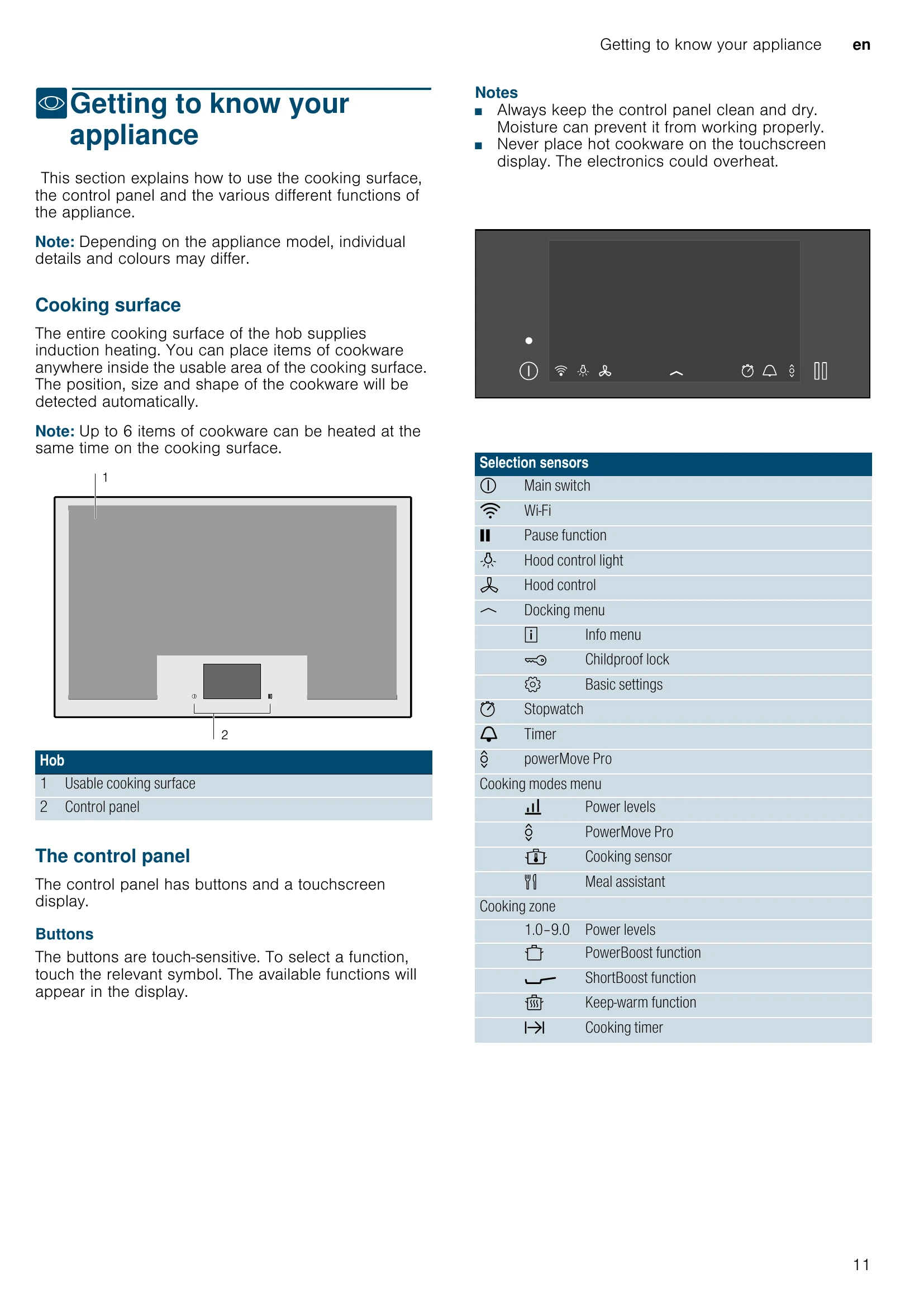
This section explains how to use the cooking surface, the control panel, and the various functions of the appliance.
The entire cooking surface uses induction heating. Cookware can be placed anywhere within the usable area and its position, size, and shape will be detected automatically. Up to 6 items of cookware can be heated simultaneously.
The control panel features buttons and a touchscreen display. Buttons are touch-sensitive. The display shows cooking modes, power levels, and timer functions.
Indicates when cookware is detected, selected, or activated on a cooking zone.
| Problem | Solution |
|---|---|
| The hob will not switch on. | Use other electrical appliances to check for short circuits. Ensure correct connection as per circuit diagram. Contact after-sales service if unresolved. |
| The touchscreen display is not responding or has frozen. | Dry the control panel or remove any objects from it. |
| The cooking zone's power level cannot be increased. | Total power output may be limited. Adjust Maximum power consumption in basic settings. If using large cookware, reposition it. Remove objects and reconfigure settings. |
| An audible signal will sound if there is something on the touchscreen display. | Do not place hot cookware on the control panel. Remove the object and reconfigure settings. |
| The hob is responding in an unusual manner or cannot be operated properly. | Switch off the appliance using the main fuse or circuit breaker. Wait a few seconds before reconnecting. |
| The electronics have overheated and have switched off the affected cooking zone. | Wait for electronics to cool down sufficiently. Resume cooking when the fault indicator goes out. |
| The electronics have overheated and all the cooking zones have been switched off. | Wait for electronics to cool down sufficiently. Then switch the cooking zone on again. |
| There is hot cookware near the control panel. The cooking zone has been switched off to protect the electronics. | Remove the offending cookware. Wait a few seconds. Resume cooking when the fault indicator goes out. |
| The cooking zone has overheated and has been switched off to protect the work surface. | Wait for electronics to cool down sufficiently. Then switch the cooking zone on again. |
| The transfer settings function cannot be activated. | Remove the active cookware and replace it with a pot or pan of a different size. Test with the same cookware. |
| The hob has been operating continuously for an extended period. | Automatic safety cut-out function has been activated. See "Automatic safety cut-out". |
| The activeLight light strips at the sides are not lighting up. | Contact technical after-sales service. |
| The cooking sensor has overheated and the cooking zone has been switched off. E8202 | Wait for the temperature sensor to cool down sufficiently. Reactivate the function. |
| The cooking sensor has overheated and the adjacent cooking zones have been switched off. E8203 | If not using the cooking sensor, remove it and keep it away from heat sources. Switch cooking zones on again. |
| The battery in the cooking sensor is almost flat. E8204 | Replace the 3 V CR2032 battery. See "Changing the battery". |
| The connection to the cooking sensor has been broken. E8205 | Switch the function off and then on again. |
| The cooking sensor is broken/faulty. E8206 | Contact technical after-sales service. |
| The cooking sensor indicator will not light up and the cooking sensor is not responding. | Replace the 3 V CR2032 battery. If unresolved, press and hold the symbol on the cooking sensor for 8-10 seconds, then reconnect it to the hob. See "Connecting the wireless temperature sensor to the control panel". If problems persist, contact after-sales service. |
| The indicator on the sensor flashes twice. The battery in the cooking sensor is almost flat. | Replace the 3 V CR2032 battery. See "Changing the battery". |
| The indicator on the sensor flashes three times. The connection to the cooking sensor has been broken. | Press and hold the symbol on the cooking sensor for 8-10 seconds and then reconnect it to the hob. See "Connecting the wireless temperature sensor to the control panel". |
| The hob is unable to connect to your home network or the extractor hood. E7010 | Switch the hob off and then on again. If the message reappears, contact technical after-sales service. |
| The operating voltage is incorrect and outside of the normal operating range. E9000/E9010 | Contact your electricity supplier. |
| The hob is not connected correctly U400 | Disconnect the hob from the mains. Ensure it is connected as shown in the circuit diagram. |