Brand: SIEMENS
Category: Mobile Phone
Document Type: Manual
Language: EN
Brand: SIEMENS
Category: Mobile Phone
Document Type: Manual
Language: EN
Uploaded: Nov. 21, 2025, 7:06 p.m.
Siemens AG 2002. All rights reserved. Subject to availability. Rights of modification reserved.
| Question | Possible causes | Possible solution |
|---|---|---|
| Phone cannot be switched on. | On/Off key not pressed long enough. | Press On/Off key for at least two seconds. |
| Flat battery. | Charge battery. Check charging indicator in the display. | |
| Battery contacts dirty. | Clean contacts. | |
| Standby time too short. | Speed search active. | Deactivate speed search (p. 58). |
| Display illumination on. | Switch off display illumination (p. 57). | |
| Charging error (charge icon not displayed). | Battery totally discharged. | 1) Plug in charger cable. 2) Wait up to 2 hours until the charge icon is displayed. 3) Charge battery as usual. |
| Temperature out of range: 5 °C to 40 °C | Make sure the ambient temperature is right, wait a while, then recharge. | |
| Contact problem. | Check power supply and connection to the phone. Check battery contacts and device interface, clean them if necessary, then insert battery again. | |
| No mains voltage. | Plug in to a different socket or check voltage. | |
| Wrong charger. | Only use original Siemens accessories. | |
| Battery fault. | Replace battery. | |
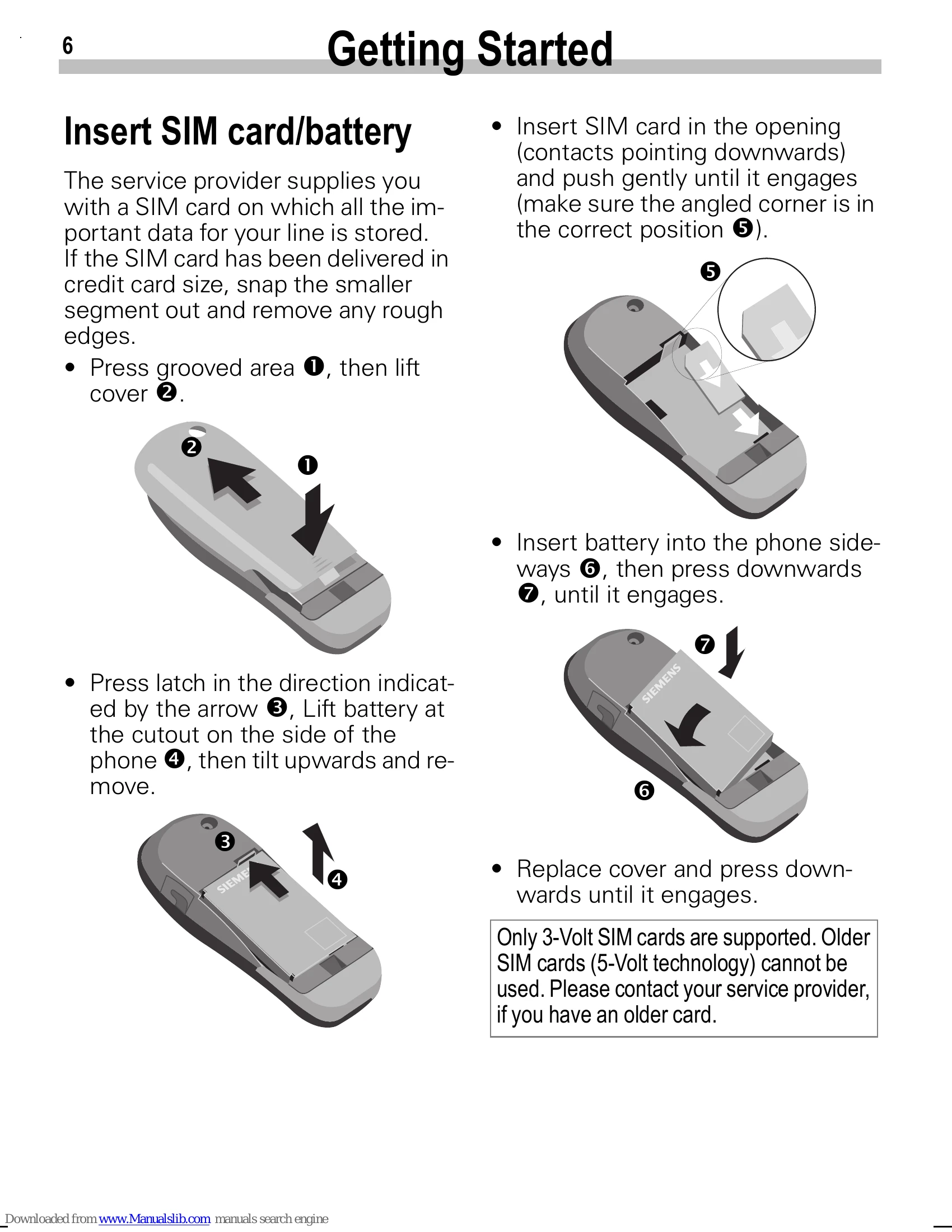
| SIM error. | SIM card not correctly inserted. | Make sure that the SIM card is correctly inserted (p. 6). |
| SIM card contacts dirty. | Clean the SIM card with a dry cloth. | |
| SIM card with wrong voltage. | Use 3 V SIM cards only. | |
| SIM card damaged (e.g. broken). | Inspect the damage. Return the SIM card to service provider. | |
| No connection to network. | Signal weak. | Move higher, to a window or open space. |
| Outside GSM range. | Check service provider coverage map. | |
| SIM card not valid. | Reclaim at the service provider. | |
| New network not authorised. | Try manual selection or select a different network (p. 59). | |
| Network barring is set. | Check barrings (p. 59). | |
| Network overloaded. | Try again later. | |
| Phone loses network. | Signal too weak. | Reconnection to another service provider is automatic (p. 59). Switching the phone on and off may speed this up. |
| Calls not possible. | 2nd line set. | Set line 1 1 > (p. 59). |
| New SIM card inserted. | Check for new restrictions. | |
| Charge limit reached. | Reset limit with PIN 2 (p. 58). | |
| Credit used up. | Load credit. | |
| Certain uses of the phone not possible. | Call restrictions are set. | Barrings may have been set by your service provider. Check barrings (p. 59). |
| Entries cannot be made in Phonebook. | Phonebook is full. | Delete entries in Phonebook (p. 20). |
| Voice mail does not work. | Call divert to the mailbox not set. | Set call divert to the mailbox (p. 43). |
| SMS (text message) flashes. | SMS memory full. | Delete messages (SMS) to make room (p. 28). |
| Function cannot be set. | Not supported by your service provider or registration required. | Contact your Service Provider. |
| Charge counter does not work. | Charge pulse not transmitted. | Contact your Service Provider. |
| Message cannot be sent. | Service provider does not support this service. | Check with your Service Provider. |
| Phone number of the service centre is not set or is wrong. | Set service centre (p. 34). | |
| SIM card contract does not support this service. | Contact your Service Provider. | |
| Service centre overloaded. | Repeat message. | |
| Addressee does not have a compatible phone. | Check. | |
| PIN error/ PIN 2 error. | Three wrong entries. | Enter the PUK (MASTER PIN) provided with the SIM card according to the instructions. If the PUK (MASTER PIN) has been lost, contact your service provider. |
| Phone code error. | Three wrong entries. | Contact Siemens Service (p. 67). |
| Service provider code error. | No authorisation for this service. | Contact your Service Provider. |
| Too few/too many menu entries. | Functions may have been added or removed by the service provider via the SIM card. | Check with your Service Provider. |
| Damage | Severe shock. | Remove battery and SIM and insert them again. Do not dismantle the phone. |
| Phone became wet. | Remove battery and SIM card. Dry immediately with cloth, do not heat. Dry connector contacts thoroughly. Stand unit upright in an air current. Do not dismantle the phone. |