Brand: SIEMENS
Category: Oven
Document Type: Manual
Language: EN
Brand: SIEMENS
Category: Oven
Document Type: Manual
Language: EN
Uploaded: Nov. 21, 2025, 7:38 p.m.
Manual Publish Date: 2007
The limited warranty covers defects in materials and workmanship for 12 months from the purchase date.
Your new oven combines popular functions, premium cooking results and simple operation.
The "cookWiz" function makes it possible to select the desired food type using the display menu. The oven then starts automatically, using the correct cooking mode and temperature.
This oven can also provide assistance after cooking: Thanks to "Self-Clean" mode, hours of scrubbing into the darkest corners of the oven is a thing of the past. The oven burns off soil simply and easily. All that is left to do is to remove a few ashes from the oven when Self-Clean is done.
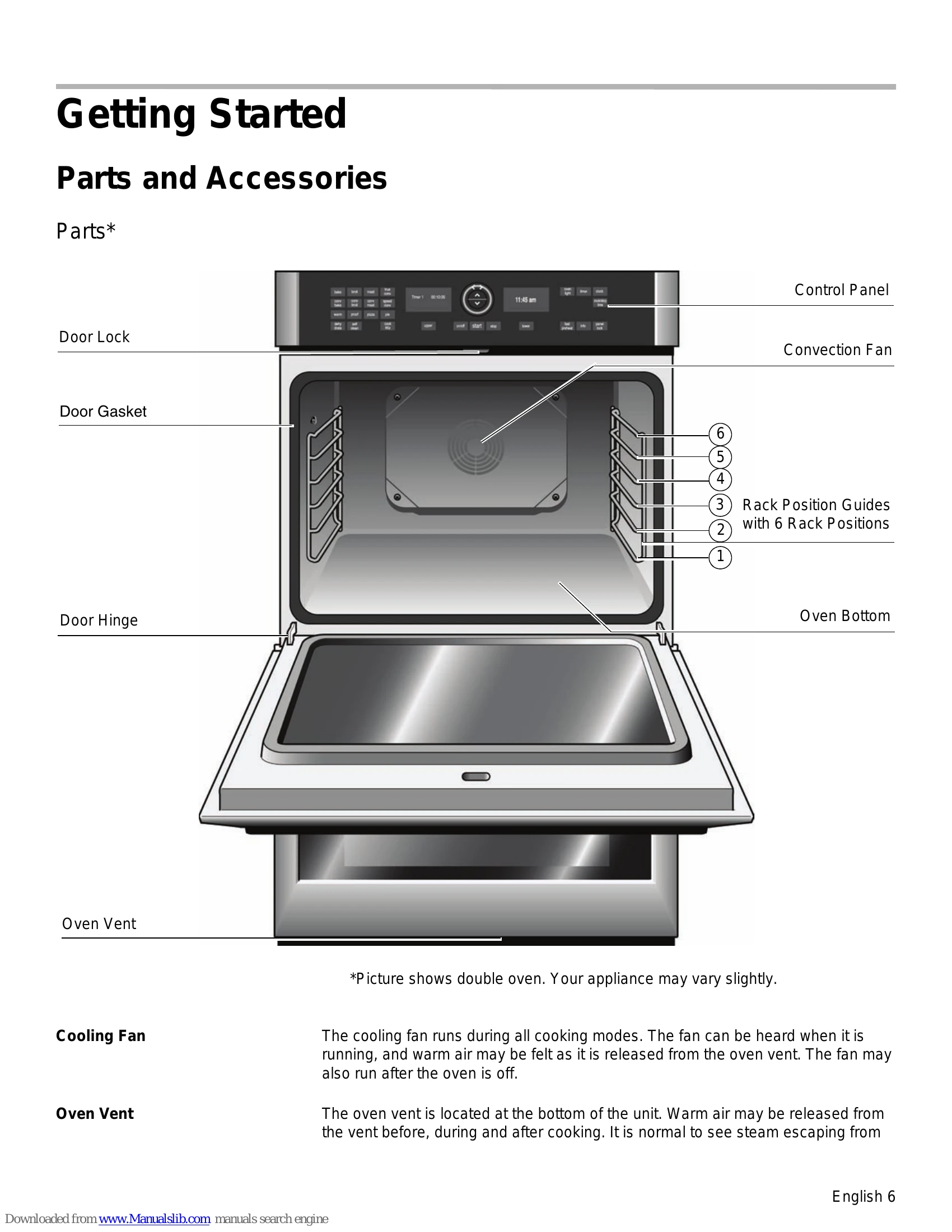
The oven design has been optimized to improve heat distribution in the oven cavity. The result is even browning, shorter cooking times and lower energy consumption. These advantages are especially noticeable in the "Convection" cooking modes. In Convection modes, an extra fan distributes the hot air evenly throughout the oven.
Clear labeling of the touch keys make operating the oven very easy. In addition, messages on the display provide assistance when adjusting settings. This manual includes all instructions for operating the oven.
Please call us if you ever have any questions. Our telephone number is located at the beginning of this manual. We welcome your comments and suggestions!
To turn the oven on: Press on/off.
The last oven mode selected and the default temperature appear in the display.
To turn the oven off: Press on/off.
The oven returns to standby mode.
Double ovens: to switch off only one oven, select the corresponding oven cavity using upper or lower. Next press pause/stop twice.
This new oven includes time functions that require the current time to be set. It is therefore important to set the clock first.
In order to access the menu for setting the clock, a cook time cannot be set.
After a power outage, the menu for setting the clock appears automatically. In this case, proceed directly to step 2.
| Oven Problem | Possible Causes and Suggested Solutions |
|---|---|
| Oven door is locked and will not open, even after cooling. | Turn the oven off at the circuit breaker and wait five minutes. Turn breaker back on. The oven should reset itself and will be operable. |
| Oven is not heating. | Check circuit breaker or fuse box to your house. Make sure there is proper electrical power to the oven. Be sure oven temperature has been selected. |
| Oven is not cooking evenly. | Refer to cooking charts for recommended rack position. Check "Getting the Most Out of Your Appliance" for tips and suggestions. |
| Baking results are not as expected. | Refer to cooking charts for recommended rack position. Check "Getting the Most Out of Your Appliance" for tips and suggestions. Adjust oven calibration if necessary. See "Oven Temperature Offset" under "User Settings". |
| Food takes longer to cook than expected. | The oven is carefully calibrated to provide accurate results. However, the temperature can be offset if food is consistently too brown or too light. See "Oven Temperature Offset" under "User Settings". |
| Food is overcooked. | The oven is carefully calibrated to provide accurate results. However, the temperature can be offset if food is consistently too brown or too light. See "Oven Temperature Offset" under "User Settings". |
| Convection Bake/True Convection results are not as expected. | The oven temperature must be manually reduced by 25 °F if Convection Conversion is not activated. Refer to cooking charts and tips for rack positions, cooking times and pan selection. Adjust oven calibration if necessary. See "Oven Temperature Offset" under "User Settings". |
| Oven light is not working properly. | Replace or reinsert the light bulb if loose or defective. Touching the bulb with fingers may cause the bulb to burn out. |
| Oven light does not turn off. | Check for obstruction in oven door. Check to see if hinge is bent. |
| Oven is not self-cleaning properly. | Allow the oven to cool before running self-clean. Always wipe out loose soils or heavy spillovers before running self-clean. If oven is badly soiled, set oven for the maximum self-clean time. |
| Clock and timer are not working properly. | Make sure there is electrical power to oven. |
| "E" and a number appears in display and control beeps. | This is a fault code. Follow the instructions in the display. If the code remains or there are no instructions in the display, press INFO to display more information (if applicable) and to turn off the beep. If the code is still displayed, write down the fault code number, turn off the oven, and call Service. |
| With a new oven there is a strong odor when oven is turned on. | This is normal with a new oven and will disappear after a few uses. Operating the self-clean cycle also "burns-off" the smell more quickly. |
| Control does not react when a key is touched. | Be sure that surface is clean and dry. Touch the center of the touch key. Use the flat part of your finger. |
| Fan is running during modes that do not use convection | On some models, the convection fan runs while the oven is preheating. This is normal. |
| Warm air or steam escapes from oven vent. | It is normal to see or feel steam or warm air escaping from the oven vent. Do not block the vent. |
| Cooling fan runs even when the oven is turned off. | This is normal. The cooling fan will continue to run, even after the oven has been turned off, until the oven has cooled sufficiently. |