Manual for SP-2124

Manual for SP-2124

Brand: SILVER CREST

Category: Audio

Document Type: Manual

Language: EN
Uploaded: Nov. 21, 2025, 6:23 p.m.

Warranty Information

This product comes with a 36-month warranty from the date of purchase, valid in the UK.

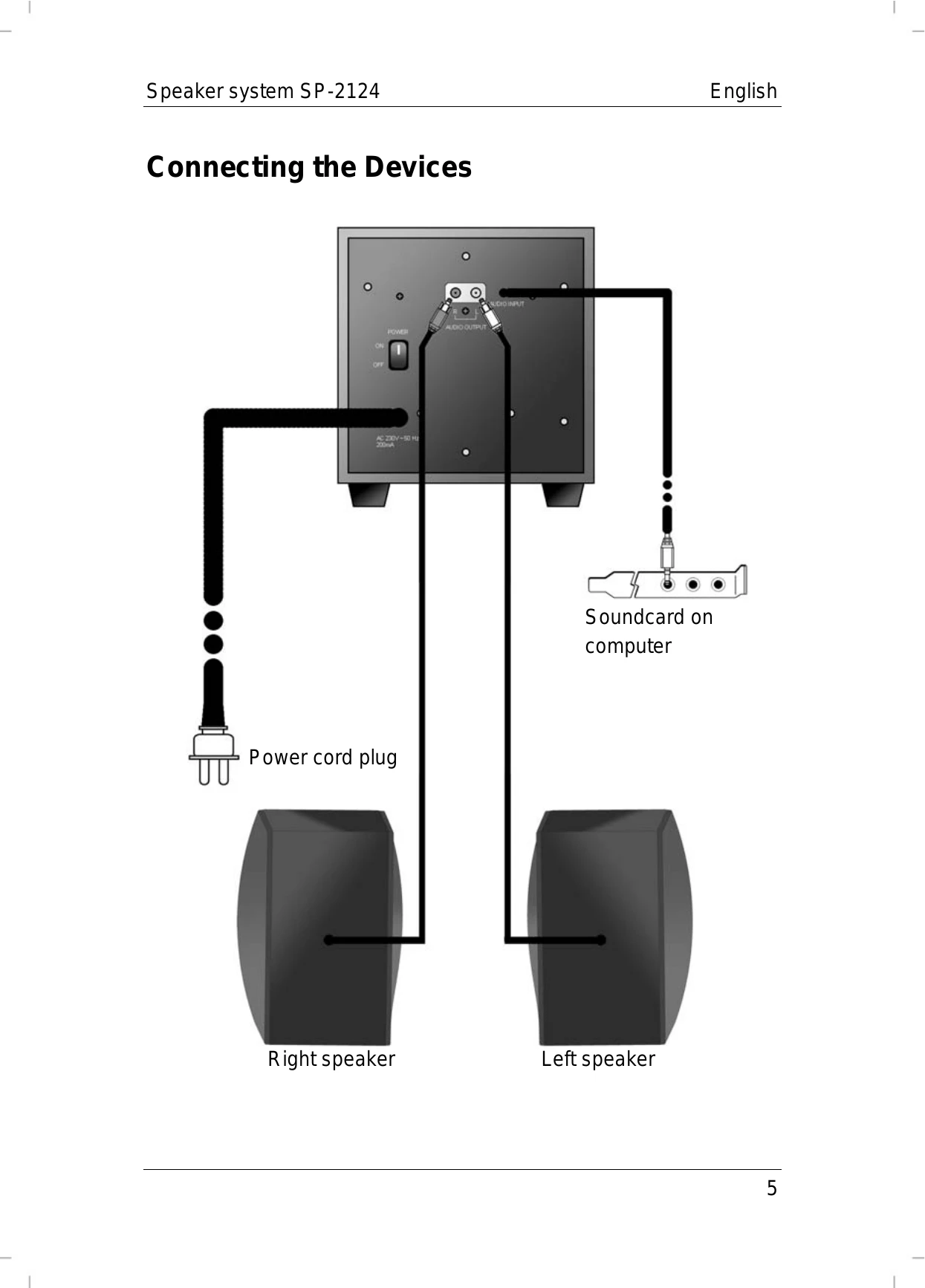
  • Connect the satellite speakers to the subwoofer using the color-coded plugs (red for right, white for left) into the corresponding audio output sockets.
  • Connect the subwoofer to your audio source (e.g., computer sound card) using the jack-type plug into the appropriate receptacle.
  • Plug the subwoofer's power cord into a wall outlet.
  • Turn on the main power switch on the subwoofer's back panel. The power indicator light will turn green.
  • Adjust the sound volume using the volume control on the subwoofer. Clockwise increases volume, counter-clockwise decreases it.
Privacy Policy