Brand: SILVER CREST
Category: Audio
Document Type: Manual
Language: EN
Brand: SILVER CREST
Category: Audio
Document Type: Manual
Language: EN
Uploaded: Nov. 21, 2025, 7:54 p.m.
Manual Publish Date: 2020-01-01
This product comes with a 3-year warranty from the date of purchase covering material or manufacturing defects.
| Error | Possible Cause | Troubleshooting |
|---|---|---|
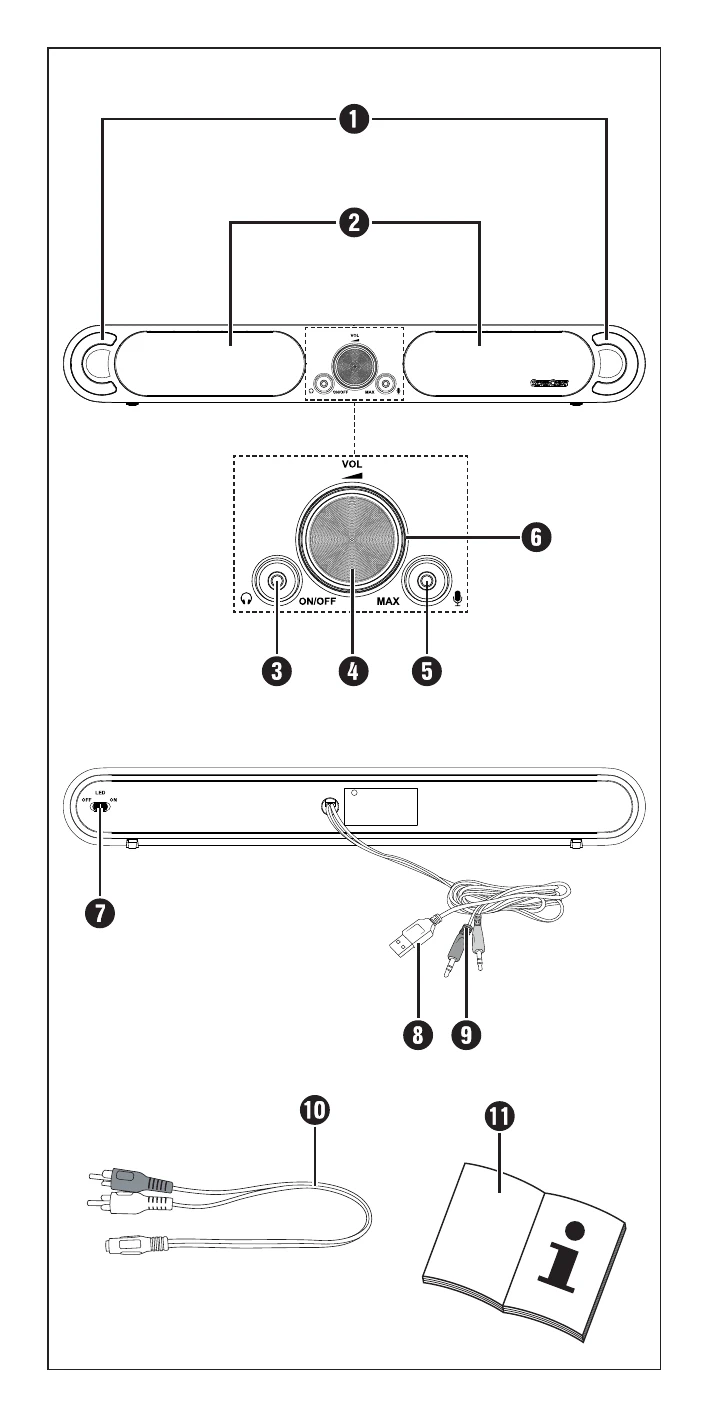
| The device will not switch on. | The device is not connected to a power source via USB. | Connect the USB plug of the power supply cable 8 to a USB connection on your computer or a USB power adapter (see chapter "Connecting computer/playback device"). |
| No sound / low volume / interference | The volume control of the soundbar, your computer, or the playback device is set to minimum. | Increase the volume on the soundbar, in your computer's audio settings, or on the playback device. |
| Soundbar, playback device, or microphone are not switched on. | Ensure that the soundbar, playback device, or microphone are switched on. | |
| The cable connections of the connected devices are not properly made. | Check the cable connections of all connected devices. | |
| The audio settings of your computer or playback device (audio input/output) are not correctly set. | Check the audio settings of your computer. | |
| No sound / low volume / interference | Headphones are connected to the headphone jack 3. This mutes the speakers 2. | Disconnect the headphones from the headphone jack 3. |
| Headphones are defective. | Check the function of the headphones on the playback device and replace them if necessary. |