Brand: SILVER CREST
Category: Audio
Document Type: Manual
Language: EN
Brand: SILVER CREST
Category: Audio
Document Type: Manual
Language: EN
Uploaded: Nov. 21, 2025, 8:13 p.m.
3-year warranty covering material and manufacturing defects.
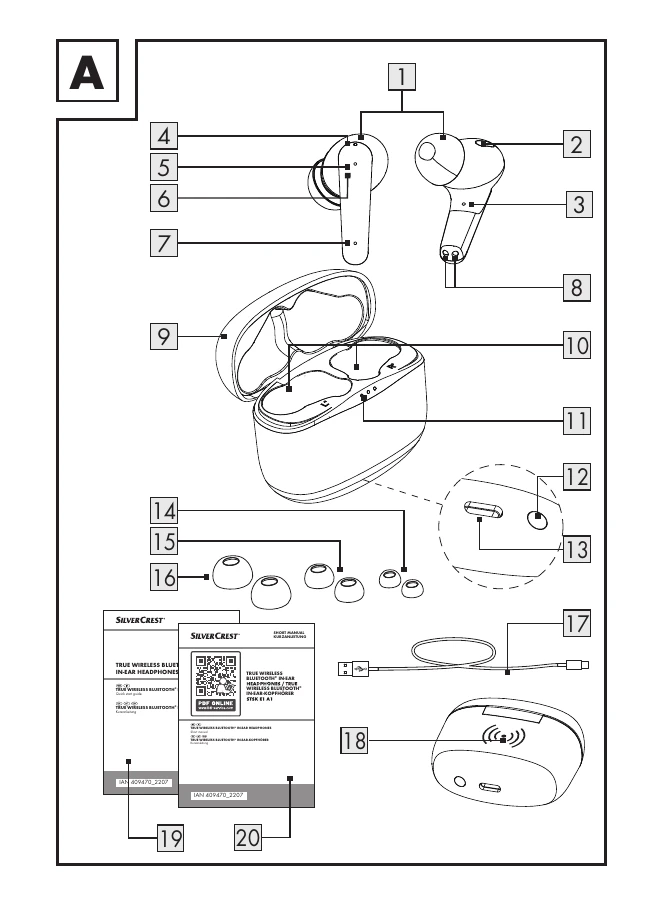
Turning on: Automatic when removed from charging case. Manual: Press and hold the MF button (6) for approx. 3 seconds.
Turning off: Automatic when placed in charging case. Manual: Press and hold the MF button (6) for approx. 5 seconds.
Pair headphones to each other: Automatically when first powered on if not already paired.
Pair with Bluetooth device: Enable Bluetooth on your device, select "SILVERCREST STSK E1 A1" from the list.
Place headphones in the charging/storage box (9). The charging status indicator (11) shows the charge level.
Charge the charging box via USB-C or Qi wireless charging.
| Error | Possible Cause | Action |
|---|---|---|
| No Functions | Battery is empty. | Charge the battery. |
| No Bluetooth Connection | Error operating headphones. | Switch headphones off and on again. |
| Error with Bluetooth device. | Disconnect and reconnect to headphones. | |
| No Sound | Error operating Bluetooth device. | Increase playback device volume. |
| Bluetooth connection error. | Move closer to the Bluetooth-connected device. | |
| Not all functions available | Error with Bluetooth device. | Check if your Bluetooth device supports all functions. |
| Wireless Qi charging of the charging/storage box does not start. | The charging/storage box has heated up due to charging. | Remove the charging/storage box from the Qi charging surface to cool down. Check for damage. |
| Charging process does not start, even after placing the product in the charging area. | Product not positioned correctly. | Position the product near the charging mark in the center of the charging surface. Consult the wireless Qi charger's manual. |