Manual for SCAW 5.00 B2

Manual for SCAW 5.00 B2

Brand: SILVER CREST

Category: Electronics

Document Type: Manual

Language: EN
Uploaded: Nov. 21, 2025, 6:57 p.m.

Warranty Information

Offers a three-year warranty from the date of purchase for material or manufacturing faults.

Getting Started:

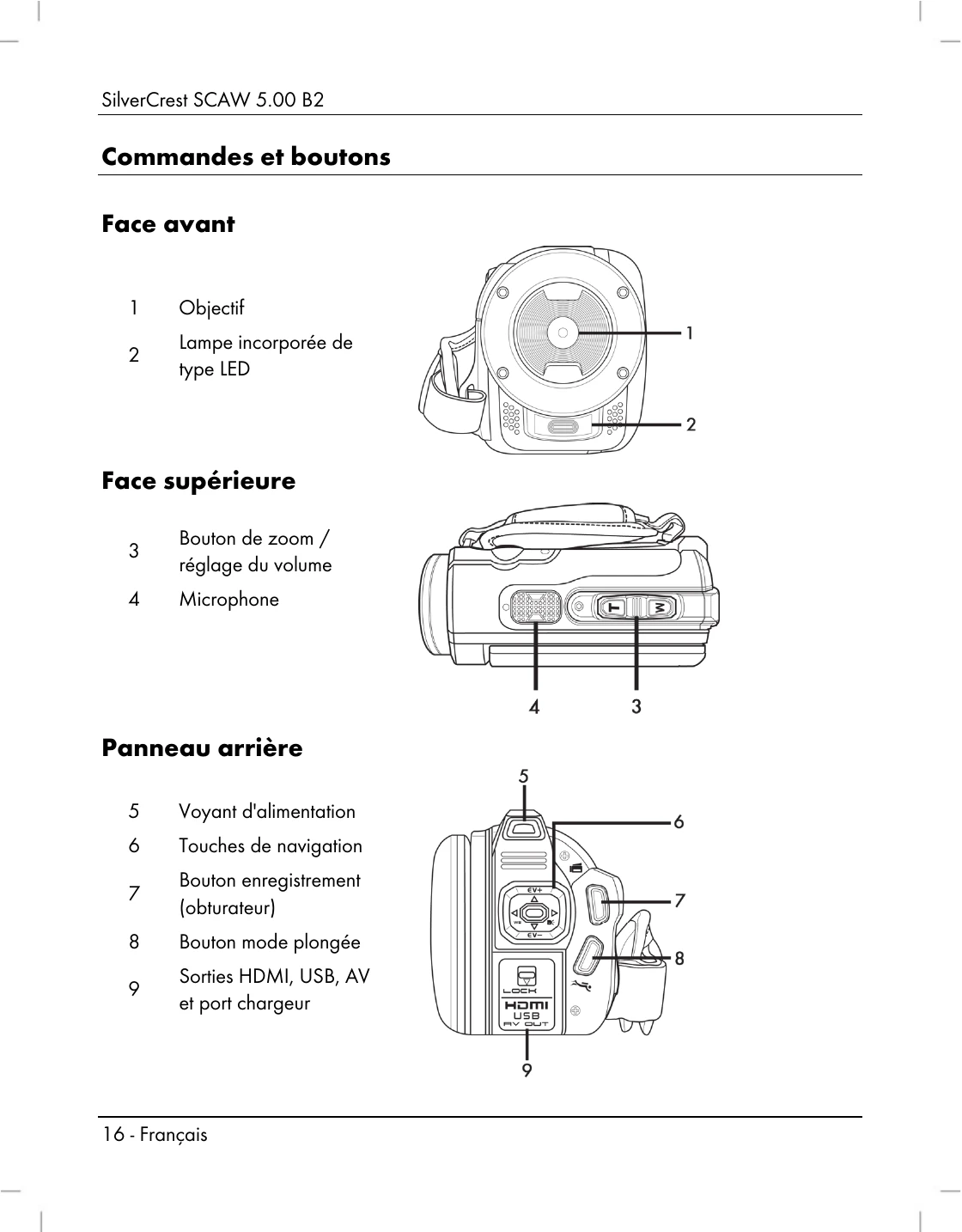
  • Opening the display: Open and rotate the display (17) as needed. It can be rotated 90° in both directions and folded back flush against the camera casing when rotated 180°.
  • Switching on/off: Press the On/Off button (12) to turn the camcorder on or off. The power light (5) will illuminate green when on and go out when off. Opening the display (17) automatically turns the camcorder on, and closing it turns it off (unless recording a movie).
  • Selecting modes: Press the Mode button (15) to cycle through Video, Photo, and Setup modes. Icons in the upper-left corner of the display (17) indicate the current mode.
  • Setting language: Open the display (17), press Mode (15) twice to enter Setup, select the 'Language' icon, and choose your preferred language using the navigation buttons (6).
  • Setting date/time: Open the display (17), press Mode (15) twice, select the 'Date/Time' icon, and adjust the year, month, day, hours, and minutes using the navigation buttons (6).

Recording Movies:

  • Open the display (17) and rotate it. The camcorder initializes in Movie mode.
  • Press the Record button (7) to start recording. The power light (5) flashes green and orange.
  • Use the Zoom/Volume button (3) to zoom in (T) or out (W).
  • You can capture up to 3 snapshots by pressing the Playback button (13) during recording.
  • Pause/resume recording by pressing the Menu button (14).
  • Press the Record button (7) to stop recording. The power light (5) turns solid green.

Playback:

  • Movie Playback: Press the Playback button (13) in Movie mode to enter playback. The icon in the top-left corner indicates playback mode. Press Playback (13) again to return to Movie mode.
  • Photo Playback: Press the Playback button (13) in Photo mode to enter playback. The icon in the top-left corner indicates playback mode. Press Playback (13) again to return to Photo mode.

Using under water:

  • Ensure the camcorder has no damage.
  • Double-check that the battery/memory card compartment (19) and ports cover (9) are properly closed and free of dirt/sand.
  • The camcorder is water-resistant up to 3m for a maximum of 60 minutes at a time.
  • Use in water temperatures between 0°C and 40°C.
  • Clean with tap water after underwater use.

Troubleshooting and error codes

Problem Solution
Unable to power the camcorder on. The battery pack is empty. Recharge the battery.
The camcorder suddenly powers off. The battery pack is empty. Recharge the battery.
The camcorder suddenly powers off. Auto power off is enabled. Check the settings (see page 228).
The camcorder fails to respond and cannot be switched off. Remove the battery pack for a few seconds and re-insert it.
Unable to disable motion detect. The device is still recording. First stop recording by pressing the Recording button (7) and then press the Menu button (14). (See page 240).
Privacy Policy